Loading
Get Worksafe Victoria For537 2009-2026
How it works
-

Open form follow the instructions
-

Easily sign the form with your finger
-

Send filled & signed form or save
How to fill out the WorkSafe Victoria FOR537 online
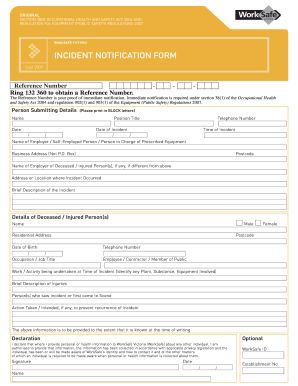
Filling out the WorkSafe Victoria FOR537 incident notification form is a critical step in reporting workplace incidents. This guide will provide clear and detailed instructions to ensure you complete the form correctly and efficiently.
Follow the steps to successfully complete the incident notification form
- Press the ‘Get Form’ button to access the form for completion and open it in your preferred editor.
- Begin filling out the person submitting details section. Use block letters to ensure clarity. Provide your position title, name, date of submission, and telephone number.
- Input the date and time of the incident. Make sure to double-check the information for accuracy.
- Enter the name of the employer, whether they are a self-employed individual or person in charge of the prescribed equipment, along with their business address and postcode.
- If applicable, provide the name and address of the employer of the deceased or injured persons, if different from the above.
- Describe the location where the incident occurred and provide a brief description of the incident.
- Fill in the details of any deceased or injured persons. Include their name, gender, postcode, residential address, date of birth, telephone number, occupation or job title, and their role during the incident (e.g., employee, contractor, member of the public).
- Describe the work or activity being undertaken at the time of the incident, along with details about any involved plant, substance, or equipment.
- Provide a brief description of the injuries sustained.
- If there were witnesses, include the names of individuals who saw the incident or who first came to the scene.
- Indicate any actions taken or intended to prevent the recurrence of the incident.
- Complete the declaration section as needed, ensuring you confirm your authority to provide personal information about others. Include your signature, date, and WorkSafe ID.
- Once completed, review the entire form for any errors. You can then save the changes, download the form, print a copy, or share it as needed.
Complete your incident notification form online to ensure prompt reporting of workplace incidents.
Yes, an employer can dispute a WorkCover claim in Victoria if they believe the claim is not valid. However, there are strict guidelines and processes that must be followed. Utilizing resources such as WorkSafe Victoria FOR537 can assist employers in understanding their rights and obligations in such situations.