Loading
Get Au St Vin. P32 2013-2026
How it works
-

Open form follow the instructions
-

Easily sign the form with your finger
-

Send filled & signed form or save
How to fill out the AU St Vin. P32 online
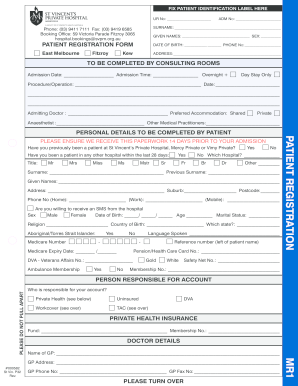
Filling out the AU St Vin. P32 patient registration form online is a critical step in ensuring a smooth admission process. This guide provides clear and detailed instructions to help users effectively complete each section of the form with confidence.
Follow the steps to complete the form correctly.
- Click the ‘Get Form’ button to access the AU St Vin. P32 document and open it in the online form editor.
- Begin by entering your UR number and admission number in the designated fields at the top of the form. This information is essential for tracking your admission details.
- Provide your surname and given names as requested in the personal details section. Be sure to input accurate information to prevent any discrepancies.
- Fill in your date of birth and phone number. This ensures that the hospital has reliable contact information for you.
- Enter your complete address, including suburb and postcode, in the address section. This is critical for correspondence related to your admission.
- Indicate your admission date and time in the designated fields. Specify whether you will be an overnight or day stay patient.
- For the procedure/operation section, clearly describe the procedure you will be undergoing, and include the date if known.
- Complete details of the admitting doctor, including their name and accommodation preferences (shared or private).
- If applicable, fill out sections related to previous admissions, health insurance details, and personal medical information.
- Complete the next of kin information, including their relation to you, and additional contact persons if necessary.
- Review all the information for accuracy. Once you have completed the form, save your changes, and choose to download, print, or share the form as needed.
Complete the AU St Vin. P32 online to ensure a smooth admission process.