Loading
Form preview
  • US Legal Forms
  • Other Templates
  • More Forms
  • More Multi-State Forms
  • Distributor Contract Template

Get Distributor Contract Template

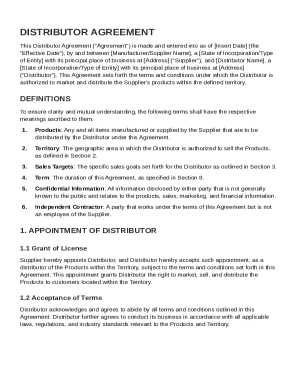
Urer/Supplier Name , a State of Incorporation/Type of Entity with its principal place of business at Address ("Supplier"), and Distributor Name , a State of Incorporation/Type of Entity with its principal place of business at Address ("Distributor"). This Agreement sets forth the terms and conditions under which the Distributor is authorized to market and distribute the Supplier's products within the defined territory. DEFINITIONS To ensure clarity and mutual understanding, the followi.

How it works

  1. Open form

    Open form follow the instructions

  2. Easily sign form

    Easily sign the form with your finger

  3. Share form

    Send filled & signed form or save

How to fill out and sign Distributor Contract Template online?

Get your online template and fill it in using progressive features. Enjoy smart fillable fields and interactivity.Follow the simple instructions below:

The preparing of legal paperwork can be costly and time-ingesting. However, with our preconfigured web templates, everything gets simpler. Now, using a Distributor Contract Template requires no more than 5 minutes. Our state-specific online blanks and crystal-clear instructions remove human-prone errors.

Follow our simple actions to get your Distributor Contract Template well prepared quickly:

  1. Choose the template in the library.
  2. Enter all necessary information in the required fillable fields. The user-friendly drag&drop graphical user interface allows you to include or relocate fields.
  3. Ensure everything is filled out properly, with no typos or lacking blocks.
  4. Use your electronic signature to the PDF page.
  5. Click Done to confirm the changes.
  6. Save the document or print your copy.
  7. Distribute immediately to the receiver.

Take advantage of the fast search and advanced cloud editor to make a correct Distributor Contract Template. Clear away the routine and produce papers on the web!

Tips on how to fill out, edit and sign Distributor Contract Template online

How to fill out and sign Distributor Contract Template online?

Get your online template and fill it in using progressive features. Enjoy smart fillable fields and interactivity.Follow the simple instructions below:

The preparing of legal paperwork can be costly and time-ingesting. However, with our preconfigured web templates, everything gets simpler. Now, using a Distributor Contract Template requires no more than 5 minutes. Our state-specific online blanks and crystal-clear instructions remove human-prone errors.

Follow our simple actions to get your Distributor Contract Template well prepared quickly:

  1. Choose the template in the library.
  2. Enter all necessary information in the required fillable fields. The user-friendly drag&drop graphical user interface allows you to include or relocate fields.
  3. Ensure everything is filled out properly, with no typos or lacking blocks.
  4. Use your electronic signature to the PDF page.
  5. Click Done to confirm the changes.
  6. Save the document or print your copy.
  7. Distribute immediately to the receiver.

Take advantage of the fast search and advanced cloud editor to make a correct Distributor Contract Template. Clear away the routine and produce papers on the web!

How to edit Distributor Contract Template: customize forms online

Choose a rock-solid file editing solution you can rely on. Revise, execute, and sign Distributor Contract Template safely online.

Too often, editing forms, like Distributor Contract Template, can be pain, especially if you received them in a digital format but don’t have access to specialized tools. Of course, you can find some workarounds to get around it, but you can end up getting a document that won't fulfill the submission requirements. Utilizing a printer and scanner isn’t an option either because it's time- and resource-consuming.

We provide a simpler and more streamlined way of modifying files. An extensive catalog of document templates that are easy to change and certify, and make fillable for other individuals. Our solution extends way beyond a set of templates. One of the best aspects of utilizing our option is that you can edit Distributor Contract Template directly on our website.

Since it's an online-based service, it spares you from having to download any computer software. Plus, not all company policies allow you to install it on your corporate laptop. Here's how you can effortlessly and safely execute your forms with our solution.

  1. Click the Get Form > you’ll be instantly taken to our editor.
  2. Once opened, you can kick off the customization process.
  3. Choose checkmark or circle, line, arrow and cross and other choices to annotate your document.
  4. Pick the date option to add a specific date to your template.
  5. Add text boxes, images and notes and more to enrich the content.
  6. Utilize the fillable fields option on the right to add fillable {fields.
  7. Choose Sign from the top toolbar to create and add your legally-binding signature.
  8. Hit DONE and save, print, and pass around or download the output.

Say goodbye to paper and other inefficient ways of modifying your Distributor Contract Template or other files. Use our solution instead that combines one of the richest libraries of ready-to-customize templates and a robust file editing option. It's easy and safe, and can save you lots of time! Don’t take our word for it, try it out yourself!

Get form

Experience a faster way to fill out and sign forms on the web. Access the most extensive library of templates available.
Get form

Related content

EXCLUSIVE DISTRIBUTOR AGREEMENT
This agreement appoints an exclusive distributor for products in a territory, who must...
Learn more
marketing/distribution agreement - UNT Libraries
Bill and collect all accounts for orders the Distributor processes. e. Sell the Work at...
Learn more
reseller agreement
Oct 1, 2020 — This Reseller Agreement is a legal agreement between a Reseller and...
Learn more

Related links form

University Of South Carolina Office Of The University ... - School Of Law G Convention Reporter Form - University Of South Carolina Computer And Software Issues - Library - Uscm Med Sc PBP-17 UNIVERSITY OF SOUTH CAROLINA DIRECT ...

Questions & Answers

Get answers to your most pressing questions about US Legal Forms API.

Contact support

Filling out a contract agreement involves understanding each section's purpose. Provide all required details such as party names, obligations, and payment terms. Ensure accuracy by reviewing the entered information before signing. For clarity and ease, consider referring to a Distributor Contract Template.

When writing a supplier contract, start by identifying the parties and the date. Describe the goods or services being supplied clearly and include delivery and payment terms. Finally, outline any special conditions or warranties that apply. Using a Distributor Contract Template can streamline this process and ensure you cover all necessary elements.

Filling up a contract begins with carefully reading each section. Make sure to provide accurate information about both parties and detail the specific terms, including payment conditions and responsibilities. It's essential to cross-check information to avoid errors. For a reliable structure, consider using a Distributor Contract Template.

Distribution agreements can vary widely, including exclusive, non-exclusive, and selective types. Each type defines different levels of rights and obligations regarding product distribution. For example, an exclusive agreement grants one distributor the sole rights to sell a product in a specified area. Exploring options using a Distributor Contract Template from uslegalforms could help clarify your choices.

To write up a simple agreement, start by drafting a clear title and date. Define all parties involved, followed by outlining the agreement's purpose. Clearly articulate the terms, responsibilities, and duration of the agreement. Utilizing a Distributor Contract Template can make this process more straightforward and efficient.

To write a simple letter of agreement, start with a clear title at the top. Then, include the names and addresses of both parties involved, followed by a straightforward introduction. Specify the terms of the agreement, ensuring you highlight the key responsibilities and obligations. This letter can be created easily using a Distributor Contract Template available on uslegalforms.

Formatting a contract agreement requires a consistent layout. Begin with the title, followed by the date and parties involved. Use headings for each section and ensure that the text is easy to read. Incorporating a Distributor Contract Template can streamline this process and help you include vital sections, like termination and responsibilities.

To create a contract file, start by gathering all necessary information related to the agreement. Use a clear structure that includes titles, sections, and clauses relevant to your agreement. You can utilize a Distributor Contract Template to ensure your contract meets legal standards and contains all essential terms.

Get This Form Now!

Use professional pre-built templates to fill in and sign documents online faster. Get access to thousands of forms.
Get form
If you believe that this page should be taken down, please follow our DMCA take down processhere.
Get Distributor Contract Template
Get form
  • Adoption
  • Bankruptcy
  • Contractors
  • Divorce
  • Home Sales
  • Employment
  • Identity Theft
  • Incorporation
  • Landlord Tenant
  • Living Trust
  • Name Change
  • Personal Planning
  • Small Business
  • Wills & Estates
  • Packages A-Z
  • Affidavits
  • Bankruptcy
  • Bill of Sale
  • Corporate - LLC
  • Divorce
  • Employment
  • Identity Theft
  • Internet Technology
  • Landlord Tenant
  • Living Wills
  • Name Change
  • Power of Attorney
  • Real Estate
  • Small Estates
  • Wills
  • All Forms
  • Forms A-Z
  • Other Templates
  • Legal Hub
  • About Us
  • Help Portal
  • Legal Resources
  • Blog
  • Affiliates
  • Contact Us
  • Delete My Account
  • Site Map
  • Industries
  • Forms in Spanish
  • Localized Forms
  • State-specific Forms
  • Forms Kit
  • Real Estate Handbook
  • All Guides
  • Notarize
  • Incorporation services
  • For Consumers
  • For Small Business
  • For Attorneys
  • USLegal
  • FormsPass
  • pdfFiller
  • signNow
  • altaFlow
  • DocHub
  • Instapage
Form Packages
  • Adoption
  • Bankruptcy
  • Contractors
  • Divorce
  • Home Sales
  • Employment
  • Identity Theft
  • Incorporation
  • Landlord Tenant
  • Living Trust
  • Name Change
  • Personal Planning
  • Small Business
  • Wills & Estates
  • Packages A-Z
Form Categories
  • Affidavits
  • Bankruptcy
  • Bill of Sale
  • Corporate - LLC
  • Divorce
  • Employment
  • Identity Theft
  • Internet Technology
  • Landlord Tenant
  • Living Wills
  • Name Change
  • Power of Attorney
  • Real Estate
  • Small Estates
  • Wills
  • All Forms
  • Forms A-Z
  • Other Templates
Customer Service
  • Legal Hub
  • About Us
  • Help Portal
  • Legal Resources
  • Blog
  • Affiliates
  • Contact Us
  • Delete My Account
  • Site Map
  • Industries
  • Forms in Spanish
  • Localized Forms
  • State-specific Forms
  • Forms Kit
Legal Guides
  • Real Estate Handbook
  • All Guides
Prepared for you
  • Notarize
  • Incorporation services
Our Customers
  • For Consumers
  • For Small Business
  • For Attorneys
Our Sites
  • USLegal
  • FormsPass
  • pdfFiller
  • signNow
  • altaFlow
  • DocHub
  • Instapage
Social Media
Call us now toll free:
+1 833 426 79 33
As seen in:
© Copyright 1999-2026 airSlate Legal Forms, Inc. 17 Station Street, Ste. 203, Brookline, MA 02445
  • Your Privacy Choices
  • Terms of Service
  • Privacy Notice
  • Content Takedown Policy
  • Bug Bounty Program