Loading
Form preview
  • US Legal Forms
  • Other Templates
  • More Forms
  • More Multi-State Forms
  • Farm Contract Template

Get Farm Contract Template

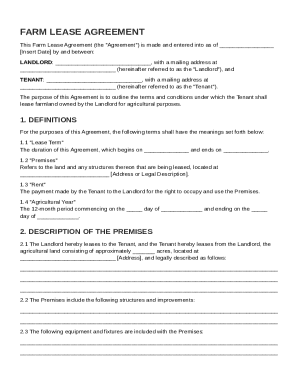
By and between: LANDLORD: , with a mailing address at (hereinafter referred to as the "Landlord"), and TENANT: , with a mailing address at (hereinafter referred to as the "Tenant"). The purpose of this Agreement is to outline the terms and conditions under which the Tenant shall lease farmland owned by the Landlord for agricultural purposes. 1. DEFINITIONS For the purposes.

How it works

  1. Open form

    Open form follow the instructions

  2. Easily sign form

    Easily sign the form with your finger

  3. Share form

    Send filled & signed form or save

How to fill out and sign Farm Contract Template online?

Get your online template and fill it in using progressive features. Enjoy smart fillable fields and interactivity.Follow the simple instructions below:

Business, tax, legal and other documents need higher of compliance with the law and protection. Our forms are regularly updated according to the latest amendments in legislation. Additionally, with our service, all the info you include in the Farm Contract Template is protected against leakage or damage with the help of industry-leading encryption.

The following tips will allow you to complete Farm Contract Template easily and quickly:

  1. Open the document in our feature-rich online editing tool by clicking on Get form.
  2. Fill in the requested fields which are colored in yellow.
  3. Press the green arrow with the inscription Next to move from one field to another.
  4. Use the e-signature solution to e-sign the document.
  5. Add the relevant date.
  6. Look through the entire template to be sure that you haven?t skipped anything.
  7. Click Done and download your new document.

Our platform allows you to take the whole process of completing legal papers online. Due to this, you save hours (if not days or weeks) and eliminate extra payments. From now on, submit Farm Contract Template from your home, place of work, or even while on the go.

Tips on how to fill out, edit and sign Farm Contract Template online

How to fill out and sign Farm Contract Template online?

Get your online template and fill it in using progressive features. Enjoy smart fillable fields and interactivity.Follow the simple instructions below:

Business, tax, legal and other documents need higher of compliance with the law and protection. Our forms are regularly updated according to the latest amendments in legislation. Additionally, with our service, all the info you include in the Farm Contract Template is protected against leakage or damage with the help of industry-leading encryption.

The following tips will allow you to complete Farm Contract Template easily and quickly:

  1. Open the document in our feature-rich online editing tool by clicking on Get form.
  2. Fill in the requested fields which are colored in yellow.
  3. Press the green arrow with the inscription Next to move from one field to another.
  4. Use the e-signature solution to e-sign the document.
  5. Add the relevant date.
  6. Look through the entire template to be sure that you haven?t skipped anything.
  7. Click Done and download your new document.

Our platform allows you to take the whole process of completing legal papers online. Due to this, you save hours (if not days or weeks) and eliminate extra payments. From now on, submit Farm Contract Template from your home, place of work, or even while on the go.

How to edit Farm Contract Template: customize forms online

Put the right document editing tools at your fingertips. Execute Farm Contract Template with our trusted solution that combines editing and eSignature functionality}.

If you want to complete and certify Farm Contract Template online without hassle, then our online cloud-based option is the ideal solution. We provide a rich template-based catalog of ready-to-use paperwork you can modify and fill out online. Moreover, you don't need to print out the document or use third-party options to make it fillable. All the necessary tools will be readily available at your disposal once you open the document in the editor.

Let’s go through our online editing tools and their main features. The editor features a self-explanatory interface, so it won't take a lot of time to learn how to use it. We’ll take a look at three main sections that let you:

  • Modify and annotate the template
  • The top toolbar comes with the tools that help you highlight and blackout text, without graphics and image elements (lines, arrows and checkmarks etc.), sign, initialize, date the document, and more.

  • Organize your paperwork
  • Use the toolbar on the left if you wish to re-order the document or/and remove pages.

  • Make them shareable
  • If you want to make the document fillable for other people and share it, you can use the tools on the right and add various fillable fields, signature and date, text box, etc.).

Apart from the capabilities mentioned above, you can protect your document with a password, put a watermark, convert the document to the required format, and much more.

Our editor makes completing and certifying the Farm Contract Template very simple. It enables you to make virtually everything concerning working with forms. Moreover, we always ensure that your experience modifying documents is safe and compliant with the major regulatory criteria. All these aspects make using our tool even more enjoyable.

Get Farm Contract Template, apply the necessary edits and changes, and get it in the desired file format. Give it a try today!

Get form

Experience a faster way to fill out and sign forms on the web. Access the most extensive library of templates available.
Get form

Related content

Land Contract Agreement For Standard Guarantee
It is understood and agreed between the Buyer, Seller, Servicing Agent and Agency that...
Learn more
Farm Lease Templates - Farm Management
These templates are intended to facilitate the creation of clear, equitable, and legally...
Learn more
Specimen Label
For control of broadleaf annual and perennial weeds and woody brush species on: •...
Learn more

Related links form

USC Advanced Esthetic Dentistry Continuum 2004 - University Of ... - Dent-web02 Usc Update On Esthetic Restorative Dentistry - University Of Southern ... - Dent-web02 Usc 2012-13 Dependent Verification Form (E-24) Research Agreement # - Usm Maine

Questions & Answers

Get answers to your most pressing questions about US Legal Forms API.

Contact support

Yes, you can draw up your own lease agreement as long as it includes essential elements like rental terms, deposits, and tenant rights. Using a Farm Contract Template can help you include all necessary details while ensuring that the lease meets legal requirements. This approach gives you control, while also simplifying the drafting process.

Filling out a contract agreement requires you to include the names and contact information of all parties, the agreement's purpose, and specific terms. Ensure you provide clear timelines, obligations, and any payment details. Consider using a Farm Contract Template for a more organized approach that helps prevent misunderstandings.

Writing a simple contract agreement starts with identifying the parties involved and the contract's purpose. Clearly state the terms, conditions, and any obligations each party must fulfill. Using a Farm Contract Template simplifies this process by providing a structured format, allowing you to focus on drafting clear terms.

A valid contract requires offer, acceptance, consideration, mutual consent, and lawful purpose. Start by making a clear offer followed by an acceptance from the other party. Ensure there is something of value exchanged, and that both parties understand and agree to the terms. Utilizing a Farm Contract Template can help ensure you meet these essential requirements.

Filling a contract involves several key steps. Begin by clearly stating the parties involved, followed by the terms and conditions of the agreement. Use a reliable Farm Contract Template to ensure you include all necessary details. Review the filled contract for accuracy, and both parties should sign it to make it legally binding.

Writing a basic contract template begins with a title that represents the agreement. Include sections for the parties involved, terms, obligations, and dispute resolution procedures. Use straightforward language that is easy to understand, and make sure to leave space for signatures. A Farm Contract Template can simplify this task, providing a clear framework to work from.

To create a contract file, start by gathering all necessary documents related to the agreement, such as the signed contract, addendums, and any correspondence. Organize these files in a dedicated folder, either digitally or as a physical file, for easy access. Keep the contract file secure, as it contains sensitive information. Consider using a Farm Contract Template to ensure all relevant documents are included.

To write up a land contract agreement, start by defining the parties involved and the property details. Next, outline the terms of sale, including payment structure and any financing specifics. It's essential to incorporate clauses for default and remedies. Using a Farm Contract Template can simplify this process and ensure you cover all necessary points.

Get This Form Now!

Use professional pre-built templates to fill in and sign documents online faster. Get access to thousands of forms.
Get form
If you believe that this page should be taken down, please follow our DMCA take down processhere.
Get Farm Contract Template
Get form
  • Adoption
  • Bankruptcy
  • Contractors
  • Divorce
  • Home Sales
  • Employment
  • Identity Theft
  • Incorporation
  • Landlord Tenant
  • Living Trust
  • Name Change
  • Personal Planning
  • Small Business
  • Wills & Estates
  • Packages A-Z
  • Affidavits
  • Bankruptcy
  • Bill of Sale
  • Corporate - LLC
  • Divorce
  • Employment
  • Identity Theft
  • Internet Technology
  • Landlord Tenant
  • Living Wills
  • Name Change
  • Power of Attorney
  • Real Estate
  • Small Estates
  • Wills
  • All Forms
  • Forms A-Z
  • Other Templates
  • Legal Hub
  • About Us
  • Help Portal
  • Legal Resources
  • Blog
  • Affiliates
  • Contact Us
  • Delete My Account
  • Site Map
  • Industries
  • Forms in Spanish
  • Localized Forms
  • State-specific Forms
  • Forms Kit
  • Real Estate Handbook
  • All Guides
  • Notarize
  • Incorporation services
  • For Consumers
  • For Small Business
  • For Attorneys
  • USLegal
  • FormsPass
  • pdfFiller
  • signNow
  • altaFlow
  • DocHub
  • Instapage
Form Packages
  • Adoption
  • Bankruptcy
  • Contractors
  • Divorce
  • Home Sales
  • Employment
  • Identity Theft
  • Incorporation
  • Landlord Tenant
  • Living Trust
  • Name Change
  • Personal Planning
  • Small Business
  • Wills & Estates
  • Packages A-Z
Form Categories
  • Affidavits
  • Bankruptcy
  • Bill of Sale
  • Corporate - LLC
  • Divorce
  • Employment
  • Identity Theft
  • Internet Technology
  • Landlord Tenant
  • Living Wills
  • Name Change
  • Power of Attorney
  • Real Estate
  • Small Estates
  • Wills
  • All Forms
  • Forms A-Z
  • Other Templates
Customer Service
  • Legal Hub
  • About Us
  • Help Portal
  • Legal Resources
  • Blog
  • Affiliates
  • Contact Us
  • Delete My Account
  • Site Map
  • Industries
  • Forms in Spanish
  • Localized Forms
  • State-specific Forms
  • Forms Kit
Legal Guides
  • Real Estate Handbook
  • All Guides
Prepared for you
  • Notarize
  • Incorporation services
Our Customers
  • For Consumers
  • For Small Business
  • For Attorneys
Our Sites
  • USLegal
  • FormsPass
  • pdfFiller
  • signNow
  • altaFlow
  • DocHub
  • Instapage
Social Media
Call us now toll free:
+1 833 426 79 33
As seen in:
© Copyright 1999-2026 airSlate Legal Forms, Inc. 17 Station Street, Ste. 203, Brookline, MA 02445
  • Your Privacy Choices
  • Terms of Service
  • Privacy Notice
  • Content Takedown Policy
  • Bug Bounty Program