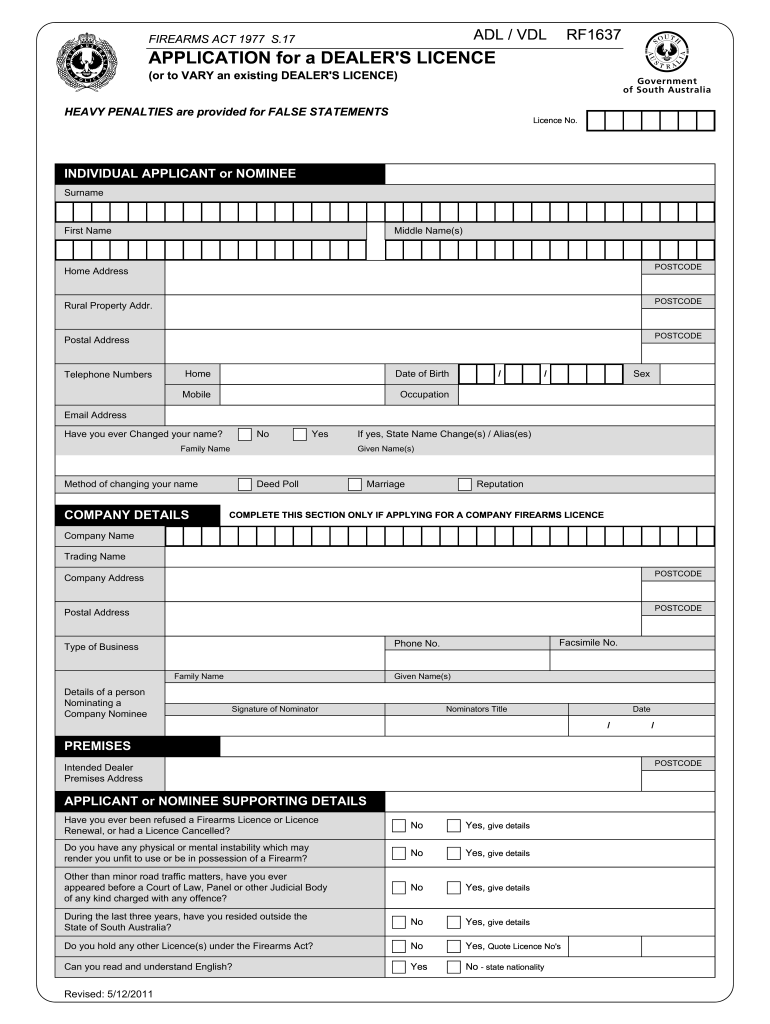
ANT or NOMINEE Surname First Name Middle Name(s) Home Address POSTCODE Rural Property Addr. POSTCODE Postal Address POSTCODE Telephone Numbers Home Date of Birth Mobile Occupation / Sex / Email Address Have you ever Changed your name? No Yes Family Name Method of changing your name COMPANY DETAILS If yes, State Name Change(s) / Alias(es) Given Name(s) Deed Poll Marriage Reputation COMPLETE THIS SECTION ONLY IF APPLYING FOR A COMPANY FIREARMS LICENCE Company Name Tradi.
Loading

Open form follow the instructions

Easily sign the form with your finger

Send filled & signed form or save
How to fill out the AU RF1637 online
The AU RF1637 form is an essential document for individuals seeking a dealer's license or wishing to vary an existing dealer's license under the Firearms Act 1977. This guide offers a step-by-step approach to successfully completing the form online, ensuring that all required information is provided accurately.
Follow the steps to accurately complete the AU RF1637 online form.
- Click the ‘Get Form’ button to access the AU RF1637 form online, allowing you to open it in your document editor.
- Begin by filling out the personal information for the individual applicant or nominee, including surname, first name, and middle names. Ensure that the home address and postal address are correct and complete.
- Enter the telephone numbers, including home and mobile, along with the date of birth and occupation. Provide the email address to enable communication.
- If applicable, indicate whether you have ever changed your name and specify the method of change along with any past names.
- For company applicants, complete the company details section with the company name, trading name, and addresses.
- If naming a company nominee, provide the details of that individual, including their name and contact information.
- Move on to the premises section and specify the intended dealer premises address.
- Fill out the supporting details, answering questions regarding previous firearms licenses, physical or mental health, and any legal history.
- Indicate whether you can read and understand English, and specify any other licenses held under the Firearms Act.
- Select the type of license being applied for by ticking the appropriate boxes and providing details if class C or D is required.
- Before submitting, review the declaration section and provide your signature and the date. Ensure all information is accurate.
- Once all information has been completed and reviewed, save the changes. You may then download, print, or share the completed form as required.
Complete your AU RF1637 form online today to ensure you are ready for submission.
Experience a faster way to fill out and sign forms on the web. Access the most extensive library of templates available.
Related content
by W Kloppmann · 2017 · Cited by 20 — Competing English, Spanish, and French alabaster...
Tours 1500. Capitale des Arts, cat. d'exp. Musée des Beaux-arts de Tours, Paris: Somogy...
Get answers to your most pressing questions about US Legal Forms API.
Why would someone not be in BOP custody?
There are several reasons someone might not be in BOP custody, including a completed sentence, parole status, or transfer to another facility. Additionally, legal issues might result in someone being out of the BOP system temporarily. It's important to understand that cases can be complex, and resources like AU RF1637 can help clarify individual circumstances. Always consult legal counsel for specific inquiries.
Can I kiss my boyfriend in prison on a visit?
During visits, physical contact rules vary depending on the facility's policies. Generally, brief hugs and kisses may be allowed at the beginning and end of the visit, but it’s best to review the specific regulations at the prison. Always check with the AU RF1637 guidelines or speak to a staff member beforehand to ensure compliance with their visitation rules. Following these guidelines helps create a pleasant visiting experience.
How do I fill out a federal inmate visitation form?
Filling out a federal inmate visitation form involves several straightforward steps. Begin by downloading the form from a reliable source like AU RF1637, and enter your details and those of the inmate. Double-check the information you provide, as inaccuracies can hinder the approval process. Submit the completed form as directed to ensure your visitation request is properly evaluated.
How to fill out a BOP visitation form?
To fill out a BOP visitation form, start by accessing the correct form via the AU RF1637 legal resource. Make sure to provide accurate personal information, including your full name, address, and relationship to the inmate. It's essential to follow the provided instructions carefully to ensure your form is processed smoothly. Additionally, submitting the form well before your intended visit helps avoid delays.
What documents do you need to buy a gun in California in 2025?
To buy a gun in California in 2025, you need valid identification, such as a real ID, and a Firearm Safety Certificate. Additionally, if it’s a private sale, you may also require additional documentation. For comprehensive details on necessary documents, AU RF1637 offers valuable insight.
Do you need a license to sell firearms?
Yes, selling firearms in California requires a Federal Firearms License (FFL). This license ensures that you comply with all federal and state regulations regarding firearm sales. If you are considering selling firearms, AU RF1637 can assist you in understanding the licensing process and regulations.
Do I need a real ID to buy a gun in California in 2025?
As of 2025, you will be required to show a valid identification, such as a real ID, when purchasing a gun in California. This change aims to enhance security and ensure responsible gun sales. Stay updated on these requirements with resources like AU RF1637 to avoid any missteps.
Do I need a gun license to have a gun in my home in California?
While you do not need a license to own a gun in your home in California, you must comply with state laws regarding firearm ownership. Ensuring that your firearm is stored safely and is legally obtained is crucial. For clarity on ownership laws, AU RF1637 provides detailed guidance.
What is the 1 in 30 rule in California?
The 1 in 30 rule in California restricts individuals from purchasing more than one handgun within a 30-day period. This regulation aims to reduce gun trafficking and ensure responsible ownership. If you are looking to navigate these laws effectively, consider using AU RF1637 for accurate information and resources.
What law bans fully automatic weapons?
The National Firearms Act (NFA) of 1934 is the law that bans fully automatic weapons in the United States. This act regulates the sale and ownership of these firearms, ensuring only specific individuals can possess them under stringent conditions. The AU RF1637 details how this legislation impacts firearm ownership and compliance, helping you navigate the complexities of gun laws.
Use professional pre-built templates to fill in and sign documents online faster. Get access to thousands of forms.
If you believe that this page should be taken down, please follow our DMCA take down process here.