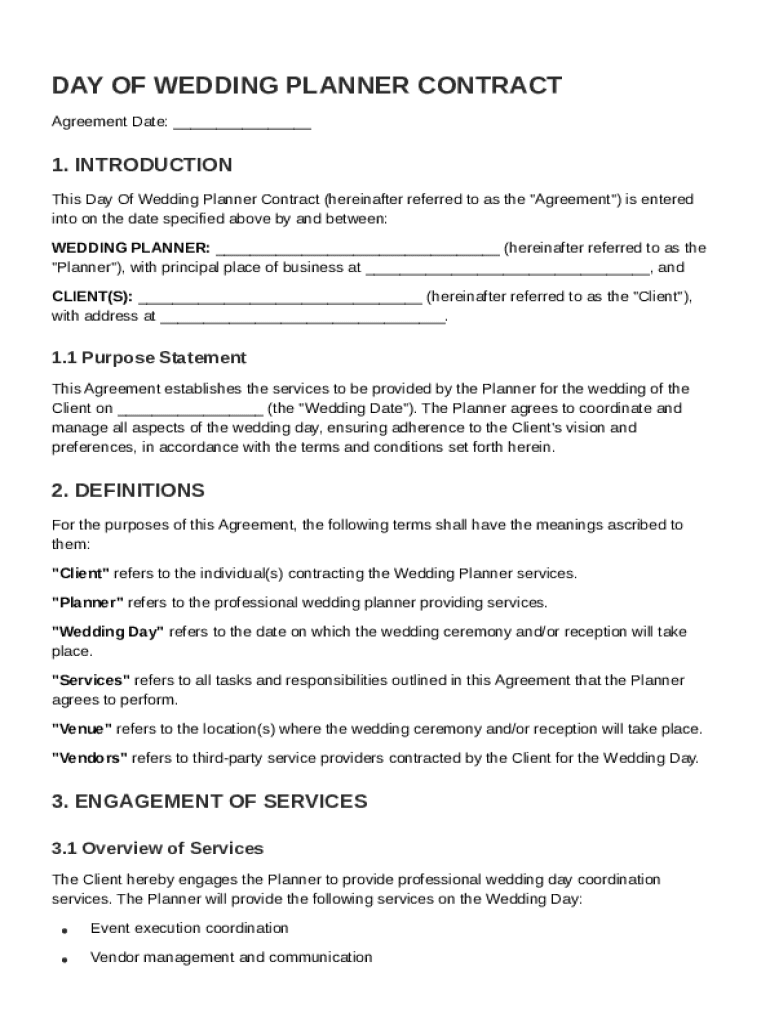
Ed above by and between: WEDDING PLANNER: (hereinafter referred to as the "Planner"), with principal place of business at , and CLIENT(S): (hereinafter referred to as the "Client"), with address at . 1.1 Purpose Statement This Agreement establishes the services to be provided by the Planner for the wedding of the Client on (the "Wedding Date").
Loading

Open form follow the instructions

Easily sign the form with your finger

Send filled & signed form or save
How to fill out and sign Day Of Wedding Planner Contract Template online?
Get your online template and fill it in using progressive features. Enjoy smart fillable fields and interactivity.Follow the simple instructions below:
The times of distressing complex legal and tax forms are over. With US Legal Forms the entire process of submitting legal documents is anxiety-free. The leading editor is directly at your fingertips giving you multiple beneficial tools for completing a Day Of Wedding Planner Contract Template. These tips, combined with the editor will guide you with the whole procedure.
- Hit the Get Form option to begin filling out.
- Switch on the Wizard mode on the top toolbar to acquire extra recommendations.
- Fill every fillable area.
- Be sure the details you add to the Day Of Wedding Planner Contract Template is updated and accurate.
- Include the date to the template with the Date tool.
- Click on the Sign tool and make a digital signature. You will find 3 available options; typing, drawing, or uploading one.
- Be sure that each area has been filled in correctly.
- Click Done in the top right corne to save and send or download the record. There are various options for getting the doc. An attachment in an email or through the mail as a hard copy, as an instant download.
We make completing any Day Of Wedding Planner Contract Template faster. Start now!
Tips on how to fill out, edit and sign Day Of Wedding Planner Contract Template online
How to fill and sign Day Of Wedding Planner Contract Template
Get your online template and fill it in using progressive features. Enjoy smart fillable fields and interactivity.Follow the simple instructions below:
The times of distressing complex legal and tax forms are over. With US Legal Forms the entire process of submitting legal documents is anxiety-free. The leading editor is directly at your fingertips giving you multiple beneficial tools for completing a Day Of Wedding Planner Contract Template. These tips, combined with the editor will guide you with the whole procedure.
- Hit the Get Form option to begin filling out.
- Switch on the Wizard mode on the top toolbar to acquire extra recommendations.
- Fill every fillable area.
- Be sure the details you add to the Day Of Wedding Planner Contract Template is updated and accurate.
- Include the date to the template with the Date tool.
- Click on the Sign tool and make a digital signature. You will find 3 available options; typing, drawing, or uploading one.
- Be sure that each area has been filled in correctly.
- Click Done in the top right corne to save and send or download the record. There are various options for getting the doc. An attachment in an email or through the mail as a hard copy, as an instant download.
We make completing any Day Of Wedding Planner Contract Template faster. Start now!
How to edit Day Of Wedding Planner Contract Template
Have your stressless and paper-free way of working with Day Of Wedding Planner Contract Template. Use our trusted online option and save a lot of time.
Drafting every form, including Day Of Wedding Planner Contract Template, from scratch requires too much time, so having a tried-and-tested solution of pre-uploaded document templates can do wonders for your efficiency.
But working with them can be challenge, especially when it comes to the documents in PDF format. Fortunately, our extensive catalog has a built-in editor that allows you to quickly complete and customize Day Of Wedding Planner Contract Template without leaving our website so that you don't need to lose your precious executing your documents. Here's what to do with your file utilizing our solution:
- Step 1. Find the needed document on our website.
- Step 2. Click Get Form to open it in the editor.
- Step 3. Use our professional modifying features that allow you to insert, remove, annotate and highlight or blackout text.
- Step 4. Create and add a legally-binding signature to your file by using the sign option from the top toolbar.
- Step 5. If the document layout doesn’t look the way you want it, use the features on the right to erase, include, and arrange pages.
- step 6. Insert fillable fields so other persons can be invited to complete the document (if applicable).
- Step 7. Pass around or send the form, print it out, or select the format in which you’d like to get the file.
Whether you need to complete editable Day Of Wedding Planner Contract Template or any other document available in our catalog, you’re well on your way with our online document editor. It's easy and secure and doesn’t require you to have special tech background. Our web-based tool is set up to deal with virtually everything you can imagine concerning document editing and completion.
Forget about the conventional way of dealing with your documents. Go with a more efficient option to help you simplify your tasks and make them less reliant on paper.
How to fill and sign Day Of Wedding Planner Contract Template
Get your online template and fill it in using progressive features. Enjoy smart fillable fields and interactivity.Follow the simple instructions below:
The times of distressing complex legal and tax forms are over. With US Legal Forms the entire process of submitting legal documents is anxiety-free. The leading editor is directly at your fingertips giving you multiple beneficial tools for completing a Day Of Wedding Planner Contract Template. These tips, combined with the editor will guide you with the whole procedure.
- Hit the Get Form option to begin filling out.
- Switch on the Wizard mode on the top toolbar to acquire extra recommendations.
- Fill every fillable area.
- Be sure the details you add to the Day Of Wedding Planner Contract Template is updated and accurate.
- Include the date to the template with the Date tool.
- Click on the Sign tool and make a digital signature. You will find 3 available options; typing, drawing, or uploading one.
- Be sure that each area has been filled in correctly.
- Click Done in the top right corne to save and send or download the record. There are various options for getting the doc. An attachment in an email or through the mail as a hard copy, as an instant download.
We make completing any Day Of Wedding Planner Contract Template faster. Start now!
Experience a faster way to fill out and sign forms on the web. Access the most extensive library of templates available.
Related content
A day of wedding coordinator contract is a formal agreement between the wedding couple...
A wedding planner template typically includes a detailed timeline outline, covering...
≥ Check your contract details carefully, as smartphone and internet contract details may...
Get answers to your most pressing questions about US Legal Forms API.
What should be included in a wedding planner contract?
A wedding planner contract should include essential details like services provided, payment schedule, and cancellation policies. Additionally, incorporate terms regarding communication and revisions. Consider utilizing a 'Day Of Wedding Planner Contract Template' to ensure you cover all necessary components, making the process transparent for both parties.
Are you supposed to tip your day of wedding coordinator?
Tipping your day of wedding coordinator is not mandatory but is often appreciated. If the coordinator exceeds your expectations or provides exceptional service, a tip can serve as a nice gesture. Consider adjusting the tip based on the overall experience and the responsibilities managed, similar to recommendations provided in a 'Day Of Wedding Planner Contract Template.'
How to fill out a contract agreement?
Filling out a contract agreement must be done systematically. Start by adding the parties' names and addresses followed by the contract's purpose. Detail the specific terms and conditions, much like those found in a 'Day Of Wedding Planner Contract Template.' Finally, ensure all parties provide their signatures to confirm acceptance of the agreement.
What are the 5 requirements of a valid contract?
A valid contract must have an offer, acceptance, consideration, capacity, and legality. The offer specifies what one party proposes, while acceptance confirms the agreement. Consideration represents what is exchanged, such as payment. If you're unsure about these elements, using a 'Day Of Wedding Planner Contract Template' can help ensure compliance.
How to fill a contract?
Filling out a contract requires attention to detail. Start by entering the names and addresses of all parties involved. Then, include the service dates and specifics about what is being agreed upon, such as services outlined in a 'Day Of Wedding Planner Contract Template.' Ensure correct dates and amounts before seeking signatures.
How do I write a simple contract agreement?
Writing a simple contract agreement involves identifying the parties involved, specifying the purpose of the agreement, and outlining the terms. Use straightforward language to describe the obligations of each party and any payments involved. Including a 'Day Of Wedding Planner Contract Template' can simplify this process. Make sure both parties sign to validate the agreement.
How do you write a wedding contract?
To write a wedding contract, begin with a clear title, such as 'Day Of Wedding Planner Contract Template.' Include the key details such as the names of both parties, dates, and services provided. Clearly outline responsibilities, payment terms, and cancellation policies. Finally, both parties should sign the contract, ensuring mutual agreement.
What to include in a wedding day timeline?
A wedding day timeline should cover the ceremony start time, reception details, and vendor arrival times. Include buffer times for each segment to accommodate any unexpected delays. Crafting this timeline with the help of the Day Of Wedding Planner Contract Template can ensure that every moment is planned out perfectly.
What needs to be done on a wedding day?
On your wedding day, several tasks must be accomplished, such as setting up the venue, final vendor check-ins, and ensuring the timeline stays on track. It’s essential to have your day-of wedding planner manage these details to allow you to enjoy the celebration. The Day Of Wedding Planner Contract Template can clarify the coordinator's responsibilities, helping all parties understand their roles.
What to include in a day of wedding binder?
In your day-of wedding binder, ensure you include your wedding timeline, vendor contracts, and emergency contact information. It should also contain a list of must-do tasks and key individuals involved on the wedding day. Utilizing the Day Of Wedding Planner Contract Template helps you organize these elements seamlessly.
Use professional pre-built templates to fill in and sign documents online faster. Get access to thousands of forms.
If you believe that this page should be taken down, please follow our DMCA take down process here.