Loading
Form preview
  • US Legal Forms
  • Other Templates
  • More Forms
  • More Multi-State Forms
  • Design Assist Contract Template

Get Design Assist Contract Template

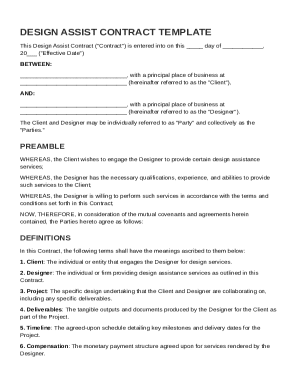
Date") BETWEEN: , with a principal place of business at (hereinafter referred to as the "Client"), AND: , with a principal place of business at (hereinafter referred to as the "Designer"). The Client and Designer may be individually referred to as "Party" and collectively as the "Parties." PREAMBLE WHEREAS, the Client wishes to engage the Designer to provide certain.

How it works

  1. Open form

    Open form follow the instructions

  2. Easily sign form

    Easily sign the form with your finger

  3. Share form

    Send filled & signed form or save

How to fill out and sign Design Assist Contract Template online?

Get your online template and fill it in using progressive features. Enjoy smart fillable fields and interactivity.Follow the simple instructions below:

The days of frightening complex tax and legal forms are over. With US Legal Forms the whole process of creating official documents is anxiety-free. The leading editor is already at your fingertips providing you with an array of beneficial instruments for completing a Design Assist Contract Template. These guidelines, along with the editor will guide you through the entire procedure.

  1. Select the orange Get Form button to start enhancing.
  2. Turn on the Wizard mode on the top toolbar to obtain more pieces of advice.
  3. Fill out every fillable field.
  4. Ensure the details you add to the Design Assist Contract Template is updated and correct.
  5. Indicate the date to the template with the Date option.
  6. Select the Sign icon and make an electronic signature. Feel free to use 3 available choices; typing, drawing, or uploading one.
  7. Re-check every field has been filled in correctly.
  8. Click Done in the top right corne to save and send or download the document. There are many alternatives for getting the doc. An attachment in an email or through the mail as a hard copy, as an instant download.

We make completing any Design Assist Contract Template more straightforward. Start now!

Tips on how to fill out, edit and sign Design Assist Contract Template online

How to fill out and sign Design Assist Contract Template online?

Get your online template and fill it in using progressive features. Enjoy smart fillable fields and interactivity.Follow the simple instructions below:

The days of frightening complex tax and legal forms are over. With US Legal Forms the whole process of creating official documents is anxiety-free. The leading editor is already at your fingertips providing you with an array of beneficial instruments for completing a Design Assist Contract Template. These guidelines, along with the editor will guide you through the entire procedure.

  1. Select the orange Get Form button to start enhancing.
  2. Turn on the Wizard mode on the top toolbar to obtain more pieces of advice.
  3. Fill out every fillable field.
  4. Ensure the details you add to the Design Assist Contract Template is updated and correct.
  5. Indicate the date to the template with the Date option.
  6. Select the Sign icon and make an electronic signature. Feel free to use 3 available choices; typing, drawing, or uploading one.
  7. Re-check every field has been filled in correctly.
  8. Click Done in the top right corne to save and send or download the document. There are many alternatives for getting the doc. An attachment in an email or through the mail as a hard copy, as an instant download.

We make completing any Design Assist Contract Template more straightforward. Start now!

How to edit Design Assist Contract Template: customize forms online

Forget a traditional paper-based way of executing Design Assist Contract Template. Get the document filled out and certified in minutes with our top-notch online editor.

Are you forced to edit and complete Design Assist Contract Template? With a robust editor like ours, you can perform this in mere minutes without having to print and scan papers back and forth. We offer completely customizable and simple document templates that will serve as a start and help you complete the required form online.

All forms, by default, contain fillable fields you can execute as soon as you open the form. However, if you need to polish the existing content of the document or add a new one, you can select from a number of customization and annotation tools. Highlight, blackout, and comment on the text; add checkmarks, lines, text boxes, images and notes, and comments. Moreover, you can easily certify the form with a legally-binding signature. The completed document can be shared with other people, stored, sent to external programs, or transformed into any other format.

You’ll never make a wrong decision choosing our web-based solution to execute Design Assist Contract Template because it's:

  • Effortless to set up and use, even for those who haven’t filled the documents online before.
  • Robust enough to allow for various modifying needs and document types.
  • Safe and secure, making your editing experience protected every time.
  • Available across various operating systems, making it effortless to complete the document from just about anywhere.
  • Capable of generating forms based on ready-made templates.
  • Compatible with numerous file formats: PDF, DOC, DOCX, PPT and JPEG etc.

Don't waste time editing your Design Assist Contract Template obsolete way - with pen and paper. Use our feature-rich tool instead. It offers you a versatile suite of editing tools, built-in eSignature capabilities, and convenience. What makes it differ from similar alternatives is the team collaboration options - you can collaborate on documents with anyone, create a well-structured document approval flow from the ground up, and a lot more. Try our online tool and get the best bang for your buck!

Get form

Experience a faster way to fill out and sign forms on the web. Access the most extensive library of templates available.
Get form

Related content

Attachment A Design Assist Agreement for...
DESIGN ASSIST CONTRACTOR (DAC) The DAC and the (Architect) will work together to produce...
Learn more
DESIGN-ASSIST AND DESIGN-BUILD SUBCONTRACTING
Introduction. In design-assist and design-build subcontracting the general contractor (GC)...
Learn more
Sample Design Contract-r - Excel TMP
A retainer of. upon execution of this agreement, with charges per the Architect's hourly...
Learn more

Related links form

Problem Statement - Computer Engineering - Santa Clara University Statement Of Financial Need - Seattle University School Of Law Request For Booking Form 2012-2013 - Santa Clara University ONLY ONE REQUEST PER FORM

Questions & Answers

Get answers to your most pressing questions about US Legal Forms API.

Contact support

Design-assist and design-bid-build are two different project delivery methods. In a design-assist approach, the contractor collaborates with the design team early in the project, which fosters teamwork and can lead to innovative solutions. Conversely, design-bid-build separates the design and construction phases, leading to potential misalignment and communication challenges. A Design Assist Contract Template helps clarify expectations and streamline the process under the design-assist model, promoting a more cohesive project environment.

To obtain an AIA (American Institute of Architects) contract, you can visit the AIA website where they provide various contract documents tailored for different project types. If you are specifically looking for a Design Assist Contract Template, AIA also offers resources that can guide you in tailoring these documents to fit your specific project needs. Make sure to understand the terms and any associated costs before purchasing. Utilizing these templates ensures that you follow established standards in the industry.

To create a design contract, start by clearly defining the scope of work, deliverables, and timeline. Incorporate a Design Assist Contract Template to help you structure the agreement effectively, addressing all essential elements. Be sure to include payment terms, liability clauses, and any necessary regulatory requirements. After drafting your contract, review it carefully to ensure all parties agree on the terms, and consider seeking legal advice for additional assurance.

assist contract is a collaborative agreement that involves architects, engineers, and contractors working together from the early stages of a project. This approach helps streamline the design process and improves communication, allowing for better project outcomes. With a Design Assist Contract Template, you can clearly outline the roles and responsibilities of each party involved, ensuring a smooth workflow. This template provides a solid foundation for your project, minimizing misunderstandings and enhancing efficiency.

Writing a design-build contract involves outlining the scope of work, roles, and responsibilities of all parties involved. Begin by detailing the project requirements and timelines, ensuring clarity in each section. You can utilize a Design Assist Contract Template from reliable sources like uslegalforms to simplify the process and ensure that all necessary clauses are included.

AIA B141 and B143 contracts serve different purposes in project delivery. B141 is an earlier version focused on traditional contracting methods, while B143 is tailored for design-build projects, incorporating design assist features. Understanding these differences can help you choose the right agreement, such as the Design Assist Contract Template, that aligns with your project's structure.

The AIA contract document is a standardized agreement created by the American Institute of Architects. These documents provide clarity on the roles and responsibilities of parties involved in construction projects. Using an AIA document can complement a design assist contract template, ensuring that your agreement meets industry standards while addressing specific design and construction needs.

A design assist contract is a specialized agreement that promotes collaboration between designers and contractors during the design phase. This type of contract outlines the roles of each party and emphasizes the importance of teamwork to achieve project goals. Utilizing a design assist contract template can help you craft an effective document that maximizes communication and efficiency in your projects.

Creating your own contract requires careful consideration of the terms and details relevant to your agreement. Start by determining what needs to be included, such as services rendered, timelines, and payment conditions. A design assist contract template can serve as a vital tool, guiding you through the necessary elements to ensure clarity and legality.

Making a design contract begins with identifying essential project details like the scope, timelines, and payment structure. Next, draft the document in clear language that outlines mutual obligations. Utilizing a design assist contract template can streamline this process, ensuring you address all necessary components effectively.

Get This Form Now!

Use professional pre-built templates to fill in and sign documents online faster. Get access to thousands of forms.
Get form
If you believe that this page should be taken down, please follow our DMCA take down processhere.
Get Design Assist Contract Template
Get form
  • Adoption
  • Bankruptcy
  • Contractors
  • Divorce
  • Home Sales
  • Employment
  • Identity Theft
  • Incorporation
  • Landlord Tenant
  • Living Trust
  • Name Change
  • Personal Planning
  • Small Business
  • Wills & Estates
  • Packages A-Z
  • Affidavits
  • Bankruptcy
  • Bill of Sale
  • Corporate - LLC
  • Divorce
  • Employment
  • Identity Theft
  • Internet Technology
  • Landlord Tenant
  • Living Wills
  • Name Change
  • Power of Attorney
  • Real Estate
  • Small Estates
  • Wills
  • All Forms
  • Forms A-Z
  • Other Templates
  • Legal Hub
  • About Us
  • Help Portal
  • Legal Resources
  • Blog
  • Affiliates
  • Contact Us
  • Delete My Account
  • Site Map
  • Industries
  • Forms in Spanish
  • Localized Forms
  • State-specific Forms
  • Forms Kit
  • Real Estate Handbook
  • All Guides
  • Notarize
  • Incorporation services
  • For Consumers
  • For Small Business
  • For Attorneys
  • USLegal
  • FormsPass
  • pdfFiller
  • signNow
  • altaFlow
  • DocHub
  • Instapage
Form Packages
  • Adoption
  • Bankruptcy
  • Contractors
  • Divorce
  • Home Sales
  • Employment
  • Identity Theft
  • Incorporation
  • Landlord Tenant
  • Living Trust
  • Name Change
  • Personal Planning
  • Small Business
  • Wills & Estates
  • Packages A-Z
Form Categories
  • Affidavits
  • Bankruptcy
  • Bill of Sale
  • Corporate - LLC
  • Divorce
  • Employment
  • Identity Theft
  • Internet Technology
  • Landlord Tenant
  • Living Wills
  • Name Change
  • Power of Attorney
  • Real Estate
  • Small Estates
  • Wills
  • All Forms
  • Forms A-Z
  • Other Templates
Customer Service
  • Legal Hub
  • About Us
  • Help Portal
  • Legal Resources
  • Blog
  • Affiliates
  • Contact Us
  • Delete My Account
  • Site Map
  • Industries
  • Forms in Spanish
  • Localized Forms
  • State-specific Forms
  • Forms Kit
Legal Guides
  • Real Estate Handbook
  • All Guides
Prepared for you
  • Notarize
  • Incorporation services
Our Customers
  • For Consumers
  • For Small Business
  • For Attorneys
Our Sites
  • USLegal
  • FormsPass
  • pdfFiller
  • signNow
  • altaFlow
  • DocHub
  • Instapage
Social Media
Call us now toll free:
+1 833 426 79 33
As seen in:
© Copyright 1999-2026 airSlate Legal Forms, Inc. 17 Station Street, Ste. 203, Brookline, MA 02445
  • Your Privacy Choices
  • Terms of Service
  • Privacy Notice
  • Content Takedown Policy
  • Bug Bounty Program