Loading
Form preview
  • US Legal Forms
  • Form Library
  • More Forms
  • More Multi-State Forms
  • Between Two Parties Contract Template

Get Between Two Parties Contract Template

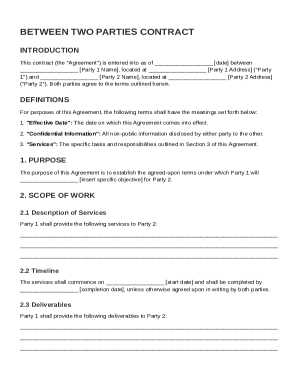
Ty 1 Address ("Party 1") and Party 2 Name , located at Party 2 Address ("Party 2"). Both parties agree to the terms outlined herein. DEFINITIONS For purposes of this Agreement, the following terms shall have the meanings set forth below: 1. "Effective Date": The date on which this Agreement comes into effect. 2. "Confidential Information": All non-public information disclosed by either party to the other. 3. "Services": The specific tasks and responsibi.

How it works

  1. Open form

    Open form follow the instructions

  2. Easily sign form

    Easily sign the form with your finger

  3. Share form

    Send filled & signed form or save

How to fill out and sign Between Two Parties Contract Template online?

Get your online template and fill it in using progressive features. Enjoy smart fillable fields and interactivity.Follow the simple instructions below:

The days of frightening complex legal and tax documents have ended. With US Legal Forms the entire process of completing legal documents is anxiety-free. A powerhouse editor is right at your fingertips providing you with a wide variety of useful instruments for completing a Between Two Parties Contract Template. These guidelines, with the editor will guide you through the complete procedure.

  1. Click on the orange Get Form option to begin modifying.
  2. Activate the Wizard mode on the top toolbar to obtain more pieces of advice.
  3. Fill out every fillable area.
  4. Be sure the details you add to the Between Two Parties Contract Template is updated and accurate.
  5. Indicate the date to the document using the Date function.
  6. Click on the Sign tool and create a signature. You can find 3 available options; typing, drawing, or uploading one.
  7. Be sure that every area has been filled in correctly.
  8. Click Done in the top right corne to save the sample. There are various alternatives for receiving the doc. As an instant download, an attachment in an email or through the mail as a hard copy.

We make completing any Between Two Parties Contract Template much faster. Get started now!

Tips on how to fill out, edit and sign Between Two Parties Contract Template online

How to fill out and sign Between Two Parties Contract Template online?

Get your online template and fill it in using progressive features. Enjoy smart fillable fields and interactivity.Follow the simple instructions below:

The days of frightening complex legal and tax documents have ended. With US Legal Forms the entire process of completing legal documents is anxiety-free. A powerhouse editor is right at your fingertips providing you with a wide variety of useful instruments for completing a Between Two Parties Contract Template. These guidelines, with the editor will guide you through the complete procedure.

  1. Click on the orange Get Form option to begin modifying.
  2. Activate the Wizard mode on the top toolbar to obtain more pieces of advice.
  3. Fill out every fillable area.
  4. Be sure the details you add to the Between Two Parties Contract Template is updated and accurate.
  5. Indicate the date to the document using the Date function.
  6. Click on the Sign tool and create a signature. You can find 3 available options; typing, drawing, or uploading one.
  7. Be sure that every area has been filled in correctly.
  8. Click Done in the top right corne to save the sample. There are various alternatives for receiving the doc. As an instant download, an attachment in an email or through the mail as a hard copy.

We make completing any Between Two Parties Contract Template much faster. Get started now!

How to edit Between Two Parties Contract Template: customize forms online

Approve and share Between Two Parties Contract Template along with any other business and personal documents online without wasting time and resources on printing and postal delivery. Take the most out of our online form editor using a built-in compliant eSignature tool.

Signing and submitting Between Two Parties Contract Template templates electronically is quicker and more efficient than managing them on paper. However, it requires employing online solutions that guarantee a high level of data protection and provide you with a compliant tool for generating eSignatures. Our robust online editor is just the one you need to complete your Between Two Parties Contract Template and other individual and business or tax forms in an accurate and suitable manner in line with all the requirements. It features all the necessary tools to quickly and easily complete, edit, and sign paperwork online and add Signature fields for other parties, specifying who and where should sign.

It takes just a few simple steps to fill out and sign Between Two Parties Contract Template online:

  1. Open the chosen file for further managing.
  2. Use the top toolkit to add Text, Initials, Image, Check, and Cross marks to your sample.
  3. Underline the most significant details and blackout or remove the sensitive ones if necessary.
  4. Click on the Sign tool above and decide on how you want to eSign your document.
  5. Draw your signature, type it, upload its picture, or use an alternative option that suits you.
  6. Switch to the Edit Fillable Fileds panel and place Signature fields for other people.
  7. Click on Add Signer and type in your recipient’s email to assign this field to them.
  8. Check that all information provided is complete and correct before you click Done.
  9. Share your documentation with others utilizing one of the available options.

When approving Between Two Parties Contract Template with our comprehensive online editor, you can always be sure to get it legally binding and court-admissible. Prepare and submit documentation in the most beneficial way possible!

Get form

Experience a faster way to fill out and sign forms on the web. Access the most extensive library of templates available.
Get form

Related content

Fillable Template MOA
This Memorandum of Agreement (MOA) constitutes an agreement between [list all parties to...
Learn more
Sample Independent Contractor Agreement This...
This is the entire Agreement between Contractor and Client. 16. Modifying the Agreement...
Learn more
12 Essential Elements Of A Solid Consulting...
Mar 24, 2022 — A solid consulting agreement should include the nature of services, fee...
Learn more

Related links form

THE MARKETING CLUB - Www6 Semo STUDENT RESPONSIBILITY FOR PAYMENT OF EDUCATIONAL ... - Siue Southeastern Women's Auxiliary Scholarship - 2011 Pastor Leader Recommendation MATS & MATSIL - Southern Baptist ...

Questions & Answers

Get answers to your most pressing questions about US Legal Forms API.

Contact support

Not all contracts between two parties require notarization, but it can add an extra layer of security and validation. In general, notarization provides evidence that both parties willingly signed the document. It is advisable to consult local laws or legal resources to determine if notarization is necessary for your specific agreement. A Between Two Parties Contract Template can guide you through the required steps.

Filling out a contract involves entering specific information such as the names of the parties, terms of the agreement, and relevant dates. It is crucial to read the contract carefully and ensure that all sections are complete. Utilizing a Between Two Parties Contract Template can simplify this process, providing prompts and guidance to help you accurately fill out each part of the agreement.

The 5 C's of a contract are clarity, completeness, conciseness, consideration, and confidence. Each element builds a strong and enforceable agreement. Understanding these principles can help you effectively use a Between Two Parties Contract Template to create agreements that meet all legal requirements and serve both parties well.

When writing a contract agreement between two parties, start by clearly identifying both parties and the purpose of the agreement. Use a Between Two Parties Contract Template to simplify the process, as it provides a structure for essential elements like obligations, payment terms, and dispute resolution. Be concise and specific to avoid ambiguity. Lastly, ensure both parties review and sign the document for it to become legally binding.

Yes, you can create your own contract between two parties using a Between Two Parties Contract Template. This customizable template allows you to outline the terms and conditions that both parties agree upon. By ensuring clarity and detail, you create a strong basis for your agreement. It's a straightforward process that empowers you to define your terms without needing a lawyer.

A notarization is not always necessary for an agreement between two parties. Most contracts, including a Between Two Parties Contract Template, are legally binding as long as they meet certain requirements, such as mutual consent and consideration. However, notarization can add an extra layer of authenticity, which may be helpful in disputes. When in doubt, consider the nature of the agreement and consult a legal expert.

Writing an agreement between two partners involves detailing the roles, responsibilities, and contributions of each partner. Include key aspects such as profit distribution, conflict resolution procedures, and exit strategies. A Between Two Parties Contract Template can help guide you in structuring the agreement to cover all vital points.

Yes, you can write your own legally binding contract, provided you include fundamental elements like offer, acceptance, and consideration. Using a Between Two Parties Contract Template can simplify this process and make sure you include all necessary parts for legality. Always review the final document to ensure that it accurately reflects the agreement between the parties.

To write a simple legally binding contract, follow a structured format that includes the parties' names, the contract purpose, the terms of agreement, and a signature line. It is vital to make the terms clear and unambiguous to avoid misunderstandings later. Consider using a Between Two Parties Contract Template for guidance on the essential components of your agreement.

A simple contract example is a service agreement between a freelancer and a client. This contract specifies the services to be provided, the payment terms, and deadlines. By using a Between Two Parties Contract Template, you can ensure that both parties have a clear understanding of their obligations.

Get This Form Now!

Use professional pre-built templates to fill in and sign documents online faster. Get access to thousands of forms.
Get form
If you believe that this page should be taken down, please follow our DMCA take down processhere.
Get Between Two Parties Contract Template
Get form
  • Adoption
  • Bankruptcy
  • Contractors
  • Divorce
  • Home Sales
  • Employment
  • Identity Theft
  • Incorporation
  • Landlord Tenant
  • Living Trust
  • Name Change
  • Personal Planning
  • Small Business
  • Wills & Estates
  • Packages A-Z
  • Affidavits
  • Bankruptcy
  • Bill of Sale
  • Corporate - LLC
  • Divorce
  • Employment
  • Identity Theft
  • Internet Technology
  • Landlord Tenant
  • Living Wills
  • Name Change
  • Power of Attorney
  • Real Estate
  • Small Estates
  • Wills
  • All Forms
  • Forms A-Z
  • Form Library
  • Legal Hub
  • About Us
  • Help Portal
  • Legal Resources
  • Blog
  • Affiliates
  • Contact Us
  • Delete My Account
  • Site Map
  • Industries
  • Forms in Spanish
  • Localized Forms
  • State-specific Forms
  • Forms Kit
  • Real Estate Handbook
  • All Guides
  • Notarize
  • Incorporation services
  • For Consumers
  • For Small Business
  • For Attorneys
  • USLegal
  • FormsPass
  • pdfFiller
  • signNow
  • altaFlow
  • DocHub
  • Instapage
Form Packages
  • Adoption
  • Bankruptcy
  • Contractors
  • Divorce
  • Home Sales
  • Employment
  • Identity Theft
  • Incorporation
  • Landlord Tenant
  • Living Trust
  • Name Change
  • Personal Planning
  • Small Business
  • Wills & Estates
  • Packages A-Z
Form Categories
  • Affidavits
  • Bankruptcy
  • Bill of Sale
  • Corporate - LLC
  • Divorce
  • Employment
  • Identity Theft
  • Internet Technology
  • Landlord Tenant
  • Living Wills
  • Name Change
  • Power of Attorney
  • Real Estate
  • Small Estates
  • Wills
  • All Forms
  • Forms A-Z
  • Form Library
Customer Service
  • Legal Hub
  • About Us
  • Help Portal
  • Legal Resources
  • Blog
  • Affiliates
  • Contact Us
  • Delete My Account
  • Site Map
  • Industries
  • Forms in Spanish
  • Localized Forms
  • State-specific Forms
  • Forms Kit
Legal Guides
  • Real Estate Handbook
  • All Guides
Prepared for you
  • Notarize
  • Incorporation services
Our Customers
  • For Consumers
  • For Small Business
  • For Attorneys
Our Sites
  • USLegal
  • FormsPass
  • pdfFiller
  • signNow
  • altaFlow
  • DocHub
  • Instapage
Social Media
Call us now toll free:
+1 833 426 79 33
As seen in:
© Copyright 1999-2026 airSlate Legal Forms, Inc. 3720 Flowood Dr, Flowood, Mississippi 39232
  • Your Privacy Choices
  • Terms of Service
  • Privacy Notice
  • Content Takedown Policy
  • Bug Bounty Program