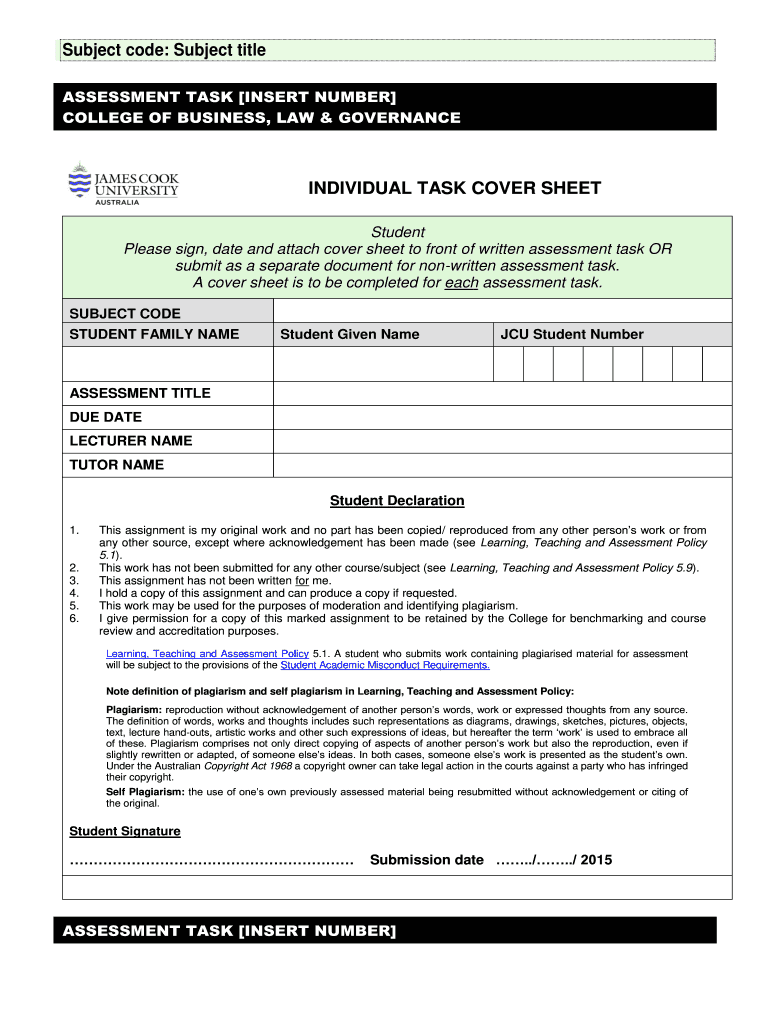
Subject code: Subject title ASSESSMENT TASK INSERT NUMBER COLLEGE OF BUSINESS, LAW & GOVERNANCE INDIVIDUAL TASK COVER SHEET Student Please sign, date and attach cover sheet to front of written.
Loading

Open form follow the instructions

Easily sign the form with your finger

Send filled & signed form or save
How to fill out the AU JCUB Individual Task Cover Sheet online
Filling out the AU JCUB Individual Task Cover Sheet is an important step in preparing your assessment task. This guide will provide you with clear, step-by-step instructions to help you complete the cover sheet accurately and efficiently.
Follow the steps to complete your cover sheet online.
- Click ‘Get Form’ button to obtain the form and open it in the editor.
- Fill in the subject code. This is a specific identifier for your course and can usually be found in your course materials.
- Enter your family name in the designated field. Ensure that the spelling is accurate as it will be used for identification.
- Provide your given name. This should match the name you use in your official documents.
- Input your JCU student number. This number is crucial for the administration of your assessment.
- Complete the assessment title. This is the title of the work you are submitting.
- Record the due date for your assignment. This helps to keep you organized and ensures timely submission.
- Fill in the lecturer's name. This is the person responsible for teaching your course.
- Input the tutor's name, if applicable. This helps to clarify who has assisted you in your learning.
- Review the Student Declaration. Ensure that you read and understand each statement before signing.
- After signing, indicate the submission date by entering the day, month, and year.
- Once all fields are filled, save changes to the document. You can then download, print, or share the cover sheet as needed.
Complete your AU JCUB Individual Task Cover Sheet online today and ensure your academic success!
Experience a faster way to fill out and sign forms on the web. Access the most extensive library of templates available.
Related content
by D Fusca · 2021 · Cited by 9 — Spiking LNs play a primary role in interglomerular...
by CS Green · 2020 · Cited by 12 — It is clearly the case that individuals can improve...
Introduction to Mathematical Modeling of Biological Systems. Mathematical biology uses...
Get answers to your most pressing questions about US Legal Forms API.
How do you create a cover page in Word?
To create a cover page in Word for your AU JCUB Individual Task Cover Sheet, start by opening a new document. Navigate to the 'Insert' tab, and select 'Cover Page' to explore available templates. Customize the template with your details like title, name, and date, ensuring all information is accurately displayed and formatted.
How do I make a cover sheet?
You can easily create an AU JCUB Individual Task Cover Sheet by using templates available online. Focus on including essential details such as your name, the title of the task, and submission information. This ensures clarity and professionalism in your submission. Utilizing platforms like uslegalforms can simplify this process with customizable templates.
How to do an assignment cover sheet?
To design an assignment cover sheet, start by gathering necessary details for the AU JCUB Individual Task Cover Sheet. Clearly present your name, course details, submission date, and any other required data. It’s beneficial to check any specific formatting rules from your institution, so you comply with their standards.
How to make a cover sheet?
Creating an AU JCUB Individual Task Cover Sheet is straightforward. Begin by selecting a clean format that clearly presents your information. Include your name, student ID, course name, and relevant task details. Make sure to review the university guidelines to ensure you meet all requirements.
What is a college cover sheet?
A college cover sheet is a document that accompanies assignments, summarizing essential details such as the course name, instructor, and submission details. It helps in organizing submissions clearly and professionally. Utilizing the AU JCUB Individual Task Cover Sheet enhances your college submissions by following the required format and presenting your work in a structured manner, which can lead to better evaluations.
What is the difference between a title page and a cover sheet?
A title page is typically the first page of a document that features the title, author, and sometimes the date of submission. In contrast, a cover sheet is more of a formal summary that includes additional details relevant to the assignment or project. Using the AU JCUB Individual Task Cover Sheet can combine both functions, providing a comprehensive overview of your work while adhering to academic guidelines.
What is the purpose of a cover sheet?
The purpose of a cover sheet is to provide a first impression of your document, presenting vital information clearly. It acts as a guide for the reader, summarizing what the attached materials will contain. By employing the AU JCUB Individual Task Cover Sheet, you can effectively communicate the key details of your assignment or project, facilitating a better understanding of your work.
What is a cover sheet for a transcript?
A cover sheet for a transcript serves as a formal introduction to your academic records. It typically includes essential information such as your name, student ID, and the course details. When utilizing the AU JCUB Individual Task Cover Sheet, you enhance the presentation of your transcript, making it look organized and professional, which can positively impact your academic or job applications.
Use professional pre-built templates to fill in and sign documents online faster. Get access to thousands of forms.
If you believe that this page should be taken down, please follow our DMCA take down process here.
This form is available in several versions. Select the version you need from the drop-down list below.