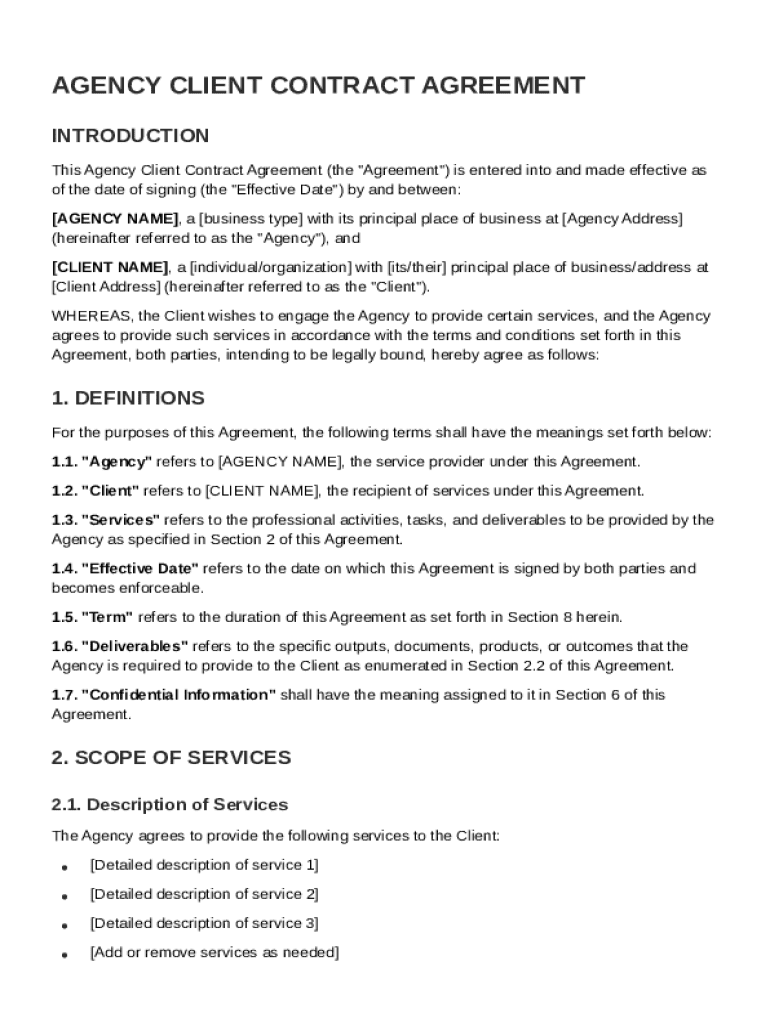
Between: AGENCY NAME , a business type with its principal place of business at Agency Address (hereinafter referred to as the "Agency"), and CLIENT NAME , a individual/organization with its/their principal place of business/address at Client Address (hereinafter referred to as the "Client"). WHEREAS, the Client wishes to engage the Agency to provide certain services, and the Agency agrees to provide such services in accordance with the terms and conditions set forth in this Agreemen.

Open form follow the instructions

Easily sign the form with your finger

Send filled & signed form or save
How to fill out and sign Agency Client Contract Template online?
Get your online template and fill it in using progressive features. Enjoy smart fillable fields and interactivity.Follow the simple instructions below:
Are you seeking a fast and efficient tool to fill out Agency Client Contract Template at an affordable price? Our service gives you a rich selection of templates that are offered for completing online. It takes only a few minutes.
Follow these simple actions to get Agency Client Contract Template ready for sending:
- Get the document you want in the collection of legal forms.
- Open the document in the online editor.
- Look through the recommendations to discover which info you must include.
- Select the fillable fields and put the required information.
- Put the date and insert your e-signature after you fill out all other boxes.
- Double-check the document for misprints as well as other mistakes. In case there?s a necessity to change some information, our online editor and its wide range of instruments are ready for your use.
- Download the filled out template to your computer by hitting Done.
- Send the electronic document to the parties involved.
Filling out Agency Client Contract Template does not really have to be stressful anymore. From now on easily cope with it from home or at your business office right from your smartphone or desktop computer.
Tips on how to fill out, edit and sign Agency Client Contract Template online
How to fill and sign Agency Client Contract Template
Get your online template and fill it in using progressive features. Enjoy smart fillable fields and interactivity.Follow the simple instructions below:
Are you seeking a fast and efficient tool to fill out Agency Client Contract Template at an affordable price? Our service gives you a rich selection of templates that are offered for completing online. It takes only a few minutes.
Follow these simple actions to get Agency Client Contract Template ready for sending:
- Get the document you want in the collection of legal forms.
- Open the document in the online editor.
- Look through the recommendations to discover which info you must include.
- Select the fillable fields and put the required information.
- Put the date and insert your e-signature after you fill out all other boxes.
- Double-check the document for misprints as well as other mistakes. In case there?s a necessity to change some information, our online editor and its wide range of instruments are ready for your use.
- Download the filled out template to your computer by hitting Done.
- Send the electronic document to the parties involved.
Filling out Agency Client Contract Template does not really have to be stressful anymore. From now on easily cope with it from home or at your business office right from your smartphone or desktop computer.
How to edit Agency Client Contract Template
Use our comprehensive editor to turn a simple online template into a completed document. Continue reading to learn how to edit Agency Client Contract Template online easily.
Once you find an ideal Agency Client Contract Template, all you have to do is adjust the template to your preferences or legal requirements. Apart from completing the fillable form with accurate details, you may want to delete some provisions in the document that are irrelevant to your case. On the other hand, you might like to add some missing conditions in the original template. Our advanced document editing tools are the simplest way to fix and adjust the form.
The editor lets you change the content of any form, even if the file is in PDF format. You can add and erase text, insert fillable fields, and make further changes while keeping the initial formatting of the document. You can also rearrange the structure of the document by changing page order.
You don’t have to print the Agency Client Contract Template to sign it. The editor comes along with electronic signature capabilities. The majority of the forms already have signature fields. So, you just need to add your signature and request one from the other signing party via email.
Follow this step-by-step guide to build your Agency Client Contract Template:
- Open the preferred template.
- Use the toolbar to adjust the form to your preferences.
- Complete the form providing accurate information.
- Click on the signature field and add your eSignature.
- Send the document for signature to other signers if needed.
Once all parties sign the document, you will receive a signed copy which you can download, print, and share with other people.
Our solutions allow you to save tons of your time and minimize the chance of an error in your documents. Enhance your document workflows with efficient editing tools and a powerful eSignature solution.
How to fill and sign Agency Client Contract Template
Get your online template and fill it in using progressive features. Enjoy smart fillable fields and interactivity.Follow the simple instructions below:
Are you seeking a fast and efficient tool to fill out Agency Client Contract Template at an affordable price? Our service gives you a rich selection of templates that are offered for completing online. It takes only a few minutes.
Follow these simple actions to get Agency Client Contract Template ready for sending:
- Get the document you want in the collection of legal forms.
- Open the document in the online editor.
- Look through the recommendations to discover which info you must include.
- Select the fillable fields and put the required information.
- Put the date and insert your e-signature after you fill out all other boxes.
- Double-check the document for misprints as well as other mistakes. In case there?s a necessity to change some information, our online editor and its wide range of instruments are ready for your use.
- Download the filled out template to your computer by hitting Done.
- Send the electronic document to the parties involved.
Filling out Agency Client Contract Template does not really have to be stressful anymore. From now on easily cope with it from home or at your business office right from your smartphone or desktop computer.
Experience a faster way to fill out and sign forms on the web. Access the most extensive library of templates available.
Related content
Aug 1, 2025 — This Backgrounder is designed for use by procurement professionals on...
Please use the attached agreement as your template for preparing Professional Services and...
The Parties herein act on their own behalf as an independent contractor. Nothing in this...
Get answers to your most pressing questions about US Legal Forms API.
How do I make an agent agreement?
To make an agent agreement, start by identifying the parties involved and their respective roles. Include details such as the services to be provided, payment terms, and duration of the agreement. Be sure to address any rights and responsibilities clearly. Utilizing an Agency Client Contract Template can greatly simplify this process by providing a comprehensive outline and saving you time.
How do you write an agency contract?
When writing an agency contract, begin by defining the relationship between the agent and the principal. Specify the services the agent will provide, along with payment details and performance expectations. Use clear and unambiguous language to avoid confusion. An Agency Client Contract Template can serve as an excellent foundation, guiding you through the process and ensuring no essential details are overlooked.
How do I write a simple contract agreement?
To write a simple contract agreement, start with a straightforward format that includes the names of the parties and the purpose of the agreement. Clearly outline the terms, conditions, and any obligations each party has. It is essential to be specific and concise, removing any ambiguity. An Agency Client Contract Template can provide you with a clear structure, making the writing process easier and more efficient.
How do agency contracts work?
Agency contracts work by establishing a formal relationship between an agent and a principal. The agent is authorized to act on behalf of the principal in specific matters, including making decisions and conducting business transactions. Clear terms outlined in an Agency Client Contract Template help prevent misunderstandings and define the scope of the agent's authority. This clarity benefits both parties, fostering a successful partnership.
What is an example of an agency contract?
An agency contract often involves a situation where one entity, the agent, represents another party in business dealings. For example, a marketing agency may enter an agreement to promote a client's products. This contract specifies roles, responsibilities, and payment terms. Using an Agency Client Contract Template can streamline this process and provide clear guidelines for both parties.
What are the 5 C's of contract law?
The 5 C's of contract law include clarity, compliance, consideration, capacity, and consent. Clarity ensures that all terms are easily understood. Compliance refers to the legal validity of the terms, while consideration involves the exchange of value. Capacity means both parties can enter into a contract, and consent signifies that both agree to the contract willingly. Utilizing an Agency Client Contract Template can help ensure all these elements are effectively addressed.
How to fill out a contract agreement?
To fill out a contract agreement effectively, start by clearly identifying the involved parties. Include essential details such as the purpose of the agreement, specific terms, and conditions. Make sure to review the Agency Client Contract Template thoroughly to avoid common mistakes like vague language or incomplete information. Finally, both parties should sign and date the document to ensure its validity.
What are the 5 required elements of a contract?
A valid contract requires five key elements: offer, acceptance, consideration, capacity, and legality. With an Agency Client Contract Template, you can ensure that all these elements are present, protecting the interests of both the staffing agency and the client. This structure helps lay a strong foundation for your working relationship.
What is the contract between staffing agency and client?
The contract between a staffing agency and a client is an essential agreement that defines the relationship between the two parties. This Agency Client Contract Template outlines the services to be provided, the fees, and the terms of engagement. It ensures clarity and legal protection for both parties, establishing expectations on work performance and payment.
How to make a contract file?
To make a contract file, start by gathering all relevant documents and information related to the agreement. Organize these materials in a digital or physical format that is easy to navigate. Using an Agency Client Contract Template can streamline this process, as it provides a clear structure for incorporating all necessary documents and clauses, making it simple to create a comprehensive file.
Use professional pre-built templates to fill in and sign documents online faster. Get access to thousands of forms.
If you believe that this page should be taken down, please follow our DMCA take down process here.