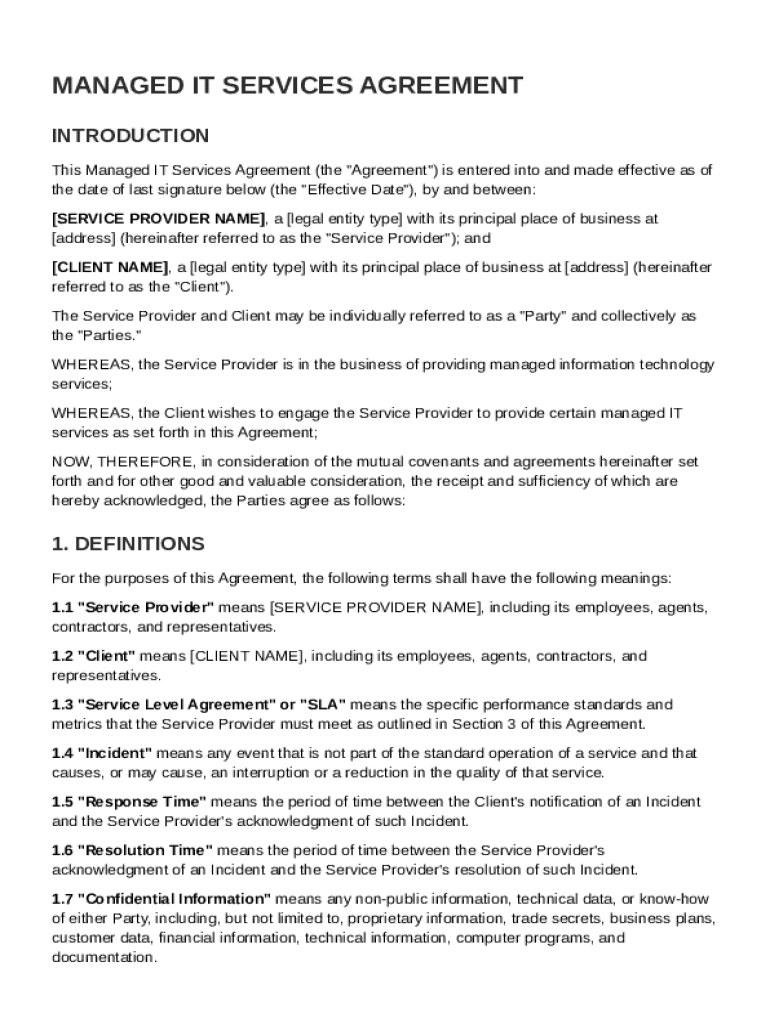
En: SERVICE PROVIDER NAME , a legal entity type with its principal place of business at address (hereinafter referred to as the "Service Provider"); and CLIENT NAME , a legal entity type with its principal place of business at address (hereinafter referred to as the "Client"). The Service Provider and Client may be individually referred to as a "Party" and collectively as the "Parties." WHEREAS, the Service Provider is in the business of providing managed information technology service.
Loading

Open form follow the instructions

Easily sign the form with your finger

Send filled & signed form or save
How to fill out and sign Managed IT Contract Template online?
Get your online template and fill it in using progressive features. Enjoy smart fillable fields and interactivity.Follow the simple instructions below:
Tax, legal, business as well as other documents demand higher of protection and compliance with the legislation. Our forms are updated on a regular basis in accordance with the latest amendments in legislation. Plus, with us, all the information you include in the Managed IT Contract Template is well-protected against leakage or damage through top-notch encryption.
The tips below can help you fill out Managed IT Contract Template easily and quickly:
- Open the document in the full-fledged online editing tool by clicking Get form.
- Complete the requested fields which are colored in yellow.
- Hit the green arrow with the inscription Next to jump from box to box.
- Use the e-autograph solution to e-sign the document.
- Insert the date.
- Look through the whole template to make sure you have not skipped anything.
- Press Done and download your new document.
Our solution allows you to take the entire process of completing legal papers online. For that reason, you save hours (if not days or even weeks) and get rid of unnecessary expenses. From now on, fill in Managed IT Contract Template from home, place of work, as well as on the go.
Tips on how to fill out, edit and sign Managed IT Contract Template online
How to fill and sign Managed IT Contract Template
Get your online template and fill it in using progressive features. Enjoy smart fillable fields and interactivity.Follow the simple instructions below:
Tax, legal, business as well as other documents demand higher of protection and compliance with the legislation. Our forms are updated on a regular basis in accordance with the latest amendments in legislation. Plus, with us, all the information you include in the Managed IT Contract Template is well-protected against leakage or damage through top-notch encryption.
The tips below can help you fill out Managed IT Contract Template easily and quickly:
- Open the document in the full-fledged online editing tool by clicking Get form.
- Complete the requested fields which are colored in yellow.
- Hit the green arrow with the inscription Next to jump from box to box.
- Use the e-autograph solution to e-sign the document.
- Insert the date.
- Look through the whole template to make sure you have not skipped anything.
- Press Done and download your new document.
Our solution allows you to take the entire process of completing legal papers online. For that reason, you save hours (if not days or even weeks) and get rid of unnecessary expenses. From now on, fill in Managed IT Contract Template from home, place of work, as well as on the go.
How to edit Managed IT Contract Template
Your easily editable and customizable Managed IT Contract Template template is within reach. Make the most of our library with a built-in online editor.
Do you postpone preparing Managed IT Contract Template because you simply don't know where to begin and how to move forward? We understand your feelings and have an excellent tool for you that has nothing nothing to do with overcoming your procrastination!
Our online catalog of ready-to-use templates allows you to search through and choose from thousands of fillable forms tailored for a number of use cases and scenarios. But obtaining the document is just scratching the surface. We provide you with all the necessary tools to fill out, certfy, and modify the form of your choosing without leaving our website.
All you need to do is to open the form in the editor. Check the verbiage of Managed IT Contract Template and verify whether it's what you’re searching for. Begin modifying the form by taking advantage of the annotation tools to give your document a more organized and neater look.
- Add checkmarks, circles, arrows and lines.
- Highlight, blackout, and fix the existing text.
- If the form is meant for other users too, you can add fillable fields and share them for other parties to fill out.
- Once you’re done modifying the template, you can get the document in any available format or select any sharing or delivery options.
Summing up, along with Managed IT Contract Template, you'll get:
- A robust set of editing} and annotation tools.
- A built-in legally-binding eSignature functionality.
- The ability to generate documents from scratch or based on the pre-uploaded template.
- Compatibility with various platforms and devices for greater convenience.
- Numerous options for safeguarding your documents.
- A wide range of delivery options for easier sharing and sending out documents.
- Compliance with eSignature frameworks regulating the use of eSignature in electronic transactions.
With our professional solution, your completed documents will almost always be officially binding and totally encrypted. We make certain to shield your most delicate information.
Get all it takes to produce a professional-hunting Managed IT Contract Template. Make a good choice and check out our program now!
How to fill and sign Managed IT Contract Template
Get your online template and fill it in using progressive features. Enjoy smart fillable fields and interactivity.Follow the simple instructions below:
Tax, legal, business as well as other documents demand higher of protection and compliance with the legislation. Our forms are updated on a regular basis in accordance with the latest amendments in legislation. Plus, with us, all the information you include in the Managed IT Contract Template is well-protected against leakage or damage through top-notch encryption.
The tips below can help you fill out Managed IT Contract Template easily and quickly:
- Open the document in the full-fledged online editing tool by clicking Get form.
- Complete the requested fields which are colored in yellow.
- Hit the green arrow with the inscription Next to jump from box to box.
- Use the e-autograph solution to e-sign the document.
- Insert the date.
- Look through the whole template to make sure you have not skipped anything.
- Press Done and download your new document.
Our solution allows you to take the entire process of completing legal papers online. For that reason, you save hours (if not days or even weeks) and get rid of unnecessary expenses. From now on, fill in Managed IT Contract Template from home, place of work, as well as on the go.
Experience a faster way to fill out and sign forms on the web. Access the most extensive library of templates available.
Related content
1. DEFINITIONS · 2. SERVICES, FEES, TERM AND GENERAL PAYMENT TERMS · 3. CONFIDENTIAL...
General Purpose. The general purpose of this Agreement is to engage the services of...
This Bring Your Own Device Agreement is entered into between the User and COMPANY...
Get answers to your most pressing questions about US Legal Forms API.
How do I write a simple contract template?
To write a simple contract template, start by outlining key sections such as the parties involved, terms of service, and payment details. Maintain clear and straightforward language throughout. When considering how to structure these components, a Managed IT Contract Template can serve as a practical guide.
What is the difference between a management contract and a franchise?
The primary difference between a management contract and a franchise is the nature of the relationship. A management contract focuses on specific management services, while a franchise provides a business model and brand for operation. Using a Managed IT Contract Template ensures clarity in your management arrangements, distinguishing them from franchise agreements.
What is an example of a management contract?
An example of a management contract might involve a technology firm hiring specialists to oversee IT operations. The contract will specify the tasks to be performed and the expected outcomes. Using a Managed IT Contract Template allows you to customize examples like this to fit your particular situation.
How to fill a contract agreement?
Filling a contract agreement involves providing the necessary information in the designated sections of the document. Ensure that you clearly enter the names of the parties, the scope of work, and other essential terms. Utilizing a Managed IT Contract Template simplifies this process, guiding you through the necessary components.
What do you mean by management contract?
A management contract is an agreement between two parties that outlines the management responsibilities of one party for another. It typically includes terms of engagement and performance measures. A Managed IT Contract Template can streamline the process of drafting such contracts, ensuring clarity and mutual understanding.
What are examples of management contracts?
Examples of management contracts include those between property owners and management companies, or agreements involving business consultants. Each contract specifies the services rendered and compensation arrangements. For a more tailored approach, consider using a Managed IT Contract Template.
What is a typical management contract?
A typical management contract outlines the relationship between an organization and a management team. It details the services provided, compensation, and duration of the contract. By utilizing a Managed IT Contract Template, you can create a well-structured agreement that meets your specific needs.
How to create a management contract?
To create a management contract, start by clearly defining the roles and responsibilities of both parties involved. It's important to outline the objectives, terms, and conditions that will govern the agreement. Using a Managed IT Contract Template can help ensure you cover all necessary details efficiently.
Use professional pre-built templates to fill in and sign documents online faster. Get access to thousands of forms.
If you believe that this page should be taken down, please follow our DMCA take down process here.