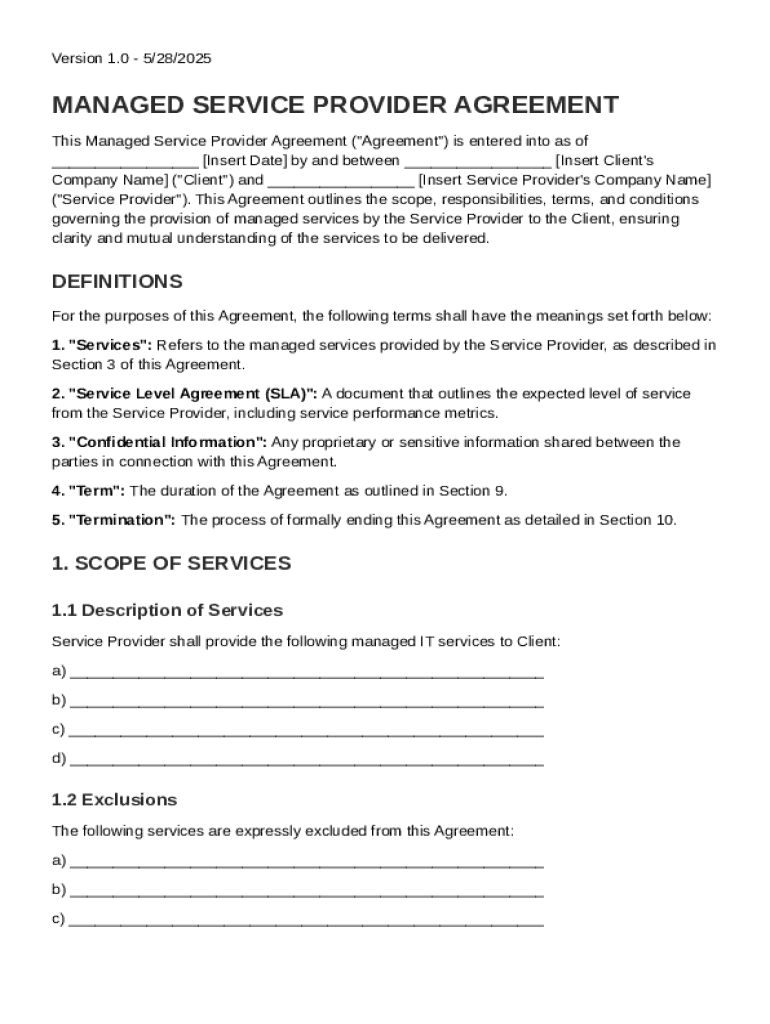
Insert Client's Company Name ("Client") and Insert Service Provider's Company Name ("Service Provider"). This Agreement outlines the scope, responsibilities, terms, and conditions governing the provision of managed services by the Service Provider to the Client, ensuring clarity and mutual understanding of the services to be delivered. DEFINITIONS For the purposes of this Agreement, the following terms shall have the meanings set forth below: 1. "Services": Refers to the.
Loading

Open form follow the instructions

Easily sign the form with your finger

Send filled & signed form or save
How to fill out and sign Managed Service Provider Contract Template online?
Get your online template and fill it in using progressive features. Enjoy smart fillable fields and interactivity.Follow the simple instructions below:
The preparing of lawful papers can be costly and time-consuming. However, with our preconfigured web templates, things get simpler. Now, creating a Managed Service Provider Contract Template takes a maximum of 5 minutes. Our state web-based samples and crystal-clear guidelines eradicate human-prone errors.
Follow our easy steps to get your Managed Service Provider Contract Template well prepared quickly:
- Select the web sample in the library.
- Type all required information in the necessary fillable areas. The intuitive drag&drop interface makes it easy to add or relocate areas.
- Make sure everything is filled out properly, without any typos or lacking blocks.
- Place your electronic signature to the PDF page.
- Click Done to save the changes.
- Download the record or print your copy.
- Send instantly towards the receiver.
Make use of the fast search and advanced cloud editor to create a precise Managed Service Provider Contract Template. Eliminate the routine and create papers online!
Tips on how to fill out, edit and sign Managed Service Provider Contract Template online
How to fill and sign Managed Service Provider Contract Template
Get your online template and fill it in using progressive features. Enjoy smart fillable fields and interactivity.Follow the simple instructions below:
The preparing of lawful papers can be costly and time-consuming. However, with our preconfigured web templates, things get simpler. Now, creating a Managed Service Provider Contract Template takes a maximum of 5 minutes. Our state web-based samples and crystal-clear guidelines eradicate human-prone errors.
Follow our easy steps to get your Managed Service Provider Contract Template well prepared quickly:
- Select the web sample in the library.
- Type all required information in the necessary fillable areas. The intuitive drag&drop interface makes it easy to add or relocate areas.
- Make sure everything is filled out properly, without any typos or lacking blocks.
- Place your electronic signature to the PDF page.
- Click Done to save the changes.
- Download the record or print your copy.
- Send instantly towards the receiver.
Make use of the fast search and advanced cloud editor to create a precise Managed Service Provider Contract Template. Eliminate the routine and create papers online!
How to edit Managed Service Provider Contract Template
Finishing papers is easy with smart online instruments. Eliminate paperwork with easily downloadable Managed Service Provider Contract Template templates you can edit online and print out.
Preparing documents and forms must be more reachable, whether it is an everyday part of one’s job or occasional work. When a person must file a Managed Service Provider Contract Template, studying regulations and guides on how to complete a form properly and what it should include might take a lot of time and effort. However, if you find the right Managed Service Provider Contract Template template, completing a document will stop being a struggle with a smart editor at hand.
Discover a wider selection of features you can add to your document flow routine. No need to print out, fill in, and annotate forms manually. With a smart modifying platform, all of the essential document processing features are always at hand. If you want to make your work process with Managed Service Provider Contract Template forms more efficient, find the template in the catalog, click on it, and see a simpler method to fill it in.
- If you want to add text in a random part of the form or insert a text field, use the Text and Text field instruments and expand the text in the form as much as you want.
- Take advantage of the Highlight instrument to stress the main aspects of the form. If you want to conceal or remove some text parts, utilize the Blackout or Erase instruments.
- Customize the form by adding default graphic elements to it. Use the Circle, Check, and Cross instruments to add these components to the forms, if possible.
- If you need additional annotations, utilize the Sticky note resource and put as many notes on the forms page as required.
- If the form needs your initials or date, the editor has instruments for that too. Reduce the chance of errors by using the Initials and Date instruments.
- It is also possible to add custom visual elements to the form. Use the Arrow, Line, and Draw instruments to customize the document.
The more instruments you are familiar with, the simpler it is to work with Managed Service Provider Contract Template. Try the solution that provides everything essential to find and edit forms in one tab of your browser and forget about manual paperwork.
How to fill and sign Managed Service Provider Contract Template
Get your online template and fill it in using progressive features. Enjoy smart fillable fields and interactivity.Follow the simple instructions below:
The preparing of lawful papers can be costly and time-consuming. However, with our preconfigured web templates, things get simpler. Now, creating a Managed Service Provider Contract Template takes a maximum of 5 minutes. Our state web-based samples and crystal-clear guidelines eradicate human-prone errors.
Follow our easy steps to get your Managed Service Provider Contract Template well prepared quickly:
- Select the web sample in the library.
- Type all required information in the necessary fillable areas. The intuitive drag&drop interface makes it easy to add or relocate areas.
- Make sure everything is filled out properly, without any typos or lacking blocks.
- Place your electronic signature to the PDF page.
- Click Done to save the changes.
- Download the record or print your copy.
- Send instantly towards the receiver.
Make use of the fast search and advanced cloud editor to create a precise Managed Service Provider Contract Template. Eliminate the routine and create papers online!
Experience a faster way to fill out and sign forms on the web. Access the most extensive library of templates available.
Related content
Apr 16, 2024 — This Managed Service Provider Agreement (“Agreement”) is made and...
Aug 31, 2020 — This Master NaaS-Managed Network Services Agreement (this...
Mar 24, 2022 — Discover the essential components of a robust consulting agreement. Learn...
Get answers to your most pressing questions about US Legal Forms API.
What is a managed service contract?
A managed service contract is an agreement between a business and a managed service provider that details the services being offered. This contract often includes service levels, performance metrics, and payment schedules. Implementing a Managed Service Provider Contract Template can make drafting this agreement straightforward and effective.
How to fill out a service contract?
To fill out a service contract, begin by entering the names of the involved parties and the specific services being provided. Next, include payment details, deadlines, and any relevant terms or conditions. Utilizing a Managed Service Provider Contract Template can ensure you don’t miss any crucial information.
What is an MSP agreement?
An MSP agreement is a formal contract between a managed service provider and a client. It outlines the types of services provided, payment structures, and the responsibilities of both parties. Having a well-defined Managed Service Provider Contract Template can facilitate smoother interactions and set clear expectations.
What is the full form of MSP protocol?
The full form of MSP protocol is Managed Service Provider protocol. This framework outlines the standards and practices for how managed services are provided and maintained. Incorporating this understanding can enhance clarity when using a Managed Service Provider Contract Template.
What are the different types of MSP contracts?
Different types of MSP contracts include service level agreements, project-based contracts, and recurring service agreements. Each type serves a unique purpose and fits various business needs. When drafting your contract, consider using a Managed Service Provider Contract Template to ensure you capture the necessary details.
How to write a simple contract for services template?
To write a simple contract for services template, start by identifying the parties involved and the services to be provided. Clearly outline the payment terms, deadlines, and obligations of both parties. Using a Managed Service Provider Contract Template can streamline this process, making it easier to cover all essential components.
What does MSP mean?
MSP stands for Managed Service Provider. This term refers to a company that delivers various IT services and solutions to businesses on a subscription basis. Utilizing a Managed Service Provider Contract Template can help formalize the relationship between your business and the MSP.
What is the full form of MSP agreement?
The full form of MSP agreement is Managed Service Provider agreement. This document outlines the terms and conditions between a service provider and a client, detailing the responsibilities of both parties. A well-structured Managed Service Provider Contract Template can help ensure clarity and mutual understanding.
Use professional pre-built templates to fill in and sign documents online faster. Get access to thousands of forms.
If you believe that this page should be taken down, please follow our DMCA take down process here.