Loading
Form preview
  • US Legal Forms
  • Form Library
  • Foreign Forms
  • Foreign Australia Other Forms
  • Au F3517 Es 2012

Get Au F3517 Es 2012

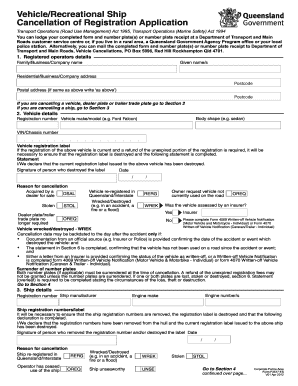
and number plate(s) or number plate receipt at a Department of Transport and Main Roads customer service centre or, if you live in a rural area, a Queensland Government Agency Program office or your local police station. Alternatively, you can mail the completed form and number plate(s) or number plate receipt to Department of Transport and Main Roads, Vehicle Cancellations, PO Box 5096, Red Hill Rockhampton Qld 4701. 1. Registered operators details Family/Business/Company name Given name/s .

How it works

  1. Open form

    Open form follow the instructions

  2. Easily sign form

    Easily sign the form with your finger

  3. Share form

    Send filled & signed form or save

How to fill out the AU F3517 ES online

The AU F3517 ES is a vital document for cancelling the registration of vehicles and recreational ships in Queensland. This guide will provide clear and concise steps to help users complete the form accurately online.

Follow the steps to successfully complete the AU F3517 ES form.

  1. Click ‘Get Form’ button to obtain the AU F3517 ES form and open it in your preferred online editor.
  2. Provide the registered operator's details, including family, business or company name, given name(s), residential or business address, postcode, and postal address (if different from the residential address).
  3. If cancelling a vehicle, proceed to fill in the vehicle details section, including body shape, registration number, vehicle make/model, and VIN/chassis number. Ensure that the registration label is destroyed and complete the statement regarding its destruction.
  4. Indicate the reason for cancellation, selecting from options such as stolen, wrecked, or owner request.
  5. If applicable, surrender both number plates. If any plates are lost, stolen, or destroyed, complete the appropriate statement regarding the circumstances.
  6. If cancelling a ship, fill out the ship details section, including registration number, manufacturer, engine numbers, and make. Ensure the registration numbers are removed and destroyed.
  7. For stolen vehicles or ships, complete the necessary sections, including police officer completion and stamping.
  8. Complete the mandatory statement confirming the registration was validly paid and that all provided information is accurate.
  9. If applicable, fill out the section for personalised plates and process any necessary applications connected to these plates.
  10. Review your entries for accuracy before saving changes, downloading, printing, or sharing the completed form.

Complete your forms online today to ensure timely processing!

Get form

Experience a faster way to fill out and sign forms on the web. Access the most extensive library of templates available.

Related content

24-nor-ursodeoxycholic acid ameliorates...
by M Sombetzki · 2015 · Cited by 73 — The study was supported by grants P-19118 and...
Learn more
0123145167893 516
... AU#'CG :7$0 3+,3$+...
Learn more
i"reed transformer co., inc.
These high qual.ity miniature, transform- ers are high efficien- cy audio components...
Learn more

Related links form

Virginia Form Va 6h Ump Apply Online City Of San Antonio Tx Lpg Permit Form Employment Training Panel Fast Track Form

Questions & Answers

Get answers to your most pressing questions about US Legal Forms API.

Contact support

To deregister a car in Victoria, you should complete a deregistration form and submit it to the appropriate authority. Additionally, ensure all fees are settled and any outstanding matters are addressed. For a seamless experience, consider utilizing the templates available through US Legal Forms to assist with the AU F3517 ES deregistration process.

Yes, you can often find a VIN number online through various vehicle history report services. These reports may require specific details about the vehicle to retrieve the VIN. For clarity and an easier search, US Legal Forms has tools that provide detailed guidance related to the AU F3517 ES.

To transfer car ownership online in Queensland, visit the official government transport website and follow the process outlined there. You will need relevant details, including the vehicle's VIN number. US Legal Forms can also assist by providing templates and information that streamline the ownership transfer concerning the AU F3517 ES.

In Queensland, you have a grace period of one month to renew your registration after it expires. However, it's essential to manage this promptly to avoid any fines or issues. For information on renewing vehicle registration, you can explore options through US Legal Forms for resources on AU F3517 ES registrations.

To find the VIN number in Queensland, look at the identification plate on the vehicle. This plate is usually located on the driver's side door frame or on the chassis. For a comprehensive understanding and a smoother experience, visit US Legal Forms, where you can find additional resources related to the AU F3517 ES.

In Queensland, you can obtain your trailer's VIN number by checking the compliance plate attached to the trailer. This plate typically includes the VIN alongside other important specifications. If you're uncertain about the process, using services offered by US Legal Forms can guide you efficiently through the registration paperwork related to the AU F3517 ES trailer.

To find your vehicle's VIN number, check the driver's side dashboard, near the windshield. You can also find it on the driver’s side door jamb. For more assistance, consider using platforms like US Legal Forms that offer resources to help you locate essential vehicle details such as the AU F3517 ES.

Filling out a U.S. declaration form involves clearly stating your identity, the purpose of your declaration, and any relevant details related to your situation. Ensure that all sections are correctly filled out and are legible. Providing accurate information is crucial for compliance with U.S. laws and regulations. If you need examples or templates, check out the AU F3517 ES resources on uslegalforms to assist you.

To obtain an EPA exemption certificate, you will generally need to apply through the EPA or your local regulatory agency. Gather all necessary documentation that demonstrates your vehicle meets the criteria for exemption. This process may involve completing certain forms, including those related to AU F3517 ES regulations. The uslegalforms platform can provide templates or guidance for the paperwork involved.

To fill out an EPA declaration form, start by providing accurate vehicle details, including make, model, and year. Follow the instructions section by section to ensure all information is clearly presented. This form acts as a legal document, confirming your vehicle’s compliance with environmental standards, so it is vital to double-check everything. You can visit uslegalforms for templates that can guide you through the process, particularly with forms related to AU F3517 ES.

Get This Form Now!

Use professional pre-built templates to fill in and sign documents online faster. Get access to thousands of forms.
If you believe that this page should be taken down, please follow our DMCA take down processhere.

Industry-leading security and compliance

US Legal Forms protects your data by complying with industry-specific security standards.
  • In businnes since 1997
    25+ years providing professional legal documents.
  • Accredited business
    Guarantees that a business meets BBB accreditation standards in the US and Canada.
  • Secured by Braintree
    Validated Level 1 PCI DSS compliant payment gateway that accepts most major credit and debit card brands from across the globe.
Get AU F3517 ES
  • Adoption
  • Bankruptcy
  • Contractors
  • Divorce
  • Home Sales
  • Employment
  • Identity Theft
  • Incorporation
  • Landlord Tenant
  • Living Trust
  • Name Change
  • Personal Planning
  • Small Business
  • Wills & Estates
  • Packages A-Z
  • Affidavits
  • Bankruptcy
  • Bill of Sale
  • Corporate - LLC
  • Divorce
  • Employment
  • Identity Theft
  • Internet Technology
  • Landlord Tenant
  • Living Wills
  • Name Change
  • Power of Attorney
  • Real Estate
  • Small Estates
  • Wills
  • All Forms
  • Forms A-Z
  • Form Library
  • Legal Hub
  • About Us
  • Help Portal
  • Legal Resources
  • Blog
  • Affiliates
  • Contact Us
  • Delete My Account
  • Site Map
  • Industries
  • Forms in Spanish
  • Localized Forms
  • State-specific Forms
  • Forms Kit
  • Real Estate Handbook
  • All Guides
  • Notarize
  • Incorporation services
  • For Consumers
  • For Small Business
  • For Attorneys
  • USLegal
  • FormsPass
  • pdfFiller
  • signNow
  • altaFlow
  • DocHub
  • Instapage
Form Packages
  • Adoption
  • Bankruptcy
  • Contractors
  • Divorce
  • Home Sales
  • Employment
  • Identity Theft
  • Incorporation
  • Landlord Tenant
  • Living Trust
  • Name Change
  • Personal Planning
  • Small Business
  • Wills & Estates
  • Packages A-Z
Form Categories
  • Affidavits
  • Bankruptcy
  • Bill of Sale
  • Corporate - LLC
  • Divorce
  • Employment
  • Identity Theft
  • Internet Technology
  • Landlord Tenant
  • Living Wills
  • Name Change
  • Power of Attorney
  • Real Estate
  • Small Estates
  • Wills
  • All Forms
  • Forms A-Z
  • Form Library
Customer Service
  • Legal Hub
  • About Us
  • Help Portal
  • Legal Resources
  • Blog
  • Affiliates
  • Contact Us
  • Delete My Account
  • Site Map
  • Industries
  • Forms in Spanish
  • Localized Forms
  • State-specific Forms
  • Forms Kit
Legal Guides
  • Real Estate Handbook
  • All Guides
Prepared for you
  • Notarize
  • Incorporation services
Our Customers
  • For Consumers
  • For Small Business
  • For Attorneys
Our Sites
  • USLegal
  • FormsPass
  • pdfFiller
  • signNow
  • altaFlow
  • DocHub
  • Instapage
Social Media
Call us now toll free:
+1 833 426 79 33
As seen in:
© Copyright 1999-2026 airSlate Legal Forms, Inc. 3720 Flowood Dr, Flowood, Mississippi 39232
  • Your Privacy Choices
  • Terms of Service
  • Privacy Notice
  • Content Takedown Policy
  • Bug Bounty Program
AU F3517 ES
This form is available in several versions.
Select the version you need from the drop-down list below.
2020 AU F3517 ES
Select form
  • 2020 AU F3517 ES
  • 2018 AU F3517 ES
  • 2015 AU F3517 ES
  • 2012 AU F3517 ES
Select form