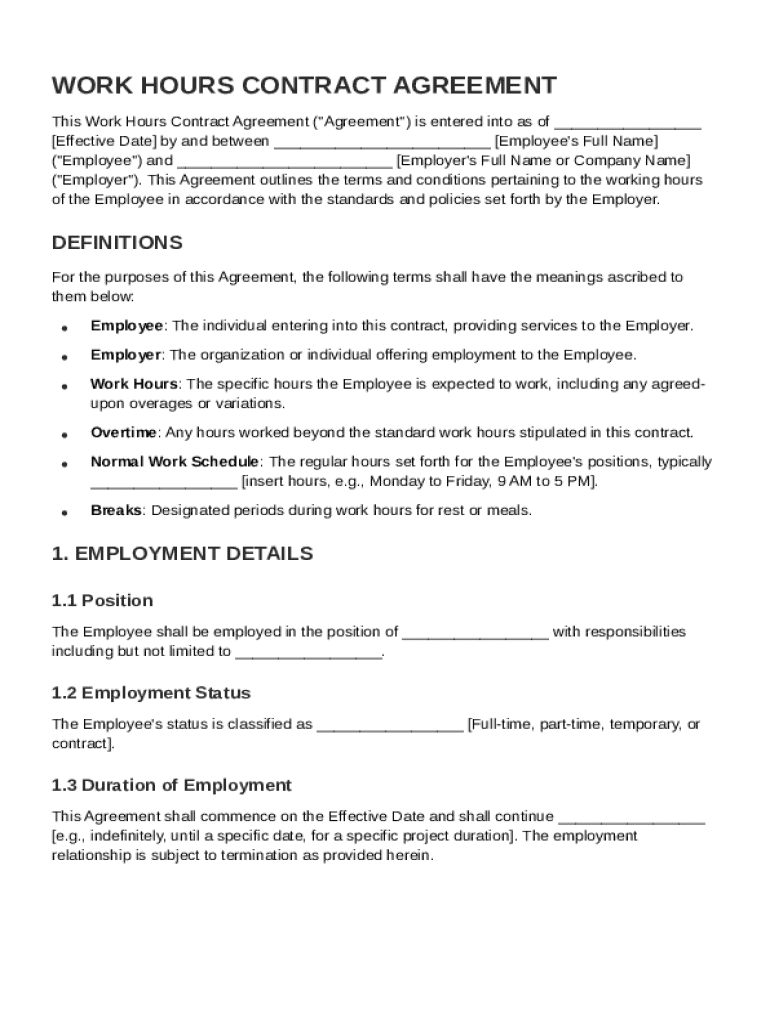
Ive Date by and between Employee's Full Name ("Employee") and Employer's Full Name or Company Name ("Employer"). This Agreement outlines the terms and conditions pertaining to the working hours of the Employee in accordance with the standards and policies set forth by the Employer. DEFINITIONS For the purposes of this Agreement, the following terms shall have the meanings ascribed to them below: Employee: The individual entering into this.
Loading

Open form follow the instructions

Easily sign the form with your finger

Send filled & signed form or save
How to fill out and sign Work Hours Contract Template online?
Get your online template and fill it in using progressive features. Enjoy smart fillable fields and interactivity.Follow the simple instructions below:
Choosing a legal professional, creating an appointment and coming to the workplace for a private meeting makes doing a Work Hours Contract Template from beginning to end exhausting. US Legal Forms lets you quickly make legally-compliant documents according to pre-created browser-based blanks.
Perform your docs within a few minutes using our easy step-by-step guide:
- Find the Work Hours Contract Template you want.
- Open it up using the online editor and begin adjusting.
- Fill out the blank areas; engaged parties names, addresses and phone numbers etc.
- Customize the blanks with unique fillable areas.
- Put the date and place your electronic signature.
- Simply click Done after twice-checking all the data.
- Save the ready-created document to your system or print it out as a hard copy.
Quickly produce a Work Hours Contract Template without needing to involve professionals. We already have more than 3 million people taking advantage of our unique library of legal documents. Join us today and get access to the #1 library of browser-based templates. Try it out yourself!
Tips on how to fill out, edit and sign Work Hours Contract Template online
How to fill and sign Work Hours Contract Template
Get your online template and fill it in using progressive features. Enjoy smart fillable fields and interactivity.Follow the simple instructions below:
Choosing a legal professional, creating an appointment and coming to the workplace for a private meeting makes doing a Work Hours Contract Template from beginning to end exhausting. US Legal Forms lets you quickly make legally-compliant documents according to pre-created browser-based blanks.
Perform your docs within a few minutes using our easy step-by-step guide:
- Find the Work Hours Contract Template you want.
- Open it up using the online editor and begin adjusting.
- Fill out the blank areas; engaged parties names, addresses and phone numbers etc.
- Customize the blanks with unique fillable areas.
- Put the date and place your electronic signature.
- Simply click Done after twice-checking all the data.
- Save the ready-created document to your system or print it out as a hard copy.
Quickly produce a Work Hours Contract Template without needing to involve professionals. We already have more than 3 million people taking advantage of our unique library of legal documents. Join us today and get access to the #1 library of browser-based templates. Try it out yourself!
How to edit Work Hours Contract Template
Doing papers is easy with smart online tools. Eliminate paperwork with easily downloadable Work Hours Contract Template templates you can modify online and print.
Preparing documents and forms must be more reachable, whether it is an everyday element of one’s occupation or occasional work. When a person must file a Work Hours Contract Template, studying regulations and guides on how to complete a form correctly and what it should include may take a lot of time and effort. Nevertheless, if you find the right Work Hours Contract Template template, completing a document will stop being a challenge with a smart editor at hand.
Discover a broader variety of functions you can add to your document flow routine. No need to print, complete, and annotate forms manually. With a smart modifying platform, all of the essential document processing functions will always be at hand. If you want to make your work process with Work Hours Contract Template forms more efficient, find the template in the catalog, click on it, and discover a less complicated way to fill it in.
- If you need to add text in a random area of the form or insert a text field, use the Text and Text field instruments and expand the text in the form as much as you need.
- Utilize the Highlight tool to stress the important parts of the form. If you need to conceal or remove some text pieces, use the Blackout or Erase tools.
- Customize the form by adding default graphic elements to it. Use the Circle, Check, and Cross tools to add these components to the forms, if needed.
- If you need additional annotations, utilize the Sticky note tool and put as many notes on the forms page as required.
- If the form requires your initials or date, the editor has tools for that too. Minimize the chance of errors using the Initials and Date instruments.
- It is also easy to add custom visual elements to the form. Use the Arrow, Line, and Draw tools to customize the document.
The more tools you are familiar with, the easier it is to work with Work Hours Contract Template. Try the solution that offers everything essential to find and modify forms in a single tab of your browser and forget about manual paperwork.
How to fill and sign Work Hours Contract Template
Get your online template and fill it in using progressive features. Enjoy smart fillable fields and interactivity.Follow the simple instructions below:
Choosing a legal professional, creating an appointment and coming to the workplace for a private meeting makes doing a Work Hours Contract Template from beginning to end exhausting. US Legal Forms lets you quickly make legally-compliant documents according to pre-created browser-based blanks.
Perform your docs within a few minutes using our easy step-by-step guide:
- Find the Work Hours Contract Template you want.
- Open it up using the online editor and begin adjusting.
- Fill out the blank areas; engaged parties names, addresses and phone numbers etc.
- Customize the blanks with unique fillable areas.
- Put the date and place your electronic signature.
- Simply click Done after twice-checking all the data.
- Save the ready-created document to your system or print it out as a hard copy.
Quickly produce a Work Hours Contract Template without needing to involve professionals. We already have more than 3 million people taking advantage of our unique library of legal documents. Join us today and get access to the #1 library of browser-based templates. Try it out yourself!
Experience a faster way to fill out and sign forms on the web. Access the most extensive library of templates available.
Related content
Regardless of the schedule worked, the EMPLOYER agrees to pay the EMPLOYEE for all hours...
This document is intended to ensure that both the supervisor and employee have a clear...
The Contractor will clock-in all hours in Quickbooks Time or through any other approved...
Get answers to your most pressing questions about US Legal Forms API.
How to write a contract for hourly work?
To write a contract for hourly work, begin by specifying the tasks required and the expected hours. Detail the hourly wage and the payment schedule. Ensure you include clauses addressing work conditions and termination procedures. A Work Hours Contract Template can guide you in creating a comprehensive document.
What is an employment contract template?
An employment contract template is a pre-formatted document that outlines the terms of employment between an employer and an employee. It typically includes job responsibilities, compensation, and working hours. This template can ease the process of establishing a clear agreement. A Work Hours Contract Template is a specific type of employment contract focused on hourly work arrangements.
How to write an hourly contract?
When writing an hourly contract, clearly define the scope of work and the expected number of hours. Specify the hourly rate, along with payment terms and conditions. It’s essential to include a termination clause to protect both parties. Using a Work Hours Contract Template can save you significant time and ensure no key details are overlooked.
How do hourly contracts work?
Hourly contracts outline the terms of payment based on the actual hours worked. They specify the hourly rate, payment frequency, and project duration. These contracts protect both the worker and the employer by clearly setting expectations. This framework is often found in a Work Hours Contract Template.
How do I write a simple contract template?
Begin a simple contract template by identifying the essential elements like the title, parties involved, and date. Include sections for the scope of work, compensation, and duration. It is also crucial to add a space for signatures to make it legally binding. Utilizing a Work Hours Contract Template can streamline this process.
How to write a simple work contract?
To write a simple work contract, start by defining the roles and responsibilities of both parties. Next, outline the payment terms and deadlines. Make sure to include clauses such as termination conditions and confidentiality. For a straightforward approach, consider using a Work Hours Contract Template that simplifies the process.
What is the working hours clause?
The working hours clause outlines the expected hours an employee or contractor should dedicate to their duties. This clause can include specifics about breaks, overtime, and flexibility. Including this in your Work Hours Contract Template will help set clear expectations and improve workplace communication.
How to write a work contract agreement?
When writing a work contract agreement, you should outline the work's scope, payment terms, and duration. Ensure that both parties understand their obligations and rights. A well-crafted Work Hours Contract Template can assist you in drafting an agreement that is legally sound and easy to understand.
How do I write a simple contract?
Writing a simple contract involves clearly outlining the agreement's key terms, including the parties involved, services rendered, payment details, and the duration of the agreement. Avoid overly complicated language to ensure understanding. Consider using a Work Hours Contract Template for guidance on structuring a straightforward agreement.
How does an hourly contract work?
An hourly contract typically stipulates that an employee or contractor will be compensated based on hours worked. This type of contract often includes the agreed rate and may specify overtime or additional charges. By utilizing a Work Hours Contract Template, you can create a clear agreement that protects both parties' interests.
Use professional pre-built templates to fill in and sign documents online faster. Get access to thousands of forms.
If you believe that this page should be taken down, please follow our DMCA take down process here.