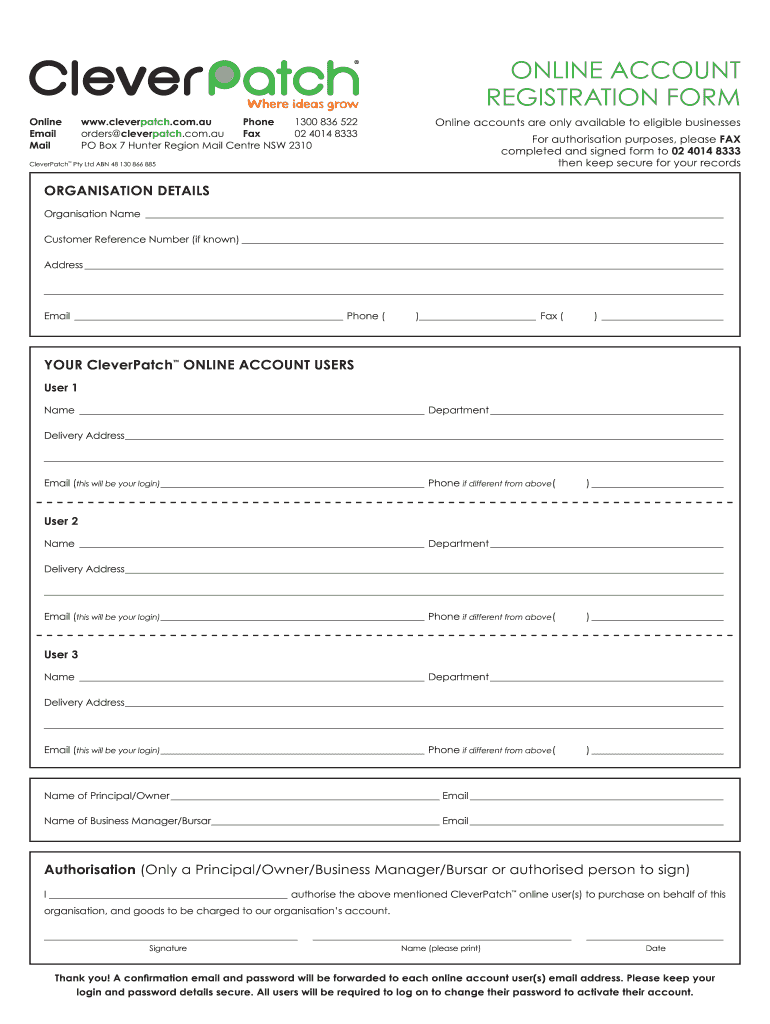
ONLINE ACCOUNT REGISTRATION FORM Online www.cleverpatch.com.au Phone 1300 836 522 Email orders cleverpatch.com.au Fax 02 4014 8333 Mail PO Box 7 Hunter Region Mail Centre NSW 2310 Online accounts.
Loading

Open form follow the instructions

Easily sign the form with your finger

Send filled & signed form or save
How to fill out the AU CleverPatch online account registration form online
Registering for an AU CleverPatch online account is important for eligible businesses wishing to access their services. This guide provides a clear and structured approach to filling out the registration form online, ensuring that you have all the information needed to complete it successfully.
Follow the steps to fill out the AU CleverPatch online account registration form.
- Click ‘Get Form’ button to obtain the form and open it in your document editor.
- In the 'Organisation Details' section, enter the organisation name, customer reference number (if available), and complete the address fields, ensuring accuracy for delivery and communication.
- Provide the contact details, including an official email address, phone number, and fax number in the appropriate fields.
- Move to the 'Your CleverPatch Online Account Users' section. Fill in the details for each user, including name, department, delivery address, email (which will serve as their login), and phone numbers. Repeat for each additional user as necessary.
- In the section for the principal or owner, include their name and email address. Additionally, fill in the name and email of the business manager or bursar.
- Authorization is required from a principal, owner, business manager, or an authorized person. The authorized individual should sign, print their name, and include the date to validate the registration.
- Once all fields are completed, save your changes to your document. You may also choose to download, print, or share the form as required.
Complete your AU CleverPatch online account registration form today to gain access to essential services.
Experience a faster way to fill out and sign forms on the web. Access the most extensive library of templates available.
Related content
by PF Cowhey · Cited by 31 — Cowhey, Peter F., 1948–. Transforming global information...
Mar 2, 2016 — Welcome to the retum of Ensoniq Technical Support Q St A. I have been so...
Get answers to your most pressing questions about US Legal Forms API.
How do I contact CleverPatch?
You can reach out to CleverPatch directly through their official website. They provide a dedicated contact page that includes phone numbers and email addresses for customer support. Additionally, you can use the online chat feature for immediate assistance. Whether you need help with the AU CleverPatch Online Account Registration Form or have other inquiries, their friendly staff is ready to assist you.
How to fill out the ACH enrollment form?
To fill out the ACH enrollment form effectively, begin by gathering necessary information such as your bank account details and routing numbers. Next, ensure that you precisely fill in each section of the AU CleverPatch Online Account Registration Form. Double-check all entries for accuracy before submitting the form to avoid any processing delays. If you need assistance, refer to the guidelines provided on the CleverPatch website.
Use professional pre-built templates to fill in and sign documents online faster. Get access to thousands of forms.
If you believe that this page should be taken down, please follow our DMCA take down process here.