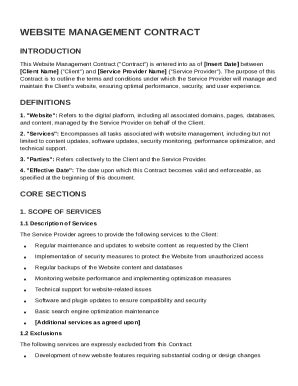
Ame ("Service Provider"). The purpose of this Contract is to outline the terms and conditions under which the Service Provider will manage and maintain the Client's website, ensuring optimal performance, security, and user experience. DEFINITIONS 1. "Website": Refers to the digital platform, including all associated domains, pages, databases, and content, managed by the Service Provider on behalf of the Client. 2. "Services": Encompasses all tasks associated with website management, including.
Open form follow the instructions
Easily sign the form with your finger
Send filled & signed form or save
How to fill out and sign Website Management Contract Template online?
Get your online template and fill it in using progressive features. Enjoy smart fillable fields and interactivity.Follow the simple instructions below:
Experience all the key benefits of completing and submitting documents online. Using our service filling in Website Management Contract Template usually takes a few minutes. We make that possible by giving you access to our feature-rich editor effective at altering/fixing a document?s original text, inserting special boxes, and putting your signature on.
Complete Website Management Contract Template within several clicks by using the recommendations listed below:
- Choose the template you will need from our collection of legal form samples.
- Choose the Get form key to open it and begin editing.
- Submit all of the required fields (these are marked in yellow).
- The Signature Wizard will help you add your e-autograph after you have finished imputing info.
- Put the date.
- Check the entire document to make sure you?ve completed all the data and no corrections are required.
- Press Done and save the filled out form to your computer.
Send your new Website Management Contract Template in an electronic form when you are done with filling it out. Your data is well-protected, as we adhere to the most up-to-date security requirements. Join millions of satisfied customers that are already submitting legal documents right from their homes.
Tips on how to fill out, edit and sign Website Management Contract Template online
How to fill and sign Website Management Contract Template
Get your online template and fill it in using progressive features. Enjoy smart fillable fields and interactivity.Follow the simple instructions below:
Experience all the key benefits of completing and submitting documents online. Using our service filling in Website Management Contract Template usually takes a few minutes. We make that possible by giving you access to our feature-rich editor effective at altering/fixing a document?s original text, inserting special boxes, and putting your signature on.
Complete Website Management Contract Template within several clicks by using the recommendations listed below:
- Choose the template you will need from our collection of legal form samples.
- Choose the Get form key to open it and begin editing.
- Submit all of the required fields (these are marked in yellow).
- The Signature Wizard will help you add your e-autograph after you have finished imputing info.
- Put the date.
- Check the entire document to make sure you?ve completed all the data and no corrections are required.
- Press Done and save the filled out form to your computer.
Send your new Website Management Contract Template in an electronic form when you are done with filling it out. Your data is well-protected, as we adhere to the most up-to-date security requirements. Join millions of satisfied customers that are already submitting legal documents right from their homes.
How to edit Website Management Contract Template
Make the most of our comprehensive online document editor while preparing your paperwork. Complete the Website Management Contract Template, indicate the most important details, and easily make any other essential alterations to its content.
Preparing documentation electronically is not only time-saving but also gives an opportunity to alter the template in accordance with your needs. If you’re about to work on Website Management Contract Template, consider completing it with our robust online editing tools. Whether you make a typo or enter the requested details into the wrong field, you can easily make changes to the document without the need to restart it from the beginning as during manual fill-out. In addition to that, you can point out the critical data in your paperwork by highlighting particular pieces of content with colors, underlining them, or circling them.
Follow these quick and simple steps to fill out and adjust your Website Management Contract Template online:
- Open the form in the editor.
- Type in the required information in the blank fields using Text, Check, and Cross tools.
- Follow the form navigation not to miss any essential fields in the template.
- Circle some of the important details and add a URL to it if needed.
- Use the Highlight or Line tools to emphasize the most important pieces of content.
- Choose colors and thickness for these lines to make your form look professional.
- Erase or blackout the data you don’t want to be visible to other people.
- Substitute pieces of content that contain errors and type in text that you need.
- Finish modifcations with the Done key as soon as you make certain everything is correct in the form.
Our powerful online solutions are the best way to fill out and modify Website Management Contract Template based on your demands. Use it to prepare personal or business documentation from anyplace. Open it in a browser, make any adjustments to your forms, and return to them anytime in the future - they all will be securely kept in the cloud.
How to fill and sign Website Management Contract Template
Get your online template and fill it in using progressive features. Enjoy smart fillable fields and interactivity.Follow the simple instructions below:
Experience all the key benefits of completing and submitting documents online. Using our service filling in Website Management Contract Template usually takes a few minutes. We make that possible by giving you access to our feature-rich editor effective at altering/fixing a document?s original text, inserting special boxes, and putting your signature on.
Complete Website Management Contract Template within several clicks by using the recommendations listed below:
- Choose the template you will need from our collection of legal form samples.
- Choose the Get form key to open it and begin editing.
- Submit all of the required fields (these are marked in yellow).
- The Signature Wizard will help you add your e-autograph after you have finished imputing info.
- Put the date.
- Check the entire document to make sure you?ve completed all the data and no corrections are required.
- Press Done and save the filled out form to your computer.
Send your new Website Management Contract Template in an electronic form when you are done with filling it out. Your data is well-protected, as we adhere to the most up-to-date security requirements. Join millions of satisfied customers that are already submitting legal documents right from their homes.
Experience a faster way to fill out and sign forms on the web. Access the most extensive library of templates available.
Related content
This Agreement constitutes the entire agreement between the parties. No modification or...
SAMPLE WEB SITE DEVELOPMENT AGREEMENT. THIS AGREEMENT is made and entered into as of this...
Mar 24, 2022 — A solid consulting agreement should include the nature of services, fee...
Get answers to your most pressing questions about US Legal Forms API.
What is an example of a management contract?
An example of a management contract typically includes sections detailing the services provided, payment structure, and confidentiality clauses. This kind of contract formalizes the relationship between a service provider and a client. You can utilize a Website Management Contract Template to see a practical example that covers all the necessary components.
How to write an online contract?
When writing an online contract, make sure to clearly define each party's obligations and rights in well-understood language. Consider provisions for digital signatures and dispute resolution methods, as these are crucial for online agreements. A Website Management Contract Template can assist you in including these elements easily.
How do I write a simple contract agreement?
To write a simple contract agreement, focus on the essential details such as the parties involved, the agreement’s purpose, and specific terms. It should also address how disputes will be handled, ensuring clarity for both parties. A Website Management Contract Template can simplify crafting this agreement by providing a ready-to-use format.
How to create a management contract?
Creating a management contract involves defining the scope of management services, payment structure, and duration of the agreement. Both parties should agree on performance metrics and termination conditions. Utilizing a Website Management Contract Template can provide you with a useful framework to ensure you include all necessary legal clauses.
How do I write terms and conditions for my website?
When writing terms and conditions for your website, start by outlining user rights and responsibilities. Include sections on privacy policies, payment terms, and liability limits. A Website Management Contract Template can guide you in structuring these terms clearly and comprehensively.
How to write a web design contract?
To create a web design contract, include key elements such as project description, timelines, and payment details. It's essential to specify ownership of the designs and any intellectual property rights. Using a Website Management Contract Template can help streamline this process and provide you with a solid foundation.
How to write a contract for a website?
To write a contract for a website, start by outlining the scope of work involved, including specific deliverables and timelines. Clearly define payment terms, as well as responsibilities for both parties. Incorporating a Website Management Contract Template can simplify the process, ensuring you cover all necessary legal aspects effectively.
How to structure a maintenance contract?
To structure a maintenance contract, begin with a clear definition of the maintenance services offered, including frequency and types of updates. Specify payment terms and any warranty or support clauses. A well-designed website management contract template can serve as an excellent base, ensuring that your maintenance contract is comprehensive and effective.
How to write a management contract?
Writing a management contract involves clearly defining the services to be provided, the responsibilities of each party, and the payment terms. Begin with an introduction, and ensure each clause is precise and understandable. A website management contract template can provide a solid framework, making it easier to draft a comprehensive agreement.
What is the difference between CMS and CLM?
CMS, or Content Management System, is a platform for creating and managing digital content, primarily for websites. In contrast, CLM, or Contract Lifecycle Management, focuses on managing contracts from inception to execution. Understanding these differences helps businesses effectively utilize a website management contract template as part of their online strategy.
Use professional pre-built templates to fill in and sign documents online faster. Get access to thousands of forms.
If you believe that this page should be taken down, please follow our DMCA take down process here.