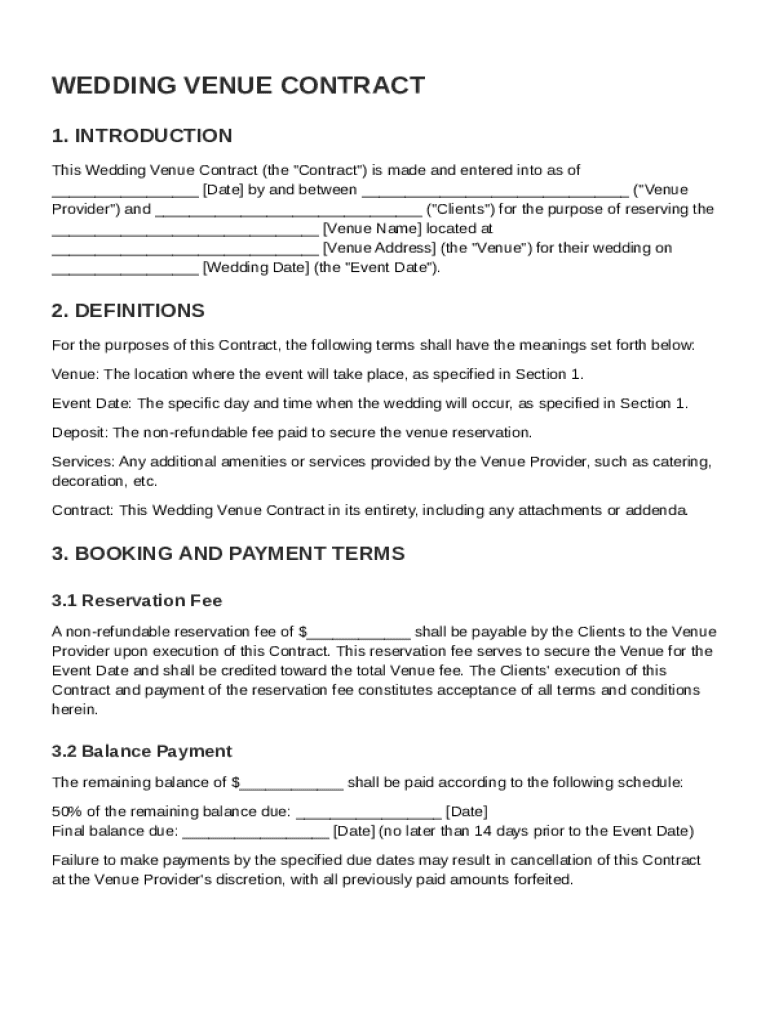
Der") and ("Clients") for the purpose of reserving the Venue Name located at Venue Address (the "Venue") for their wedding on Wedding Date (the "Event Date"). 2. DEFINITIONS For the purposes of this Contract, the following terms shall have the meanings set forth below: Venue: The location where the event will take place, as specified in Section 1. Event Date: The specific day.
Loading

Open form follow the instructions

Easily sign the form with your finger

Send filled & signed form or save
How to fill out and sign Wedding Venue Contract Template online?
Get your online template and fill it in using progressive features. Enjoy smart fillable fields and interactivity.Follow the simple instructions below:
The prep of lawful papers can be expensive and time-consuming. However, with our preconfigured web templates, everything gets simpler. Now, creating a Wedding Venue Contract Template takes at most 5 minutes. Our state web-based blanks and complete guidelines eradicate human-prone mistakes.
Follow our simple actions to get your Wedding Venue Contract Template prepared rapidly:
- Select the template in the catalogue.
- Enter all required information in the required fillable fields. The easy-to-use drag&drop graphical user interface makes it easy to include or move fields.
- Ensure everything is filled out properly, without any typos or lacking blocks.
- Use your electronic signature to the page.
- Simply click Done to confirm the adjustments.
- Download the data file or print your PDF version.
- Send immediately towards the receiver.
Make use of the fast search and innovative cloud editor to generate an accurate Wedding Venue Contract Template. Eliminate the routine and create documents on the internet!
Tips on how to fill out, edit and sign Wedding Venue Contract Template online
How to fill and sign Wedding Venue Contract Template
Get your online template and fill it in using progressive features. Enjoy smart fillable fields and interactivity.Follow the simple instructions below:
The prep of lawful papers can be expensive and time-consuming. However, with our preconfigured web templates, everything gets simpler. Now, creating a Wedding Venue Contract Template takes at most 5 minutes. Our state web-based blanks and complete guidelines eradicate human-prone mistakes.
Follow our simple actions to get your Wedding Venue Contract Template prepared rapidly:
- Select the template in the catalogue.
- Enter all required information in the required fillable fields. The easy-to-use drag&drop graphical user interface makes it easy to include or move fields.
- Ensure everything is filled out properly, without any typos or lacking blocks.
- Use your electronic signature to the page.
- Simply click Done to confirm the adjustments.
- Download the data file or print your PDF version.
- Send immediately towards the receiver.
Make use of the fast search and innovative cloud editor to generate an accurate Wedding Venue Contract Template. Eliminate the routine and create documents on the internet!
How to edit Wedding Venue Contract Template
Your quickly editable and customizable Wedding Venue Contract Template template is within reach. Take advantage of our library with a built-in online editor.
Do you postpone completing Wedding Venue Contract Template because you simply don't know where to start and how to move forward? We understand how you feel and have a great tool for you that has nothing nothing to do with overcoming your procrastination!
Our online catalog of ready-to-use templates enables you to sort through and select from thousands of fillable forms tailored for a variety of purposes and scenarios. But getting the form is just scratching the surface. We provide you with all the necessary tools to complete, certfy, and edit the document of your choice without leaving our website.
All you need to do is to open the document in the editor. Check the verbiage of Wedding Venue Contract Template and confirm whether it's what you’re looking for. Start off completing the template by using the annotation tools to give your form a more organized and neater look.
- Add checkmarks, circles, arrows and lines.
- Highlight, blackout, and fix the existing text.
- If the document is intended for other users too, you can add fillable fields and share them for others to complete.
- As soon as you’re through completing the template, you can download the document in any available format or pick any sharing or delivery options.
Summing up, along with Wedding Venue Contract Template, you'll get:
- A powerful suite of editing} and annotation tools.
- A built-in legally-binding eSignature functionality.
- The option to generate documents from scratch or based on the pre-drafted template.
- Compatibility with various platforms and devices for increased convenience.
- Many possibilities for safeguarding your files.
- An array of delivery options for more frictionless sharing and sending out files.
- Compliance with eSignature laws regulating the use of eSignature in electronic operations.
With our full-featured option, your completed documents will almost always be lawfully binding and fully encrypted. We ensure to safeguard your most delicate information and facts.
Get what is needed to produce a professional-hunting Wedding Venue Contract Template. Make the correct choice and attempt our foundation now!
How to fill and sign Wedding Venue Contract Template
Get your online template and fill it in using progressive features. Enjoy smart fillable fields and interactivity.Follow the simple instructions below:
The prep of lawful papers can be expensive and time-consuming. However, with our preconfigured web templates, everything gets simpler. Now, creating a Wedding Venue Contract Template takes at most 5 minutes. Our state web-based blanks and complete guidelines eradicate human-prone mistakes.
Follow our simple actions to get your Wedding Venue Contract Template prepared rapidly:
- Select the template in the catalogue.
- Enter all required information in the required fillable fields. The easy-to-use drag&drop graphical user interface makes it easy to include or move fields.
- Ensure everything is filled out properly, without any typos or lacking blocks.
- Use your electronic signature to the page.
- Simply click Done to confirm the adjustments.
- Download the data file or print your PDF version.
- Send immediately towards the receiver.
Make use of the fast search and innovative cloud editor to generate an accurate Wedding Venue Contract Template. Eliminate the routine and create documents on the internet!
Experience a faster way to fill out and sign forms on the web. Access the most extensive library of templates available.
Related content
Feb 18, 2022 — It is the responsibility of the Applicant/User to ensure the delivery and...
1) Venue rental fees: a) The clients agree to pay an initial retainer fee of $500.00. This...
Example #1. Patient. And then, right in front of Brian, my mother told me that she was...
Get answers to your most pressing questions about US Legal Forms API.
How to create a contract agreement?
Creating a contract agreement requires you to clearly state the parties involved, the purpose of the contract, and the obligations of each party. Ensure you include details such as timelines, payments, and any legal disclaimers. Using a Wedding Venue Contract Template simplifies the process, allowing you to customize the agreement while ensuring it meets legal standards.
How to write a wedding contract?
To write a wedding contract, start with a detailed description of the services or items you are hiring, including the venue, catering, and entertainment. Specify payment schedules, cancellation policies, and any other expectations. A Wedding Venue Contract Template can help you draft a comprehensive and professional document that protects your interests.
How do you write a contract for a venue?
Writing a contract for a venue involves outlining essential information like venue name, address, and services offered. Include payment terms, timelines for deposits, and any required insurance. By utilizing a Wedding Venue Contract Template, you can easily incorporate these elements, ensuring clarity and legal protection for your event.
How to make an event contract?
To make an event contract, start by defining the key elements, such as dates, locations, and services included. Be specific about the terms and conditions, payments, and cancellation policies. A Wedding Venue Contract Template can streamline this process, ensuring you cover all necessary details while protecting both parties involved.
Use professional pre-built templates to fill in and sign documents online faster. Get access to thousands of forms.
If you believe that this page should be taken down, please follow our DMCA take down process here.