Loading
Form preview
  • US Legal Forms
  • Form Library
  • Foreign Forms
  • Foreign Australia Other Forms
  • Au Amsa 250 2003

Get Au Amsa 250 2003

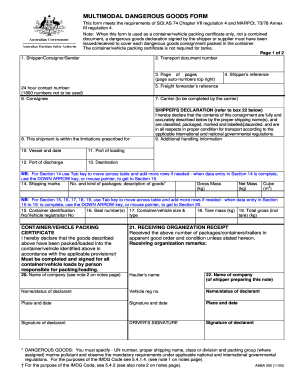
MULTIMODAL DANGEROUS GOODS FORM This form meets the requirements of SOLAS 74 Chapter VII regulation 4 and MARPOL 73/78 Annex III regulation 4. Note: When this form is used as a container/vehicle packing.

How it works

  1. Open form

    Open form follow the instructions

  2. Easily sign form

    Easily sign the form with your finger

  3. Share form

    Send filled & signed form or save

How to fill out the AU AMSA 250 online

The AU AMSA 250 form is essential for the multimodal transport of dangerous goods, ensuring compliance with international regulations. This guide provides clear, step-by-step instructions tailored to help you fill out the form accurately and effectively.

Follow the steps to complete the AU AMSA 250 form online.

  1. Use the ‘Get Form’ button to acquire the AU AMSA 250 form and open it in the online editor.
  2. Complete the shipper/consignor/sender section with the necessary details, including the transport document number and your reference for tracking.
  3. Input your 24-hour contact number, ensuring adherence to the guideline of not using 1800 numbers.
  4. Fill in the consignee information, along with details of the carrier, if applicable.
  5. Confirm that the shipment adheres to the prescribed limitations and fill out the details of the vessel, including the date, port of loading, port of discharge, and final destination.
  6. In the shipper's declaration section, accurately describe the contents of the consignment using the proper shipping names and classifications as per regulations.
  7. Provide additional handling instructions if necessary, followed by details about the shipping marks, including package count and descriptions in the appropriate sections.
  8. Fill in the container identification, seal numbers, container/vehicle size, tare mass, and total gross mass as required.
  9. Complete the container/vehicle packing certificate, ensuring all declarations are made and signed by the responsible person.
  10. After completing the form, save your changes, and choose to download, print, or share the filled AU AMSA 250 form as needed.

Start completing your AU AMSA 250 form online today to ensure compliance and efficient transport of dangerous goods.

Get form

Experience a faster way to fill out and sign forms on the web. Access the most extensive library of templates available.

Related content

Standards of Medical Fitness | Army Regulation...
Jun 14, 2017 — The proponent of this regulation is The Sur- geon General. The proponent...
Learn more
Australian Maritime Law Update: 2000
by M White · 2001 · Cited by 9 — I. INTRODUCTION. This Update covers the period from...
Learn more
Healthy Housing Reference Manual
This manual includes a preface, definitions, standards, an executive summary, and a...
Learn more

Related links form

1 800 Ael 8888 Form Iframe Iwidget Buisness Space Form Synology Disk Station Vpn Center Users Guide Form AHEC Membership Application - Ahec

Questions & Answers

Get answers to your most pressing questions about US Legal Forms API.

Contact support

A dangerous goods declaration sea freight is a specialized document that certifies hazardous materials being shipped by sea. It aims to ensure safety and regulations compliance during transit, particularly under AU AMSA 250 standards. This declaration serves as a critical component of shipping documentation, safeguarding the crew, the vessel, and the environment.

To fill out a multimodal dangerous goods form, start by gathering all necessary details about the goods being transported. Make sure to include information about the quantity, classification, and packaging of hazardous materials as required under AU AMSA 250. Utilize tools available through platforms like US Legal Forms to simplify the process and maintain accuracy in your submissions.

To fill out a patient authorization form, begin with your personal details and clearly identify the healthcare provider and the information being authorized for release. Be precise about the purpose of the authorization and how you would like the information to be handled. Proper completion of this form is necessary for adhering to privacy standards, including AU AMSA 250.

When filling out a medical authorization form, you need to enter your basic information, along with details of the healthcare provider involved. Clearly state what medical information is being authorized for release. This form ensures that your health information is protected while complying with necessary regulations, including AU AMSA 250.

Filling out a dangerous goods declaration form involves detailing the type and quantity of dangerous goods being transported. Make sure to classify the goods correctly and include emergency contact information. This form is crucial for meeting safety regulations, such as AU AMSA 250, and helps ensure that all necessary precautions are taken during transportation.

To fill out a medical release form, start by providing your personal information and the name of the healthcare provider releasing the information. Clearly indicate what specific medical records you wish to access and for what purpose. This simple yet essential document plays a vital role in maintaining privacy and complies with regulations like AU AMSA 250.

To fill out a medical consent form, begin by entering the patient's personal information, including their name and date of birth. Next, specify the treatment or procedure that the patient is consenting to. Make sure to include any potential risks and benefits associated with the treatment. Completing a medical consent form correctly is crucial for compliance with regulations like AU AMSA 250.

Filling out a dangerous goods declaration form requires accurate details about the hazardous materials. You must include specific information such as classification codes, quantity, and safety instructions. For guidance, the AU AMSA 250 serves as a valuable resource, helping you navigate the requirements and complete the form accurately for transport and compliance.

The multimodal DG form is generally prepared by the individual or entity responsible for the shipment. This could include shippers or freight forwarders, who should be well- in regulations. Understanding the requirements of the AU AMSA 250 is crucial to ensure that the DG form is filled out correctly and comprehensively.

Completing a multimodal dangerous goods form involves gathering accurate data regarding the materials to be shipped. Include all required details such as classification, packaging instructions, and emergency contact information. Leveraging resources like the AU AMSA 250 for guidance will help in ensuring compliance and safety in the shipping process.

Get This Form Now!

Use professional pre-built templates to fill in and sign documents online faster. Get access to thousands of forms.
If you believe that this page should be taken down, please follow our DMCA take down processhere.

Industry-leading security and compliance

US Legal Forms protects your data by complying with industry-specific security standards.
  • In businnes since 1997
    25+ years providing professional legal documents.
  • Accredited business
    Guarantees that a business meets BBB accreditation standards in the US and Canada.
  • Secured by Braintree
    Validated Level 1 PCI DSS compliant payment gateway that accepts most major credit and debit card brands from across the globe.
Get AU AMSA 250
  • Adoption
  • Bankruptcy
  • Contractors
  • Divorce
  • Home Sales
  • Employment
  • Identity Theft
  • Incorporation
  • Landlord Tenant
  • Living Trust
  • Name Change
  • Personal Planning
  • Small Business
  • Wills & Estates
  • Packages A-Z
  • Affidavits
  • Bankruptcy
  • Bill of Sale
  • Corporate - LLC
  • Divorce
  • Employment
  • Identity Theft
  • Internet Technology
  • Landlord Tenant
  • Living Wills
  • Name Change
  • Power of Attorney
  • Real Estate
  • Small Estates
  • Wills
  • All Forms
  • Forms A-Z
  • Form Library
  • Legal Hub
  • About Us
  • Help Portal
  • Legal Resources
  • Blog
  • Affiliates
  • Contact Us
  • Delete My Account
  • Site Map
  • Industries
  • Forms in Spanish
  • Localized Forms
  • State-specific Forms
  • Forms Kit
  • Real Estate Handbook
  • All Guides
  • Notarize
  • Incorporation services
  • For Consumers
  • For Small Business
  • For Attorneys
  • USLegal
  • FormsPass
  • pdfFiller
  • signNow
  • altaFlow
  • DocHub
  • Instapage
Form Packages
  • Adoption
  • Bankruptcy
  • Contractors
  • Divorce
  • Home Sales
  • Employment
  • Identity Theft
  • Incorporation
  • Landlord Tenant
  • Living Trust
  • Name Change
  • Personal Planning
  • Small Business
  • Wills & Estates
  • Packages A-Z
Form Categories
  • Affidavits
  • Bankruptcy
  • Bill of Sale
  • Corporate - LLC
  • Divorce
  • Employment
  • Identity Theft
  • Internet Technology
  • Landlord Tenant
  • Living Wills
  • Name Change
  • Power of Attorney
  • Real Estate
  • Small Estates
  • Wills
  • All Forms
  • Forms A-Z
  • Form Library
Customer Service
  • Legal Hub
  • About Us
  • Help Portal
  • Legal Resources
  • Blog
  • Affiliates
  • Contact Us
  • Delete My Account
  • Site Map
  • Industries
  • Forms in Spanish
  • Localized Forms
  • State-specific Forms
  • Forms Kit
Legal Guides
  • Real Estate Handbook
  • All Guides
Prepared for you
  • Notarize
  • Incorporation services
Our Customers
  • For Consumers
  • For Small Business
  • For Attorneys
Our Sites
  • USLegal
  • FormsPass
  • pdfFiller
  • signNow
  • altaFlow
  • DocHub
  • Instapage
Social Media
Call us now toll free:
+1 833 426 79 33
As seen in:
© Copyright 1999-2026 airSlate Legal Forms, Inc. 3720 Flowood Dr, Flowood, Mississippi 39232
  • Your Privacy Choices
  • Terms of Service
  • Privacy Notice
  • Content Takedown Policy
  • Bug Bounty Program
AU AMSA 250
This form is available in several versions.
Select the version you need from the drop-down list below.
2013 AU AMSA 250
Select form
  • 2013 AU AMSA 250
  • 2009 AU AMSA 250
  • 2003 AU AMSA 250
  • 2001 AU AMSA 250
Select form