Loading
Get Au Ad 576 2016
How it works
-

Open form follow the instructions
-

Easily sign the form with your finger
-

Send filled & signed form or save
How to fill out the AU AD 576 online
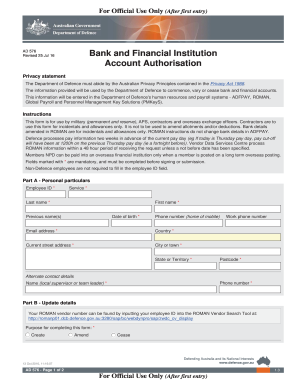
Filling out the AU AD 576 form is essential for managing bank and financial account information within the Department of Defence. This guide provides step-by-step instructions to ensure accuracy and ease while completing the form online.
Follow the steps to complete the AU AD 576 form successfully.
- Press the ‘Get Form’ button to access the form and open it in the editor.
- In Part A, provide your personal particulars. Fill in the mandatory fields marked with an asterisk, including your employee ID, service, last name, first name, date of birth, phone number, email address, current street address, city or town, state or territory, and postcode. You may also include previous names and work phone number if applicable.
- For alternate contact details, enter the name and phone number of your local supervisor or team leader, ensuring you fill in the mandatory fields.
- In Part B, select the purpose for completing this form (create, amend, or cease). Provide your ROMAN vendor number, which can be found via the ROMAN Vendor Search Tool.
- Proceed to Part C, where you will input your bank or financial institution details. Fill in the name of the bank, the country, branch address, city or town, state or territory, postcode, account number, BSB/IBAN, and full name the account is conducted in. Ensure that you do not enter credit or debit card numbers.
- Complete the currency, SWIFT, ABA routing number, and SORT fields if applicable, indicating whether this account is the same as your net pay deposit account by selecting 'Yes' or 'No.'
- Finally, review the information you provided, ensuring that all mandatory fields are completed, and sign the form. Once you are satisfied, submit the form for processing.
Complete your AU AD 576 form online today to manage your bank and financial institution details efficiently.
Get form
Experience a faster way to fill out and sign forms on the web. Access the most extensive library of templates available.
Get This Form Now!
Use professional pre-built templates to fill in and sign documents online faster. Get access to thousands of forms.