Loading
Get Au Aafc Tr66 2011-2026
How it works
-

Open form follow the instructions
-

Easily sign the form with your finger
-

Send filled & signed form or save
How to fill out the AU AAFC TR66 online
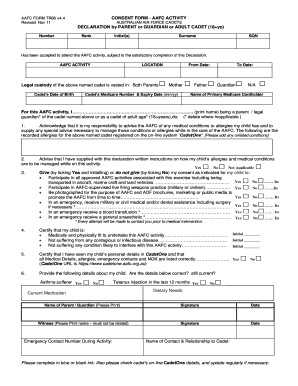
This guide provides clear and supportive instructions for users looking to fill out the AU AAFC TR66 consent form online. Whether you are a parent, guardian, or an adult cadet, this comprehensive resource will assist you through each section and field of the form.
Follow the steps to fill out the AU AAFC TR66 consent form accurately.
- Click the ‘Get Form’ button to obtain the AU AAFC TR66 form and open it in your preferred viewer.
- Begin by completing the declaration section. Indicate the number, rank, initial(s), surname, and squadron (SQN) of the cadet. Ensure that the AAFC activity and location are filled out accurately.
- Provide the legal custody details of the cadet, marking if it is held by both parents or if there are other specific arrangements.
- Enter the cadet’s date of birth and the relevant medicare information, completing both the number and expiry date.
- In the space provided, as a parent or guardian, print your name and clarify your relationship to the cadet. This is important to confirm your authority for the consent.
- Acknowledge any medical conditions or allergies your child may have by providing details in the indicated box, ensuring that any relevant information is noted.
- For each of the consent items listed, tick 'Yes' or 'No' based on your decision regarding various AAFC activities, documenting your agreement or disagreement clearly.
- Certify your child’s fitness and health status by checking the boxes provided. If any conditions apply, make your responses clear.
- Confirm that you have reviewed all personal and medical details in CadetOne, marking 'Yes' if everything is correct.
- Finally, provide your signature, the date, and any witness information required. Remember to fill this out in blue or black ink.
- Once you have completed the form, make sure to save your changes, and consider downloading or printing a copy for your records.
Complete the AU AAFC TR66 consent form online today to ensure all necessary information is submitted efficiently.