Loading
Get Au 61-9pic 2017
How it works
-

Open form follow the instructions
-

Easily sign the form with your finger
-

Send filled & signed form or save
How to fill out the AU 61-9PIC online
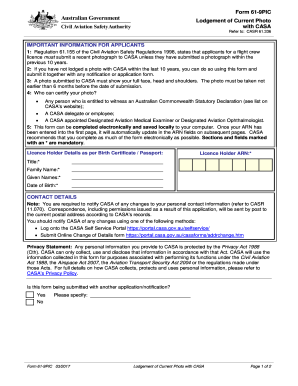
The AU 61-9PIC form is essential for applicants of a flight crew licence as it facilitates the lodgement of a current photograph to the Civil Aviation Safety Authority (CASA). This guide provides clear, step-by-step instructions to assist you in efficiently completing the form online.
Follow the steps to complete the AU 61-9PIC online.
- Press the ‘Get Form’ button to access the form and open it in your preferred digital editor.
- Fill in the licence holder details as per your birth certificate or passport. This includes your title, family name, given names, date of birth, and licence holder ARN, which are marked with an asterisk (*) indicating they are mandatory fields.
- Provide your contact details, ensuring all information is current. CASA requires notification of any updates to personal contact information.
- For the photo identification section, attach a certified passport quality photo in the designated area. Make sure not to use staples or glue. It should meet the specified size requirements.
- On the back of the photograph, enter your name and have the certifying person's signature and authority noted. The certifier should also provide their contact phone number and details of their position or qualifications.
- Read and confirm whether you are submitting the form with another application or notification by marking 'Yes' or 'No'.
- After completing the form, review all sections for accuracy. Save the changes to your computer, and consider downloading or printing a copy for your records.
- Once satisfied with your entry, you can submit the completed form to CASA by mailing it to the specified address.
Start filling out your AU 61-9PIC online today!
Get form
Experience a faster way to fill out and sign forms on the web. Access the most extensive library of templates available.
Related links form
Get This Form Now!
Use professional pre-built templates to fill in and sign documents online faster. Get access to thousands of forms.