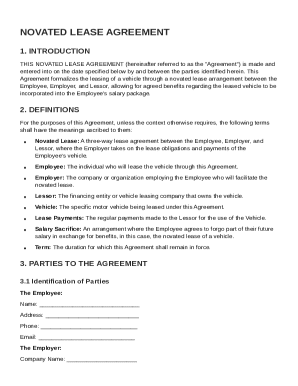
Get Novated Lease Agreement Template
How it works
-

Open form follow the instructions
-

Easily sign the form with your finger
-

Send filled & signed form or save
How to fill out and sign Novated Lease Agreement Template online?
Get your online template and fill it in using progressive features. Enjoy smart fillable fields and interactivity.Follow the simple instructions below:Are you still seeking a quick and practical tool to fill out Novated Lease Agreement Template at a reasonable cost? Our service gives you a rich selection of templates available for completing on the internet. It only takes a couple of minutes.
Stick to these simple instructions to get Novated Lease Agreement Template prepared for submitting:
- Choose the document you want in our collection of legal forms.
- Open the document in the online editing tool.
- Read through the guidelines to determine which data you have to give.
- Choose the fillable fields and add the requested details.
- Add the relevant date and insert your e-signature once you fill out all of the boxes.
- Examine the completed form for misprints and other errors. If there?s a necessity to change something, the online editing tool along with its wide variety of instruments are ready for your use.
- Save the completed template to your gadget by clicking on Done.
- Send the e-document to the parties involved.
Filling in Novated Lease Agreement Template does not have to be complicated anymore. From now on simply get through it from your apartment or at the place of work right from your smartphone or desktop.
Tips on how to fill out, edit and sign Novated Lease Agreement Template online
How to fill out and sign Novated Lease Agreement Template online?
Get your online template and fill it in using progressive features. Enjoy smart fillable fields and interactivity.Follow the simple instructions below:
Are you still seeking a quick and practical tool to fill out Novated Lease Agreement Template at a reasonable cost? Our service gives you a rich selection of templates available for completing on the internet. It only takes a couple of minutes.
Stick to these simple instructions to get Novated Lease Agreement Template prepared for submitting:
- Choose the document you want in our collection of legal forms.
- Open the document in the online editing tool.
- Read through the guidelines to determine which data you have to give.
- Choose the fillable fields and add the requested details.
- Add the relevant date and insert your e-signature once you fill out all of the boxes.
- Examine the completed form for misprints and other errors. If there?s a necessity to change something, the online editing tool along with its wide variety of instruments are ready for your use.
- Save the completed template to your gadget by clicking on Done.
- Send the e-document to the parties involved.
Filling in Novated Lease Agreement Template does not have to be complicated anymore. From now on simply get through it from your apartment or at the place of work right from your smartphone or desktop.
How to edit Novated Lease Agreement Template: customize forms online
Put the right document editing capabilities at your fingertips. Execute Novated Lease Agreement Template with our reliable tool that combines editing and eSignature functionality}.
If you want to complete and sign Novated Lease Agreement Template online without hassle, then our online cloud-based solution is the way to go. We offer a wealthy template-based library of ready-to-use paperwork you can modify and fill out online. In addition, you don't need to print out the document or use third-party solutions to make it fillable. All the necessary features will be readily available at your disposal once you open the document in the editor.
Let’s go through our online editing capabilities and their key features. The editor has a self-explanatory interface, so it won't require a lot of time to learn how to use it. We’ll check out three main sections that let you:
- Edit and annotate the template
- Arrange your paperwork
- Make them shareable
The top toolbar comes with the features that help you highlight and blackout text, without photos and graphic elements (lines, arrows and checkmarks etc.), sign, initialize, date the document, and more.
Use the toolbar on the left if you wish to re-order the document or/and remove pages.
If you want to make the template fillable for others and share it, you can use the tools on the right and insert various fillable fields, signature and date, text box, etc.).
Aside from the functionality mentioned above, you can shield your document with a password, put a watermark, convert the file to the required format, and much more.
Our editor makes completing and certifying the Novated Lease Agreement Template a piece of cake. It allows you to make pretty much everything when it comes to dealing with documents. In addition, we always make sure that your experience working with documents is secure and compliant with the main regulatory criteria. All these aspects make utilizing our tool even more pleasant.
Get Novated Lease Agreement Template, apply the necessary edits and changes, and download it in the preferred file format. Give it a try today!
Related links form
Yes, Microsoft Word offers various templates, including lease agreement templates. You can customize these templates to meet your specific needs by incorporating relevant information. For a tailored approach, consider using a Novated Lease Agreement Template which provides a focused design for leasing agreements.