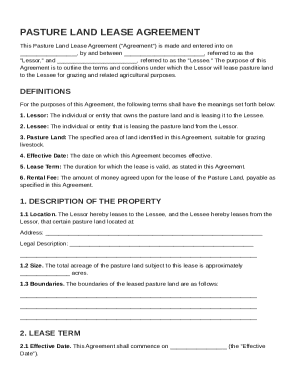
Get Pasture Land Lease Agreement Template
How it works
-

Open form follow the instructions
-

Easily sign the form with your finger
-

Send filled & signed form or save
How to fill out and sign Pasture Land Lease Agreement Template online?
Get your online template and fill it in using progressive features. Enjoy smart fillable fields and interactivity.Follow the simple instructions below:Tax, legal, business along with other electronic documents demand a top level of protection and compliance with the legislation. Our documents are regularly updated in accordance with the latest amendments in legislation. In addition, with us, all the data you provide in your Pasture Land Lease Agreement Template is well-protected from leakage or damage by means of top-notch encryption.
The tips below will allow you to fill out Pasture Land Lease Agreement Template easily and quickly:
- Open the template in the full-fledged online editing tool by clicking on Get form.
- Complete the requested fields which are marked in yellow.
- Press the arrow with the inscription Next to move on from one field to another.
- Use the e-signature solution to add an electronic signature to the form.
- Insert the relevant date.
- Double-check the entire e-document to ensure that you haven?t skipped anything important.
- Click Done and save the resulting document.
Our solution enables you to take the entire procedure of submitting legal forms online. As a result, you save hours (if not days or weeks) and get rid of extra costs. From now on, fill in Pasture Land Lease Agreement Template from your home, business office, as well as while on the go.
Tips on how to fill out, edit and sign Pasture Land Lease Agreement Template online
How to fill out and sign Pasture Land Lease Agreement Template online?
Get your online template and fill it in using progressive features. Enjoy smart fillable fields and interactivity.Follow the simple instructions below:
Tax, legal, business along with other electronic documents demand a top level of protection and compliance with the legislation. Our documents are regularly updated in accordance with the latest amendments in legislation. In addition, with us, all the data you provide in your Pasture Land Lease Agreement Template is well-protected from leakage or damage by means of top-notch encryption.
The tips below will allow you to fill out Pasture Land Lease Agreement Template easily and quickly:
- Open the template in the full-fledged online editing tool by clicking on Get form.
- Complete the requested fields which are marked in yellow.
- Press the arrow with the inscription Next to move on from one field to another.
- Use the e-signature solution to add an electronic signature to the form.
- Insert the relevant date.
- Double-check the entire e-document to ensure that you haven?t skipped anything important.
- Click Done and save the resulting document.
Our solution enables you to take the entire procedure of submitting legal forms online. As a result, you save hours (if not days or weeks) and get rid of extra costs. From now on, fill in Pasture Land Lease Agreement Template from your home, business office, as well as while on the go.
How to edit Pasture Land Lease Agreement Template: customize forms online
Take away the mess from your paperwork routine. Discover the most effective way to find and edit, and file a Pasture Land Lease Agreement Template
The process of preparing Pasture Land Lease Agreement Template needs precision and focus, especially from those who are not well familiar with this kind of job. It is important to get a suitable template and fill it in with the correct information. With the right solution for handling documents, you can get all the instruments at hand. It is easy to simplify your editing process without learning new skills. Find the right sample of Pasture Land Lease Agreement Template and fill it out quickly without switching between your browser tabs. Discover more tools to customize your Pasture Land Lease Agreement Template form in the editing mode.
While on the Pasture Land Lease Agreement Template page, click on the Get form button to start editing it. Add your data to the form on the spot, as all the needed instruments are at hand right here. The sample is pre-designed, so the effort required from the user is minimal. Use the interactive fillable fields in the editor to easily complete your paperwork. Simply click on the form and proceed to the editor mode immediately. Complete the interactive field, and your file is good to go.
Try more tools to customize your form:
- Place more textual content around the document if needed. Use the Text and Text Box tools to insert text in a separate box.
- Add pre-designed graphic components like Circle, Cross, and Check with respective tools.
- If needed, capture or upload images to the document with the Image tool.
- If you need to draw something in the document, use Line, Arrow, and Draw tools.
- Try the Highlight, Erase, and Blackout tools to customize the text in the document.
- If you need to add comments to specific document sections, click on the Sticky tool and place a note where you want.
Often, a small error can ruin the whole form when someone fills it manually. Forget about inaccuracies in your paperwork. Find the samples you require in moments and complete them electronically using a smart editing solution.
Yes, Microsoft Word offers various templates, including lease agreements. However, for a more tailored approach, consider using a pasture land lease agreement template from US Legal Forms. This option can provide you with comprehensive content and tailored clauses that suit your specific leasing scenario.