Loading
Form preview
  • US Legal Forms
  • Other Templates
  • More Forms
  • More Multi-State Forms
  • Medical Office Lease Agreement Template

Get Medical Office Lease Agreement Template

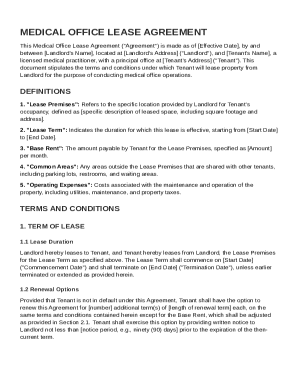
Ord's Name , located at Landlord's Address ("Landlord"), and Tenant's Name , a licensed medical practitioner, with a principal office at Tenant's Address ("Tenant"). This document stipulates the terms and conditions under which Tenant will lease property from Landlord for the purpose of conducting medical office operations. DEFINITIONS 1. "Lease Premises": Refers to the specific location provided by Landlord for Tenant's occupancy, defined as specific description of leased space, includin.

How it works

  1. Open form

    Open form follow the instructions

  2. Easily sign form

    Easily sign the form with your finger

  3. Share form

    Send filled & signed form or save

How to fill out and sign Medical Office Lease Agreement Template online?

Get your online template and fill it in using progressive features. Enjoy smart fillable fields and interactivity.Follow the simple instructions below:

Experience all the key benefits of submitting and completing legal documents online. Using our solution filling in Medical Office Lease Agreement Template requires just a couple of minutes. We make that possible by offering you access to our full-fledged editor capable of altering/correcting a document?s initial textual content, adding unique fields, and putting your signature on.

Fill out Medical Office Lease Agreement Template in several minutes by following the recommendations below:

  1. Select the document template you require from the collection of legal forms.
  2. Click the Get form key to open it and start editing.
  3. Complete all of the required fields (they will be yellowish).
  4. The Signature Wizard will help you add your electronic autograph as soon as you?ve finished imputing data.
  5. Add the date.
  6. Double-check the whole form to make certain you?ve completed all the data and no changes are needed.
  7. Hit Done and download the filled out template to the computer.

Send the new Medical Office Lease Agreement Template in an electronic form right after you are done with completing it. Your information is well-protected, as we keep to the newest security criteria. Join millions of satisfied customers that are already filling in legal forms straight from their apartments.

Tips on how to fill out, edit and sign Medical Office Lease Agreement Template online

How to fill out and sign Medical Office Lease Agreement Template online?

Get your online template and fill it in using progressive features. Enjoy smart fillable fields and interactivity.Follow the simple instructions below:

Experience all the key benefits of submitting and completing legal documents online. Using our solution filling in Medical Office Lease Agreement Template requires just a couple of minutes. We make that possible by offering you access to our full-fledged editor capable of altering/correcting a document?s initial textual content, adding unique fields, and putting your signature on.

Fill out Medical Office Lease Agreement Template in several minutes by following the recommendations below:

  1. Select the document template you require from the collection of legal forms.
  2. Click the Get form key to open it and start editing.
  3. Complete all of the required fields (they will be yellowish).
  4. The Signature Wizard will help you add your electronic autograph as soon as you?ve finished imputing data.
  5. Add the date.
  6. Double-check the whole form to make certain you?ve completed all the data and no changes are needed.
  7. Hit Done and download the filled out template to the computer.

Send the new Medical Office Lease Agreement Template in an electronic form right after you are done with completing it. Your information is well-protected, as we keep to the newest security criteria. Join millions of satisfied customers that are already filling in legal forms straight from their apartments.

How to edit Medical Office Lease Agreement Template: customize forms online

Put the right document editing tools at your fingertips. Complete Medical Office Lease Agreement Template with our reliable solution that comes with editing and eSignature functionality}.

If you want to complete and certify Medical Office Lease Agreement Template online without hassle, then our online cloud-based option is the way to go. We offer a wealthy template-based catalog of ready-to-use forms you can change and complete online. In addition, you don't need to print out the document or use third-party options to make it fillable. All the needed features will be readily available at your disposal once you open the file in the editor.

Let’s examine our online editing tools and their key features. The editor has a self-explanatory interface, so it won't take a lot of time to learn how to utilize it. We’ll check out three main parts that allow you to:

  • Edit and annotate the template
  • The top toolbar has the features that help you highlight and blackout text, without graphics and image factors (lines, arrows and checkmarks etc.), sign, initialize, date the form, and more.

  • Arrange your documents
  • Use the toolbar on the left if you wish to re-order the form or/and remove pages.

  • Prepare them for sharing
  • If you want to make the document fillable for others and share it, you can use the tools on the right and insert various fillable fields, signature and date, text box, etc.).

In addition to the functionality mentioned above, you can shield your file with a password, put a watermark, convert the document to the needed format, and much more.

Our editor makes modifying and certifying the Medical Office Lease Agreement Template a piece of cake. It allows you to make virtually everything concerning dealing with forms. In addition, we always make sure that your experience working with files is protected and compliant with the major regulatory criteria. All these aspects make using our tool even more pleasant.

Get Medical Office Lease Agreement Template, apply the needed edits and changes, and get it in the desired file format. Give it a try today!

Get form

Experience a faster way to fill out and sign forms on the web. Access the most extensive library of templates available.
Get form

Related content

MEDICAL OFFICE BUILDING LEASE
Tenant shall contract for and pay the costs and expenses of such architectural services...
Learn more
Shreveport-Conway-Hospital-Lease- ...
Initial Term and of each fifth year thereafter, Lessee and Lessor shall engage an...
Learn more
Contracts, organisation and operations
Nov 17, 2020 — Long-term contracts with limited landlord concentration underpinning...
Learn more

Related links form

TC 99-202.xlsx - Kentucky Transportation Cabinet 202-knott-10-4019 - Kentucky Transportation Cabinet Call No. 108 Contract Id. 195090 Carroll County Fed/state Project ... Nepis.epa.govExeZyPURLContracting Contacts For The Superfund And Oil Spills ... - EPA

Questions & Answers

Get answers to your most pressing questions about US Legal Forms API.

Contact support

Preparing a lease agreement requires you to gather all necessary information and review local laws pertaining to leases. Ensure your document includes clear terms regarding rental, property use, and any regulatory compliance needed in a medical setting. A Medical Office Lease Agreement Template can streamline this preparation, ensuring all key points are effectively addressed.

To draft an effective lease agreement, first identify all parties and describe the property clearly. Next, include rental terms, payment due dates, and conditions for renewal or termination. Using a Medical Office Lease Agreement Template can help ensure your document is thorough and compliant with legal standards.

Yes, Microsoft Word offers various lease agreement templates, which can help streamline the process of creating your document. However, it’s beneficial to use a Medical Office Lease Agreement Template tailored for specific requirements in medical practices, as generic templates may not cover all necessary legal aspects.

To complete a lease agreement, start by filling in all relevant information, such as tenant and landlord names, property details, and payment terms. Ensure clarity in clauses covering maintenance responsibilities, termination conditions, and penalties for late payments. Using a Medical Office Lease Agreement Template can simplify this process by providing you with a comprehensive framework.

A lease agreement typically includes a title, parties involved, property description, and lease duration. Additionally, it should detail financial terms like rent amounts and due dates. A Medical Office Lease Agreement Template can provide a structured format that meets legal requirements while addressing specific needs in the medical field.

Yes, you can create your own tenancy agreement, but ensure it complies with local laws. A Medical Office Lease Agreement Template can serve as a valuable starting point, as it outlines necessary terms and conditions specific to medical offices. Review your draft to ensure clarity and legality, or consider using a trusted platform for review.

To create a tenancy agreement template, start by gathering essential components such as the parties involved, property details, and terms of the lease. Incorporate clauses that address rent, security deposits, and responsibilities of both the landlord and tenant. It's wise to utilize resources like a Medical Office Lease Agreement Template available on premium platforms like US Legal Forms for guidance.

Get This Form Now!

Use professional pre-built templates to fill in and sign documents online faster. Get access to thousands of forms.
Get form
If you believe that this page should be taken down, please follow our DMCA take down processhere.
Get Medical Office Lease Agreement Template
Get form
  • Adoption
  • Bankruptcy
  • Contractors
  • Divorce
  • Home Sales
  • Employment
  • Identity Theft
  • Incorporation
  • Landlord Tenant
  • Living Trust
  • Name Change
  • Personal Planning
  • Small Business
  • Wills & Estates
  • Packages A-Z
  • Affidavits
  • Bankruptcy
  • Bill of Sale
  • Corporate - LLC
  • Divorce
  • Employment
  • Identity Theft
  • Internet Technology
  • Landlord Tenant
  • Living Wills
  • Name Change
  • Power of Attorney
  • Real Estate
  • Small Estates
  • Wills
  • All Forms
  • Forms A-Z
  • Other Templates
  • Legal Hub
  • About Us
  • Help Portal
  • Legal Resources
  • Blog
  • Affiliates
  • Contact Us
  • Delete My Account
  • Site Map
  • Industries
  • Forms in Spanish
  • Localized Forms
  • State-specific Forms
  • Forms Kit
  • Real Estate Handbook
  • All Guides
  • Notarize
  • Incorporation services
  • For Consumers
  • For Small Business
  • For Attorneys
  • USLegal
  • FormsPass
  • pdfFiller
  • signNow
  • altaFlow
  • DocHub
  • Instapage
Form Packages
  • Adoption
  • Bankruptcy
  • Contractors
  • Divorce
  • Home Sales
  • Employment
  • Identity Theft
  • Incorporation
  • Landlord Tenant
  • Living Trust
  • Name Change
  • Personal Planning
  • Small Business
  • Wills & Estates
  • Packages A-Z
Form Categories
  • Affidavits
  • Bankruptcy
  • Bill of Sale
  • Corporate - LLC
  • Divorce
  • Employment
  • Identity Theft
  • Internet Technology
  • Landlord Tenant
  • Living Wills
  • Name Change
  • Power of Attorney
  • Real Estate
  • Small Estates
  • Wills
  • All Forms
  • Forms A-Z
  • Other Templates
Customer Service
  • Legal Hub
  • About Us
  • Help Portal
  • Legal Resources
  • Blog
  • Affiliates
  • Contact Us
  • Delete My Account
  • Site Map
  • Industries
  • Forms in Spanish
  • Localized Forms
  • State-specific Forms
  • Forms Kit
Legal Guides
  • Real Estate Handbook
  • All Guides
Prepared for you
  • Notarize
  • Incorporation services
Our Customers
  • For Consumers
  • For Small Business
  • For Attorneys
Our Sites
  • USLegal
  • FormsPass
  • pdfFiller
  • signNow
  • altaFlow
  • DocHub
  • Instapage
Social Media
Call us now toll free:
+1 833 426 79 33
As seen in:
© Copyright 1999-2026 airSlate Legal Forms, Inc. 17 Station Street, Ste. 203, Brookline, MA 02445
  • Your Privacy Choices
  • Terms of Service
  • Privacy Notice
  • Content Takedown Policy
  • Bug Bounty Program