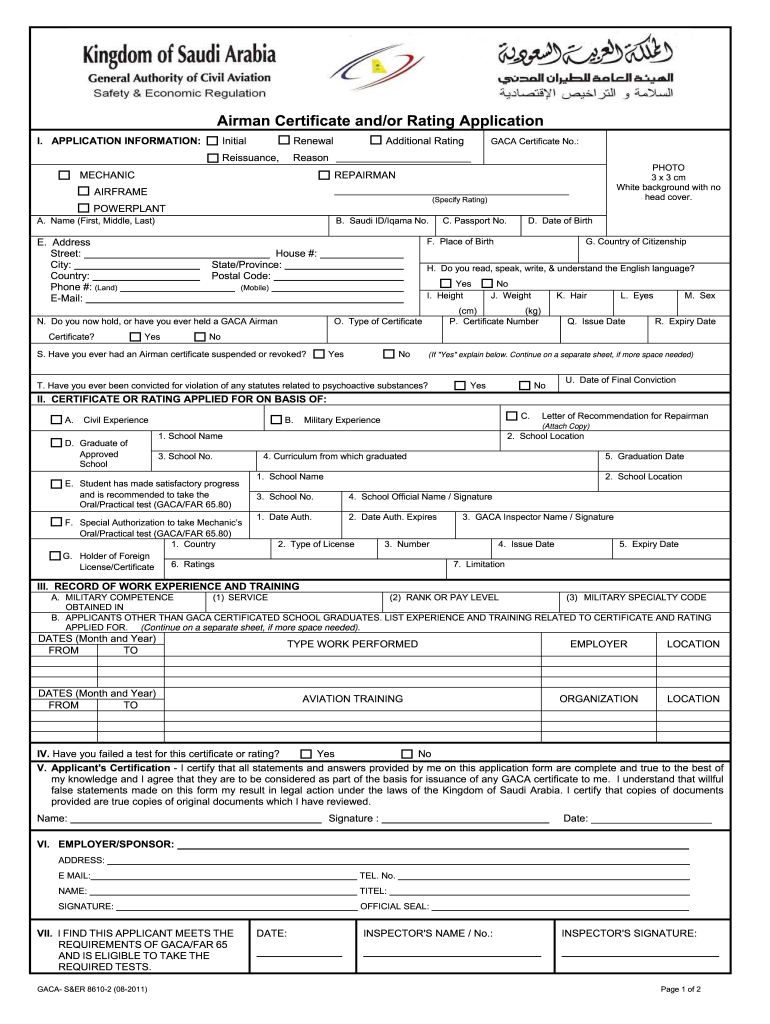
Eissuance, Reason □ REPAIRMAN (Specify Rating) A. Name (First, Middle, Last) B. Saudi ID/Iqama No. C. Passport No. House #: State/Province: Postal Code: □ Yes □ G. Country of Citizenship H. Do you read, speak, write, & understand the English language? □ Yes I. Height (Mobile) N. Do you now hold, or have you ever held a GACA Airman □ No J. Weight O. Type of Certificate □ □ Yes No □ □ E. □ B. Civil Experience □ C. Military Experience 1. Schoo.

Open form follow the instructions

Easily sign the form with your finger

Send filled & signed form or save
How to fill out the AE GACA-S&ER 8610-2 online
Filling out the AE GACA-S&ER 8610-2 form online is an essential step for individuals seeking to apply for an airman certificate or rating in Saudi Arabia. This guide offers clear, step-by-step instructions to help you complete each section of the form with confidence.
Follow the steps to successfully complete the form online.
- Click ‘Get Form’ button to obtain the form and open it in your preferred editor.
- Begin with the application information section. Select your desired role (mechanic, airframe, powerplant, or repairman) and indicate whether this is an initial application, renewal, additional rating, or reissuance by checking the appropriate box.
- Enter your full name as requested in section A (First, Middle, Last). This name should match the identification documents you are submitting.
- Complete section B by providing your Saudi ID or Iqama number, followed by your passport number in section C.
- Fill in your residence details, including house number, state/province, and postal code. Ensure that this information is accurate and up to date.
- Indicate your country of citizenship in section G and answer section H regarding your proficiency in English by checking either yes or no.
- Input your height in centimeters and weight in kilograms in sections I and J, respectively.
- State the type of certificate you are applying for in section O by checking the relevant box.
- In the civil and military experience sections, provide details of your educational background and relevant experience. List the names of schools, dates of attendance, and certifications achieved.
- Provide details if you have ever been convicted of any statutes related to psychoactive substances in section T, and indicate if you have ever had a GACA airman certificate suspended or revoked in section S.
- Conclude by signing in the Applicant's Certification section, affirming that all information provided is complete and truthful. Include the date of signing.
- If applicable, fill out the sections for employer/sponsor information and the designated examiner's report, ensuring to include all required signatures.
- Once all sections are completed, review your form for accuracy, save your changes, and choose to download, print, or share the form as necessary.
Complete your AE GACA-S&ER 8610-2 form online today for hassle-free processing.
Experience a faster way to fill out and sign forms on the web. Access the most extensive library of templates available.
Related content
General Information. Editorial Note. The Middle Georgia State College Catalog is reviewed...
Get answers to your most pressing questions about US Legal Forms API.
How to get a 8610-2 form?
You can easily secure the AE GACA-S&ER 8610-2 form through the US Legal Forms platform. They provide a seamless way to access this form, ensuring you have the latest version. Simply navigate to their website, search for the form, and follow the prompts for a quick download.
How long is an 8610-2 good for?
The AE GACA-S&ER 8610-2 form remains valid as long as the information provided is accurate and up-to-date. Typically, it should align with the time frame of the agreement or project it pertains to. Regular updates may be necessary to maintain compliance and effectiveness, so monitor the relevance of your form.
Who signs the 8610-2?
The AE GACA-S&ER 8610-2 requires signature from authorized personnel of the organization or individual submitting the form. Typically, this should be someone who has the authority to certify the information provided. Ensure that all required signatures are collected before submitting the form to avoid delays.
How to get 8610-2 form?
To obtain the AE GACA-S&ER 8610-2 form, visit the US Legal Forms website. They offer a user-friendly platform where you can easily find and download the necessary form. Simply search for 'AE GACA-S&ER 8610-2' to access the document. Make sure to follow all instructions provided for accurate completion.
What benefits does the AE GACA-S&ER 8610-2 offer?
The AE GACA-S&ER 8610-2 certification provides several advantages for aviation personnel. It increases your employability by showcasing your qualifications and adherence to industry standards. Additionally, holding this certification can enhance your professional reputation within the aviation community. Overall, it positions you as a trusted and knowledgeable individual in your field.
How to obtain FAA form 8610-2?
To obtain the AE GACA-S&ER 8610-2, you should start by visiting the FAA website or utilizing professional platforms like uslegalforms. These resources will guide you through the application process step by step. It is important to gather the necessary documentation and fill out the form accurately to ensure a smooth approval process. Remember, having the right support can make obtaining the form much simpler.
What is 8610-2 certification?
The AE GACA-S&ER 8610-2 certification is a crucial document for aviation professionals. It signifies that a candidate has met necessary requirements and can operate specific aircraft responsibly. Being certified not only enhances your credibility but also shows your commitment to safety and regulatory standards. This certification opens doors to various career opportunities in the aviation field.
How long is a 8610-2 good for?
The AE GACA-S&ER 8610-2 is typically valid for one year. This means that if you receive this certification, you should be aware of its expiration date. Renewing it in time will allow you to maintain compliance and continue your aviation activities without interruption. Make sure to keep track of your certification's validity to avoid any lapses.
Can a 337 be completed electronically?
Yes, the FAA allows Form 337 to be completed and submitted electronically. Utilizing the electronic submission process aligns with the AE GACA-S&ER 8610-2 guidelines and simplifies your filing. This not only enhances efficiency but also ensures faster turnaround times for your documentation.
Where do I mail Form 337?
You should mail Form 337 to the FAA Aircraft Registration Branch, which is located in Oklahoma City, Oklahoma. Ensure you send it to the right address to avoid delays in processing your document. Keeping all documentation organized and compliant helps maintain your aircraft's registration and airworthiness.
Use professional pre-built templates to fill in and sign documents online faster. Get access to thousands of forms.
If you believe that this page should be taken down, please follow our DMCA take down process here.