Loading
Form preview
  • US Legal Forms
  • Other Templates
  • More Forms
  • More Multi-State Forms
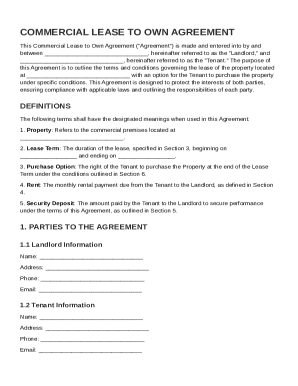
  • Commercial Lease To Own Agreement Template

Get Commercial Lease To Own Agreement Template

, hereinafter referred to as the "Landlord," and , hereinafter referred to as the "Tenant." The purpose of this Agreement is to outline the terms and conditions governing the lease of the property located at with an option for the Tenant to purchase the property under specific conditions. This Agreement is designed to protect the interests of both parties, ensuring compliance with applicable laws and outlining the responsib.

How it works

  1. Open form

    Open form follow the instructions

  2. Easily sign form

    Easily sign the form with your finger

  3. Share form

    Send filled & signed form or save

How to fill out and sign Commercial Lease To Own Agreement Template online?

Get your online template and fill it in using progressive features. Enjoy smart fillable fields and interactivity.Follow the simple instructions below:

The preparation of lawful paperwork can be costly and time-ingesting. However, with our preconfigured web templates, things get simpler. Now, creating a Commercial Lease To Own Agreement Template requires no more than 5 minutes. Our state-specific online blanks and crystal-clear instructions eliminate human-prone errors.

Follow our simple steps to have your Commercial Lease To Own Agreement Template ready rapidly:

  1. Find the web sample from the library.
  2. Complete all necessary information in the required fillable fields. The easy-to-use drag&drop user interface allows you to add or move fields.
  3. Check if everything is filled out properly, with no typos or missing blocks.
  4. Use your electronic signature to the page.
  5. Click on Done to save the alterations.
  6. Save the papers or print your PDF version.
  7. Send immediately to the receiver.

Make use of the quick search and powerful cloud editor to generate a precise Commercial Lease To Own Agreement Template. Clear away the routine and create paperwork on the internet!

Tips on how to fill out, edit and sign Commercial Lease To Own Agreement Template online

How to fill out and sign Commercial Lease To Own Agreement Template online?

Get your online template and fill it in using progressive features. Enjoy smart fillable fields and interactivity.Follow the simple instructions below:

The preparation of lawful paperwork can be costly and time-ingesting. However, with our preconfigured web templates, things get simpler. Now, creating a Commercial Lease To Own Agreement Template requires no more than 5 minutes. Our state-specific online blanks and crystal-clear instructions eliminate human-prone errors.

Follow our simple steps to have your Commercial Lease To Own Agreement Template ready rapidly:

  1. Find the web sample from the library.
  2. Complete all necessary information in the required fillable fields. The easy-to-use drag&drop user interface allows you to add or move fields.
  3. Check if everything is filled out properly, with no typos or missing blocks.
  4. Use your electronic signature to the page.
  5. Click on Done to save the alterations.
  6. Save the papers or print your PDF version.
  7. Send immediately to the receiver.

Make use of the quick search and powerful cloud editor to generate a precise Commercial Lease To Own Agreement Template. Clear away the routine and create paperwork on the internet!

How to edit Commercial Lease To Own Agreement Template: customize forms online

Pick a rock-solid file editing service you can rely on. Revise, execute, and sign Commercial Lease To Own Agreement Template safely online.

Too often, working with documents, like Commercial Lease To Own Agreement Template, can be pain, especially if you got them online or via email but don’t have access to specialized software. Of course, you can use some workarounds to get around it, but you can end up getting a document that won't meet the submission requirements. Utilizing a printer and scanner isn’t a way out either because it's time- and resource-consuming.

We offer a smoother and more efficient way of completing forms. A rich catalog of document templates that are easy to customize and certify, and then make fillable for some individuals. Our platform extends way beyond a set of templates. One of the best aspects of using our services is that you can revise Commercial Lease To Own Agreement Template directly on our website.

Since it's an online-based service, it spares you from having to download any software. Additionally, not all company policies permit you to download it on your corporate laptop. Here's the best way to easily and safely execute your documents with our platform.

  1. Click the Get Form > you’ll be immediately taken to our editor.
  2. Once opened, you can start the editing process.
  3. Choose checkmark or circle, line, arrow and cross and other options to annotate your document.
  4. Pick the date option to include a particular date to your template.
  5. Add text boxes, images and notes and more to complement the content.
  6. Utilize the fillable fields option on the right to create fillable {fields.
  7. Choose Sign from the top toolbar to generate and create your legally-binding signature.
  8. Click DONE and save, print, and share or download the output.

Say goodbye to paper and other ineffective ways of completing your Commercial Lease To Own Agreement Template or other documents. Use our solution instead that combines one of the richest libraries of ready-to-customize templates and a powerful file editing services. It's easy and secure, and can save you lots of time! Don’t take our word for it, give it a try yourself!

Get form

Experience a faster way to fill out and sign forms on the web. Access the most extensive library of templates available.
Get form

Related content

Equipment Lease to Own Agreement
This agreement is a lease-to-own for equipment between a Utah municipality and River...
Learn more
SAMPLE COMMERCIAL LEASE AGREEMENT
Landlord, in consideration of the rents to be paid and the covenants and agreements to be...
Learn more
Contracts, organisation and operations
Nov 17, 2020 — Long-term contracts with limited landlord concentration underpinning...
Learn more

Related links form

Tc7501-1 Zap Id Fuels Use Report 4-23-03. Tc7501-1 Zap Id Fuels Use Report 4-23-03 Complete Form - Idaho.gov Idaho Schedule For Nonelecting Owners - Tax Idaho PART I - LOSS COMPUTATION - Use This Part To Compute Your Net Operating Loss

Questions & Answers

Get answers to your most pressing questions about US Legal Forms API.

Contact support

The most common commercial lease agreement is a standard lease, where the terms and conditions are straightforward and easy to understand. However, for unique situations, customized agreements can better serve your business needs. Utilizing a Commercial Lease To Own Agreement Template ensures you cover necessary details while conforming to legal standards.

The most popular commercial lease is the NNN lease, as it shifts most of the operating expenses to the tenant. This type of lease is appealing to landlords because it reduces their financial risk. When setting up a Commercial Lease To Own Agreement Template, reviewing various lease types can ensure a deal that benefits both the tenant and the landlord.

The most common lease term for office space typically ranges from three to five years. This timeframe allows businesses to establish their presence while providing landlords with stable income. When creating a Commercial Lease To Own Agreement Template, it can be beneficial to align lease terms that accommodate both parties' plans.

The best commercial lease for a tenant often depends on their specific needs and business model. Generally, a lease that offers flexibility, clear terms, and fair rent is advantageous. A well-structured Commercial Lease To Own Agreement Template can provide tenants with a clear path to ownership while establishing favorable conditions.

Yes, Microsoft Word does provide lease agreement templates for users. These templates offer a straightforward way to draft leases, including commercial leases. However, for a tailored solution, consider using a Commercial Lease To Own Agreement Template from reliable platforms like uslegalforms. This ensures all essential details are included and meets legal standards.

Yes, you can create your own tenancy agreement, but it's crucial to include all necessary components to ensure its validity. Consider key factors like rental amount, duration, and responsibilities of both parties. Using a Commercial Lease To Own Agreement Template from US Legal Forms can ease this process, providing a comprehensive structure. This way, you can personalize your agreement while ensuring it meets legal standards.

Drafting a lease agreement involves outlining the terms and conditions of the rental arrangement. Start by specifying the property details, rent amount, and duration of the lease. Utilizing a Commercial Lease To Own Agreement Template from US Legal Forms can simplify this process, providing you with a solid foundation. By using a template, you ensure that you include all necessary elements while saving time and minimizing potential errors.

You can have various professionals draft a tenancy agreement for you, including real estate attorneys and property managers. Additionally, you might consider using a trusted platform like US Legal Forms, which offers a Commercial Lease To Own Agreement Template. This template allows you to create an agreement tailored to your situation, ensuring all critical details are covered. Ultimately, having a clear agreement can help prevent disputes in the future.

Get This Form Now!

Use professional pre-built templates to fill in and sign documents online faster. Get access to thousands of forms.
Get form
If you believe that this page should be taken down, please follow our DMCA take down processhere.
Get Commercial Lease To Own Agreement Template
Get form
  • Adoption
  • Bankruptcy
  • Contractors
  • Divorce
  • Home Sales
  • Employment
  • Identity Theft
  • Incorporation
  • Landlord Tenant
  • Living Trust
  • Name Change
  • Personal Planning
  • Small Business
  • Wills & Estates
  • Packages A-Z
  • Affidavits
  • Bankruptcy
  • Bill of Sale
  • Corporate - LLC
  • Divorce
  • Employment
  • Identity Theft
  • Internet Technology
  • Landlord Tenant
  • Living Wills
  • Name Change
  • Power of Attorney
  • Real Estate
  • Small Estates
  • Wills
  • All Forms
  • Forms A-Z
  • Other Templates
  • Legal Hub
  • About Us
  • Help Portal
  • Legal Resources
  • Blog
  • Affiliates
  • Contact Us
  • Delete My Account
  • Site Map
  • Industries
  • Forms in Spanish
  • Localized Forms
  • State-specific Forms
  • Forms Kit
  • Real Estate Handbook
  • All Guides
  • Notarize
  • Incorporation services
  • For Consumers
  • For Small Business
  • For Attorneys
  • USLegal
  • FormsPass
  • pdfFiller
  • signNow
  • altaFlow
  • DocHub
  • Instapage
Form Packages
  • Adoption
  • Bankruptcy
  • Contractors
  • Divorce
  • Home Sales
  • Employment
  • Identity Theft
  • Incorporation
  • Landlord Tenant
  • Living Trust
  • Name Change
  • Personal Planning
  • Small Business
  • Wills & Estates
  • Packages A-Z
Form Categories
  • Affidavits
  • Bankruptcy
  • Bill of Sale
  • Corporate - LLC
  • Divorce
  • Employment
  • Identity Theft
  • Internet Technology
  • Landlord Tenant
  • Living Wills
  • Name Change
  • Power of Attorney
  • Real Estate
  • Small Estates
  • Wills
  • All Forms
  • Forms A-Z
  • Other Templates
Customer Service
  • Legal Hub
  • About Us
  • Help Portal
  • Legal Resources
  • Blog
  • Affiliates
  • Contact Us
  • Delete My Account
  • Site Map
  • Industries
  • Forms in Spanish
  • Localized Forms
  • State-specific Forms
  • Forms Kit
Legal Guides
  • Real Estate Handbook
  • All Guides
Prepared for you
  • Notarize
  • Incorporation services
Our Customers
  • For Consumers
  • For Small Business
  • For Attorneys
Our Sites
  • USLegal
  • FormsPass
  • pdfFiller
  • signNow
  • altaFlow
  • DocHub
  • Instapage
Social Media
Call us now toll free:
+1 833 426 79 33
As seen in:
© Copyright 1999-2026 airSlate Legal Forms, Inc. 17 Station Street, Ste. 203, Brookline, MA 02445
  • Your Privacy Choices
  • Terms of Service
  • Privacy Notice
  • Content Takedown Policy
  • Bug Bounty Program