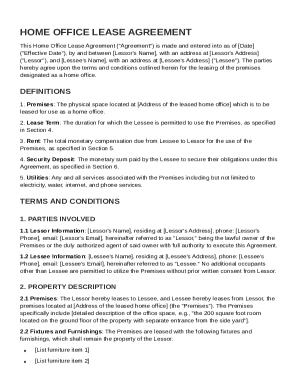
Get Home Office Lease Agreement Template
How it works
-

Open form follow the instructions
-

Easily sign the form with your finger
-

Send filled & signed form or save
How to fill out and sign Home Office Lease Agreement Template online?
Get your online template and fill it in using progressive features. Enjoy smart fillable fields and interactivity.Follow the simple instructions below:The preparation of lawful documents can be high-priced and time-ingesting. However, with our pre-built online templates, everything gets simpler. Now, working with a Home Office Lease Agreement Template requires a maximum of 5 minutes. Our state-specific web-based blanks and simple guidelines eradicate human-prone errors.
Follow our simple actions to get your Home Office Lease Agreement Template ready quickly:
- Pick the web sample from the catalogue.
- Complete all necessary information in the necessary fillable areas. The intuitive drag&drop interface makes it simple to add or relocate fields.
- Check if everything is completed appropriately, with no typos or absent blocks.
- Apply your electronic signature to the PDF page.
- Simply click Done to confirm the changes.
- Download the data file or print out your copy.
- Distribute immediately towards the receiver.
Take advantage of the quick search and innovative cloud editor to make a correct Home Office Lease Agreement Template. Clear away the routine and create documents online!
Tips on how to fill out, edit and sign Home Office Lease Agreement Template online
How to fill out and sign Home Office Lease Agreement Template online?
Get your online template and fill it in using progressive features. Enjoy smart fillable fields and interactivity.Follow the simple instructions below:
The preparation of lawful documents can be high-priced and time-ingesting. However, with our pre-built online templates, everything gets simpler. Now, working with a Home Office Lease Agreement Template requires a maximum of 5 minutes. Our state-specific web-based blanks and simple guidelines eradicate human-prone errors.
Follow our simple actions to get your Home Office Lease Agreement Template ready quickly:
- Pick the web sample from the catalogue.
- Complete all necessary information in the necessary fillable areas. The intuitive drag&drop interface makes it simple to add or relocate fields.
- Check if everything is completed appropriately, with no typos or absent blocks.
- Apply your electronic signature to the PDF page.
- Simply click Done to confirm the changes.
- Download the data file or print out your copy.
- Distribute immediately towards the receiver.
Take advantage of the quick search and innovative cloud editor to make a correct Home Office Lease Agreement Template. Clear away the routine and create documents online!
How to modify Home Office Lease Agreement Template: customize forms online
Take away the mess from your paperwork routine. Discover the simplest way to find and edit, and file a Home Office Lease Agreement Template
The process of preparing Home Office Lease Agreement Template needs accuracy and focus, especially from people who are not well familiar with this kind of job. It is important to find a suitable template and fill it in with the correct information. With the proper solution for processing paperwork, you can get all the instruments at hand. It is easy to streamline your editing process without learning additional skills. Find the right sample of Home Office Lease Agreement Template and fill it out right away without switching between your browser tabs. Discover more tools to customize your Home Office Lease Agreement Template form in the editing mode.
While on the Home Office Lease Agreement Template page, just click the Get form button to start editing it. Add your details to the form on the spot, as all the needed instruments are at hand right here. The sample is pre-designed, so the work required from the user is minimal. Just use the interactive fillable fields in the editor to easily complete your paperwork. Simply click on the form and proceed to the editor mode immediately. Complete the interactive field, and your file is all set.
Try more tools to customize your form:
- Place more textual content around the document if needed. Use the Text and Text Box tools to insert text in a separate box.
- Add pre-designed visual elements like Circle, Cross, and Check with respective tools.
- If needed, capture or upload images to the document with the Image tool.
- If you need to draw something in the document, use Line, Arrow, and Draw tools.
- Try the Highlight, Erase, and Blackout tools to customize the text in the document.
- If you need to add comments to specific document parts, click on the Sticky tool and place a note where you want.
Sometimes, a small error can wreck the whole form when someone completes it manually. Forget about inaccuracies in your paperwork. Find the templates you need in moments and complete them electronically via a smart editing solution.
Yes, Word offers a variety of lease agreement templates that you can customize. However, for those specifically tailored to home office use or compliance with local laws, a Home Office Lease Agreement Template may be more beneficial. Consider using a dedicated template to address your specific needs effectively.