Loading
Form preview
  • US Legal Forms
  • Other Templates
  • More Forms
  • More Multi-State Forms
  • Waiver Waiver Agreement Template

Get Waiver Waiver Agreement Template

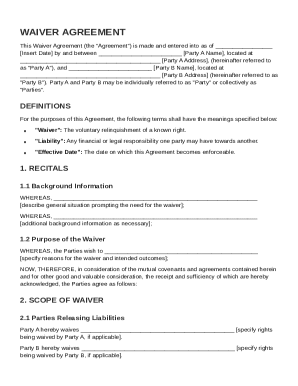
Party A Name , located at Party A Address , (hereinafter referred to as "Party A"), and Party B Name , located at Party B Address (hereinafter referred to as "Party B"). Party A and Party B may be individually referred to as "Party" or collectively as "Parties". DEFINITIONS For the purposes of this Agreement, the following terms shall have the meanings specified below: "Waiver":.

How it works

  1. Open form

    Open form follow the instructions

  2. Easily sign form

    Easily sign the form with your finger

  3. Share form

    Send filled & signed form or save

How to fill out and sign Waiver Waiver Agreement Template online?

Get your online template and fill it in using progressive features. Enjoy smart fillable fields and interactivity.Follow the simple instructions below:

Tax, business, legal and other documents demand higher of compliance with the legislation and protection. Our documents are updated on a regular basis according to the latest amendments in legislation. Additionally, with our service, all the info you include in the Waiver Waiver Agreement Template is well-protected against leakage or damage with the help of cutting-edge file encryption.

The following tips will help you fill out Waiver Waiver Agreement Template easily and quickly:

  1. Open the template in our full-fledged online editing tool by hitting Get form.
  2. Fill in the requested boxes which are colored in yellow.
  3. Click the arrow with the inscription Next to move on from box to box.
  4. Use the e-signature tool to e-sign the form.
  5. Insert the date.
  6. Look through the entire document to be sure that you haven?t skipped anything.
  7. Click Done and download your new template.

Our platform allows you to take the whole process of completing legal forms online. For that reason, you save hours (if not days or weeks) and get rid of additional payments. From now on, complete Waiver Waiver Agreement Template from your home, business office, and even while on the go.

Tips on how to fill out, edit and sign Waiver Waiver Agreement Template online

How to fill out and sign Waiver Waiver Agreement Template online?

Get your online template and fill it in using progressive features. Enjoy smart fillable fields and interactivity.Follow the simple instructions below:

Tax, business, legal and other documents demand higher of compliance with the legislation and protection. Our documents are updated on a regular basis according to the latest amendments in legislation. Additionally, with our service, all the info you include in the Waiver Waiver Agreement Template is well-protected against leakage or damage with the help of cutting-edge file encryption.

The following tips will help you fill out Waiver Waiver Agreement Template easily and quickly:

  1. Open the template in our full-fledged online editing tool by hitting Get form.
  2. Fill in the requested boxes which are colored in yellow.
  3. Click the arrow with the inscription Next to move on from box to box.
  4. Use the e-signature tool to e-sign the form.
  5. Insert the date.
  6. Look through the entire document to be sure that you haven?t skipped anything.
  7. Click Done and download your new template.

Our platform allows you to take the whole process of completing legal forms online. For that reason, you save hours (if not days or weeks) and get rid of additional payments. From now on, complete Waiver Waiver Agreement Template from your home, business office, and even while on the go.

How to edit Waiver Waiver Agreement Template: customize forms online

Simplify your paperwork preparation process and adapt it to your needs within clicks. Fill out and sign Waiver Waiver Agreement Template with a powerful yet user-friendly online editor.

Managing documents is always difficult, especially when you cope with it from time to time. It demands you strictly adhere to all the formalities and precisely fill out all fields with full and accurate information. Nevertheless, it often happens that you need to adjust the document or insert extra fields to fill out. If you need to improve Waiver Waiver Agreement Template before submitting it, the easiest way to do it is by using our robust yet easy-to-use online editing tools.

This extensive PDF editing solution allows you to easily and quickly fill out legal paperwork from any internet-connected device, make fundamental changes to the form, and insert more fillable fields. The service allows you to choose a specific area for each data type, like Name, Signature, Currency and SSN etc. You can make them required or conditional and choose who should fill out each field by assigning them to a defined recipient.

Make the steps below to improve your Waiver Waiver Agreement Template online:

  1. Open required file from the catalog.
  2. Fill out the blanks with Text and drop Check and Cross tools to the tickboxes.
  3. Utilize the right-hand toolbar to alter the form with new fillable areas.
  4. Opt for the fields depending on the type of information you want to be collected.
  5. Make these fields required, optional, and conditional and customize their order.
  6. Assign each field to a specific party using the Add Signer tool.
  7. Verify that you’ve made all the required modifications and click Done.

Our editor is a versatile multi-featured online solution that can help you quickly and easily adapt Waiver Waiver Agreement Template along with other forms in accordance with your requirements. Reduce document preparation and submission time and make your documentation look professional without hassle.

Get form

Experience a faster way to fill out and sign forms on the web. Access the most extensive library of templates available.
Get form

Related content

Form of Waiver Agreement
This waiver agreement involves Class B holders waiving anti-dilution protections on their...
Learn more
Participation Agreement and Waiver Form
Participation Agreement and Waiver Form. PROGRAM/ACTIVITY INFORMATION. Program/Activity...
Learn more
FL-626 Stipulation and Order Waiving Unassigned...
FL-626 is a form to waive past-due support, where the party waiving cannot later request...
Learn more

Related links form

Printable Nomination Form For 2013 - CT.gov - Cga Ct DELAWARE DE 300 SCHEDULE K-1 Reset Tax Year 2010 Print Form PARTNER S SHARE OF INCOME Fiscal Year Real Estate Verification - Delaware State Housing Authority DELAWARE SCHEDULE W Tax Year 2012 APPORTIONMENT WORKSHEET Reset NAME Print Form SOCIAL SECURITY

Questions & Answers

Get answers to your most pressing questions about US Legal Forms API.

Contact support

To make a waiver, begin by identifying the rights or claims you want to relinquish. Use a tool like the Waiver Waiver Agreement Template for guidance on formatting and necessary contents. Clearly state all terms and conditions, and ensure all involved parties understand them. Once completed, collect signatures to formalize the waiver.

Writing a waiver contract involves outlining the specific rights you wish to waive and providing details about the involved parties. The Waiver Waiver Agreement Template can streamline this process, offering a clear structure to follow. Be sure to use simple language that reflects the intent of the parties. After drafting, everyone should sign the contract to make it official.

Creating your own waiver is possible, but it requires careful consideration to be effective. Utilize a resource like the Waiver Waiver Agreement Template to ensure all necessary components are included. This template helps ensure that your waiver covers the essential details, making it both clear and enforceable. Always review your document for accuracy before signing.

To fill out a waiver form, begin by entering the names of the parties involved and clearly specifying the rights being waived. Incorporate information that reflects the circumstances of the waiver, which can typically be found in the Waiver Waiver Agreement Template. Finally, ensure that all parties sign and date the waiver to acknowledge their agreement.

Yes, signing a waiver is legal, provided it is properly drafted. A waiver that follows guidelines, such as those found in the Waiver Waiver Agreement Template, creates an enforceable agreement. Remember that both parties must willingly agree to the terms of the waiver. It is advisable to keep a copy of the signed waiver for future reference.

Yes, you can create your own waiver, but it must contain specific elements to be legally enforceable. The Waiver Waiver Agreement Template provides a solid foundation for your document. Make sure it details the rights being waived and includes all necessary party information. A well-structured waiver can protect you from future liabilities.

A waiver is a legally binding document as long as it meets certain requirements. It must clearly outline the rights being waived and the circumstances surrounding the waiver. Using the Waiver Waiver Agreement Template helps ensure compliance with legal standards. Therefore, it is crucial to understand the specifics before signing.

To fill out a waiver of rights, start by clearly stating the rights you wish to waive. Use the Waiver Waiver Agreement Template for guidance. Ensure that you include the names of all parties involved, the specific rights being waived, and the date. Lastly, sign the document to confirm your intentions.

Get This Form Now!

Use professional pre-built templates to fill in and sign documents online faster. Get access to thousands of forms.
Get form
If you believe that this page should be taken down, please follow our DMCA take down processhere.
Get Waiver Waiver Agreement Template
Get form
  • Adoption
  • Bankruptcy
  • Contractors
  • Divorce
  • Home Sales
  • Employment
  • Identity Theft
  • Incorporation
  • Landlord Tenant
  • Living Trust
  • Name Change
  • Personal Planning
  • Small Business
  • Wills & Estates
  • Packages A-Z
  • Affidavits
  • Bankruptcy
  • Bill of Sale
  • Corporate - LLC
  • Divorce
  • Employment
  • Identity Theft
  • Internet Technology
  • Landlord Tenant
  • Living Wills
  • Name Change
  • Power of Attorney
  • Real Estate
  • Small Estates
  • Wills
  • All Forms
  • Forms A-Z
  • Other Templates
  • Legal Hub
  • About Us
  • Help Portal
  • Legal Resources
  • Blog
  • Affiliates
  • Contact Us
  • Delete My Account
  • Site Map
  • Industries
  • Forms in Spanish
  • Localized Forms
  • State-specific Forms
  • Forms Kit
  • Real Estate Handbook
  • All Guides
  • Notarize
  • Incorporation services
  • For Consumers
  • For Small Business
  • For Attorneys
  • USLegal
  • FormsPass
  • pdfFiller
  • signNow
  • altaFlow
  • DocHub
  • Instapage
Form Packages
  • Adoption
  • Bankruptcy
  • Contractors
  • Divorce
  • Home Sales
  • Employment
  • Identity Theft
  • Incorporation
  • Landlord Tenant
  • Living Trust
  • Name Change
  • Personal Planning
  • Small Business
  • Wills & Estates
  • Packages A-Z
Form Categories
  • Affidavits
  • Bankruptcy
  • Bill of Sale
  • Corporate - LLC
  • Divorce
  • Employment
  • Identity Theft
  • Internet Technology
  • Landlord Tenant
  • Living Wills
  • Name Change
  • Power of Attorney
  • Real Estate
  • Small Estates
  • Wills
  • All Forms
  • Forms A-Z
  • Other Templates
Customer Service
  • Legal Hub
  • About Us
  • Help Portal
  • Legal Resources
  • Blog
  • Affiliates
  • Contact Us
  • Delete My Account
  • Site Map
  • Industries
  • Forms in Spanish
  • Localized Forms
  • State-specific Forms
  • Forms Kit
Legal Guides
  • Real Estate Handbook
  • All Guides
Prepared for you
  • Notarize
  • Incorporation services
Our Customers
  • For Consumers
  • For Small Business
  • For Attorneys
Our Sites
  • USLegal
  • FormsPass
  • pdfFiller
  • signNow
  • altaFlow
  • DocHub
  • Instapage
Social Media
Call us now toll free:
+1 833 426 79 33
As seen in:
© Copyright 1999-2026 airSlate Legal Forms, Inc. 17 Station Street, Ste. 203, Brookline, MA 02445
  • Your Privacy Choices
  • Terms of Service
  • Privacy Notice
  • Content Takedown Policy
  • Bug Bounty Program