Loading
Form preview
  • US Legal Forms
  • Other Templates
  • More Forms
  • More Multi-State Forms
  • Unpaid Leave Employee Agreement Template

Get Unpaid Leave Employee Agreement Template

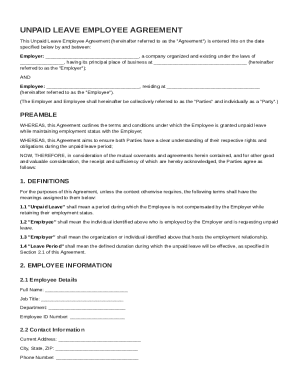
, a company organized and existing under the laws of , having its principal place of business at (hereinafter referred to as the "Employer"); AND Employee: , residing at (hereinafter referred to as the "Employee"). (The Employer and Employee shall hereinafter be collectively referred to as the "Parties" and individually as a "Party".) PREAMBLE WHEREAS,.

How it works

  1. Open form

    Open form follow the instructions

  2. Easily sign form

    Easily sign the form with your finger

  3. Share form

    Send filled & signed form or save

How to fill out and sign Unpaid Leave Employee Agreement Template online?

Get your online template and fill it in using progressive features. Enjoy smart fillable fields and interactivity.Follow the simple instructions below:

Experience all the key benefits of submitting and completing legal forms online. With our platform filling in Unpaid Leave Employee Agreement Template usually takes a couple of minutes. We make that achievable by offering you access to our feature-rich editor effective at transforming/fixing a document?s initial textual content, adding unique boxes, and putting your signature on.

Execute Unpaid Leave Employee Agreement Template within a couple of minutes following the instructions listed below:

  1. Find the document template you will need from the library of legal form samples.
  2. Choose the Get form key to open the document and move to editing.
  3. Fill out all the requested fields (these are yellowish).
  4. The Signature Wizard will allow you to put your electronic autograph after you?ve finished imputing information.
  5. Add the relevant date.
  6. Check the whole form to make certain you have completed all the data and no corrections are needed.
  7. Hit Done and save the resulting document to your device.

Send your Unpaid Leave Employee Agreement Template in a digital form as soon as you finish filling it out. Your information is securely protected, because we adhere to the most up-to-date security criteria. Join millions of happy clients that are already filling in legal templates from their homes.

Tips on how to fill out, edit and sign Unpaid Leave Employee Agreement Template online

How to fill out and sign Unpaid Leave Employee Agreement Template online?

Get your online template and fill it in using progressive features. Enjoy smart fillable fields and interactivity.Follow the simple instructions below:

Experience all the key benefits of submitting and completing legal forms online. With our platform filling in Unpaid Leave Employee Agreement Template usually takes a couple of minutes. We make that achievable by offering you access to our feature-rich editor effective at transforming/fixing a document?s initial textual content, adding unique boxes, and putting your signature on.

Execute Unpaid Leave Employee Agreement Template within a couple of minutes following the instructions listed below:

  1. Find the document template you will need from the library of legal form samples.
  2. Choose the Get form key to open the document and move to editing.
  3. Fill out all the requested fields (these are yellowish).
  4. The Signature Wizard will allow you to put your electronic autograph after you?ve finished imputing information.
  5. Add the relevant date.
  6. Check the whole form to make certain you have completed all the data and no corrections are needed.
  7. Hit Done and save the resulting document to your device.

Send your Unpaid Leave Employee Agreement Template in a digital form as soon as you finish filling it out. Your information is securely protected, because we adhere to the most up-to-date security criteria. Join millions of happy clients that are already filling in legal templates from their homes.

How to edit Unpaid Leave Employee Agreement Template: customize forms online

Eliminate the mess from your paperwork routine. Discover the most effective way to find and edit, and file a Unpaid Leave Employee Agreement Template

The process of preparing Unpaid Leave Employee Agreement Template requires precision and attention, especially from people who are not well familiar with such a job. It is important to get a suitable template and fill it in with the correct information. With the proper solution for processing documents, you can get all the instruments at hand. It is easy to simplify your editing process without learning additional skills. Locate the right sample of Unpaid Leave Employee Agreement Template and fill it out quickly without switching between your browser tabs. Discover more tools to customize your Unpaid Leave Employee Agreement Template form in the editing mode.

While on the Unpaid Leave Employee Agreement Template page, simply click the Get form button to start editing it. Add your details to the form on the spot, as all the needed instruments are at hand right here. The sample is pre-designed, so the work needed from the user is minimal. Simply use the interactive fillable fields in the editor to easily complete your paperwork. Simply click on the form and proceed to the editor mode straight away. Fill in the interactive field, and your file is all set.

Try more tools to customize your form:

  • Place more textual content around the document if needed. Use the Text and Text Box tools to insert text in a separate box.
  • Add pre-designed visual elements like Circle, Cross, and Check with respective tools.
  • If needed, capture or upload images to the document with the Image tool.
  • If you need to draw something in the document, use Line, Arrow, and Draw tools.
  • Try the Highlight, Erase, and Blackout tools to customize the text in the document.
  • If you need to add comments to specific document sections, click on the Sticky tool and place a note where you want.

Sometimes, a small error can wreck the whole form when someone fills it by hand. Forget about inaccuracies in your paperwork. Find the templates you require in moments and finish them electronically via a smart editing solution.

Get form

Experience a faster way to fill out and sign forms on the web. Access the most extensive library of templates available.
Get form

Related content

EMPLOYMENT AGREEMENT
Employee is entitled to accrue thirty (30) days of Paid Time Off (“PTO”) on an annual...
Learn more
Unpaid Leave Request Form
Employees who meet the eligibility criteria for a leave of absence must complete this form...
Learn more
Sample Policies and Standard Operating Procedures
May 8, 2021 — Staff.Wiki comes with a number of sample policies and procedures. We've...
Learn more

Related links form

Application Law Enforcement, Twin Peaks - Ohv Parks Ca Reservations For PESTICIDE ANALYSIS REPORT - California Department Of ... FIFRA Section 18 Emergency ExemptionsMinnesota Department Of ...

Questions & Answers

Get answers to your most pressing questions about US Legal Forms API.

Contact support

To write an unpaid leave letter to an employee, start with a clear subject line and salutation. Use an Unpaid Leave Employee Agreement Template to ensure you cover important details like the leave duration and any responsibilities during the leave. This letter provides the employee with an official outline of the agreement, promoting clarity and understanding.

When writing a letter for unpaid leave, include essential details such as the dates of leave and the reason. Refer to an Unpaid Leave Employee Agreement Template for guidance on structure and content. This letter serves not only as a formal request but also as a record for both parties involved.

Recording unpaid leave involves accurately documenting the dates and reasons for the leave. Implement an Unpaid Leave Employee Agreement Template to create a reliable record of the agreement between you and the employee. This template acts as a solid reference point in case of future inquiries or disputes.

When requesting unpaid leave via email, be concise and clear about your intentions. Use an Unpaid Leave Employee Agreement Template to ensure all necessary information is included, such as dates of leave and reasons. This structured approach increases the likelihood of your request being approved promptly.

To inform an employee about unpaid leave, you should communicate the decision in writing and provide specific details. Best practices suggest utilizing an Unpaid Leave Employee Agreement Template for consistency and compliance. This documentation clarifies the duration, reasons, and expectations during the leave period, which fosters transparency.

Yes, you can place an employee on unpaid leave if it aligns with your company's policies and local labor laws. It's essential to document this decision properly using an Unpaid Leave Employee Agreement Template to ensure clarity. This template helps outline the terms and conditions of the unpaid leave, protecting both the employer and the employee.

Justifying a leave of absence involves providing valid reasons that clearly convey the necessity of your time away. Your explanation might include personal or family health issues, further education requirements, or major life events. Using an Unpaid Leave Employee Agreement Template can help you articulate your justification in a formal manner that resonates with your employer.

When writing a request for unpaid leave, start with a polite greeting followed by a clear and honest explanation of your need for leave. Include specific dates and mention how work responsibilities will be covered while you are away. An Unpaid Leave Employee Agreement Template can guide you in structuring this request to ensure all important aspects are addressed.

To ask for a leave of absence professionally, begin with a concise letter or email addressed to your supervisor. Clearly state your need for leave, specify the duration, and express your commitment to managing your workload in your absence. Utilizing an Unpaid Leave Employee Agreement Template can ensure you include all relevant details, making your request more formal.

Asking for unpaid leave involves preparing a formal request. Start by writing a clear letter or email to your supervisor, stating the reason for your leave, the dates you plan to be away, and how your responsibilities will be handled. Using an Unpaid Leave Employee Agreement Template can help you structure your request effectively.

Get This Form Now!

Use professional pre-built templates to fill in and sign documents online faster. Get access to thousands of forms.
Get form
If you believe that this page should be taken down, please follow our DMCA take down processhere.
Get Unpaid Leave Employee Agreement Template
Get form
  • Adoption
  • Bankruptcy
  • Contractors
  • Divorce
  • Home Sales
  • Employment
  • Identity Theft
  • Incorporation
  • Landlord Tenant
  • Living Trust
  • Name Change
  • Personal Planning
  • Small Business
  • Wills & Estates
  • Packages A-Z
  • Affidavits
  • Bankruptcy
  • Bill of Sale
  • Corporate - LLC
  • Divorce
  • Employment
  • Identity Theft
  • Internet Technology
  • Landlord Tenant
  • Living Wills
  • Name Change
  • Power of Attorney
  • Real Estate
  • Small Estates
  • Wills
  • All Forms
  • Forms A-Z
  • Other Templates
  • Legal Hub
  • About Us
  • Help Portal
  • Legal Resources
  • Blog
  • Affiliates
  • Contact Us
  • Delete My Account
  • Site Map
  • Industries
  • Forms in Spanish
  • Localized Forms
  • State-specific Forms
  • Forms Kit
  • Real Estate Handbook
  • All Guides
  • Notarize
  • Incorporation services
  • For Consumers
  • For Small Business
  • For Attorneys
  • USLegal
  • FormsPass
  • pdfFiller
  • signNow
  • altaFlow
  • DocHub
  • Instapage
Form Packages
  • Adoption
  • Bankruptcy
  • Contractors
  • Divorce
  • Home Sales
  • Employment
  • Identity Theft
  • Incorporation
  • Landlord Tenant
  • Living Trust
  • Name Change
  • Personal Planning
  • Small Business
  • Wills & Estates
  • Packages A-Z
Form Categories
  • Affidavits
  • Bankruptcy
  • Bill of Sale
  • Corporate - LLC
  • Divorce
  • Employment
  • Identity Theft
  • Internet Technology
  • Landlord Tenant
  • Living Wills
  • Name Change
  • Power of Attorney
  • Real Estate
  • Small Estates
  • Wills
  • All Forms
  • Forms A-Z
  • Other Templates
Customer Service
  • Legal Hub
  • About Us
  • Help Portal
  • Legal Resources
  • Blog
  • Affiliates
  • Contact Us
  • Delete My Account
  • Site Map
  • Industries
  • Forms in Spanish
  • Localized Forms
  • State-specific Forms
  • Forms Kit
Legal Guides
  • Real Estate Handbook
  • All Guides
Prepared for you
  • Notarize
  • Incorporation services
Our Customers
  • For Consumers
  • For Small Business
  • For Attorneys
Our Sites
  • USLegal
  • FormsPass
  • pdfFiller
  • signNow
  • altaFlow
  • DocHub
  • Instapage
Social Media
Call us now toll free:
+1 833 426 79 33
As seen in:
© Copyright 1999-2026 airSlate Legal Forms, Inc. 17 Station Street, Ste. 203, Brookline, MA 02445
  • Your Privacy Choices
  • Terms of Service
  • Privacy Notice
  • Content Takedown Policy
  • Bug Bounty Program