Get Va 22-5495 2002
How it works
-

Open form follow the instructions
-

Easily sign the form with your finger
-

Send filled & signed form or save
How to fill out the VA 22-5495 online
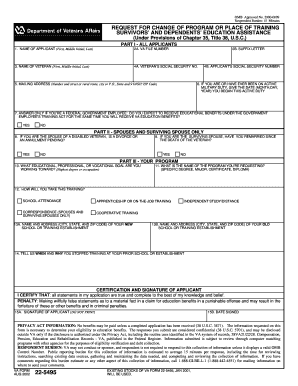
This guide provides clear, step-by-step instructions for completing the VA 22-5495 form, which is used to request a change of program or place of training under the Survivors’ and Dependents’ Educational Assistance program. Whether you are changing schools or your educational goals, this guide will help you navigate the process confidently.
Follow the steps to complete the VA 22-5495 online.
- Click ‘Get Form’ button to access the form and open it in your document management system.
- Begin by entering your name as the applicant in the designated fields (first, middle initial, last). Ensure this information is accurate.
- Provide your VA file number in section 2A, which can usually be found on your VA benefit checks or correspondence. If applicable, include the suffix letter in section 2B.
- Enter the name of the veteran in section 3, including their first, middle initial, and last name.
- Fill out the veteran’s social security number in section 4A.
- Add your mailing address in section 5, ensuring you include the correct ZIP code.
- Input your social security number in section 4B.
- If applicable, record the date when you began active military duty in section 6.
- If you are a federal government employee, answer the question in section 7 regarding educational benefits under the Government Employee’s Training Act.
- If you are a spouse or surviving spouse, complete sections 8 and 9 regarding divorce or remarriage status, respectively.
- In section 10, specify your educational, professional, or vocational goal.
- Indicate the name of the program you are requesting in section 11, specifying the degree, major, or certification.
- Select how you will take the training in section 12 and provide the name and address of your new school or training establishment in section 13A.
- Also provide the name and address of your old school in section 13B.
- In section 14, explain when and why you stopped training at your previous school.
- After completing all sections, ensure your name is signed in section 15A and include the date in section 15B.
- Once finished, you have the option to save changes, download, print, or share your filled form.
Take the next step towards your educational goals by completing the VA 22-5495 online today.
Get form
Yes, 100% disabled veterans are generally eligible for the full GI Bill benefits. This allows them to cover tuition and fees at eligible institutions, as well as housing allowances and other associated costs. It is essential to submit the appropriate forms, such as VA form 22-5495, to access these benefits. To navigate this effectively, services like USLegalForms can provide necessary assistance and resources.