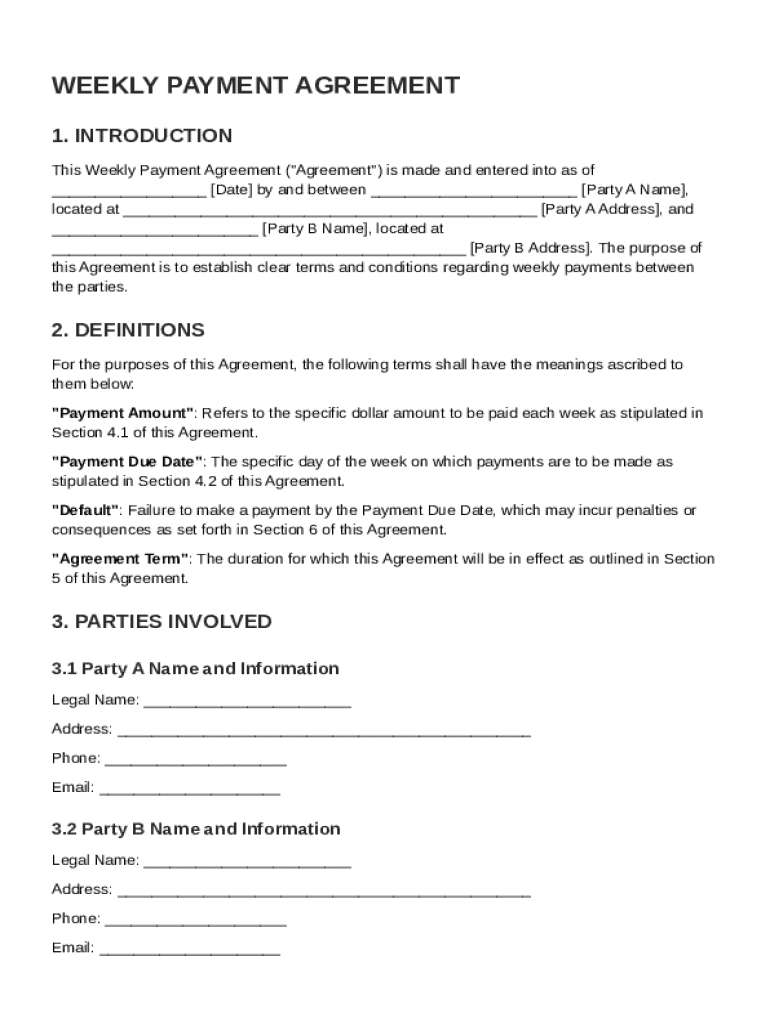
Party A Name , located at Party A Address , and Party B Name , located at Party B Address . The purpose of this Agreement is to establish clear terms and conditions regarding weekly payments between the parties. 2. DEFINITIONS For the purposes of this Agreement, the following terms shall have the meanings ascribed to them below: "Payment Amount": Refer.
Loading

Open form follow the instructions

Easily sign the form with your finger

Send filled & signed form or save
How to fill out and sign Weekly Payment Agreement Template online?
Get your online template and fill it in using progressive features. Enjoy smart fillable fields and interactivity.Follow the simple instructions below:
The days of distressing complicated tax and legal documents have ended. With US Legal Forms filling out legal documents is anxiety-free. The leading editor is right close at hand offering you a wide variety of beneficial instruments for completing a Weekly Payment Agreement Template. The following tips, along with the editor will guide you through the complete process.
- Hit the Get Form option to start editing and enhancing.
- Switch on the Wizard mode in the top toolbar to obtain extra tips.
- Complete every fillable area.
- Ensure that the information you add to the Weekly Payment Agreement Template is up-to-date and accurate.
- Add the date to the document with the Date feature.
- Select the Sign icon and create a signature. There are 3 options; typing, drawing, or uploading one.
- Re-check each field has been filled in properly.
- Select Done in the top right corne to export the file. There are many alternatives for getting the doc. An attachment in an email or through the mail as a hard copy, as an instant download.
We make completing any Weekly Payment Agreement Template much faster. Get started now!
Tips on how to fill out, edit and sign Weekly Payment Agreement Template online
How to fill and sign Weekly Payment Agreement Template
Get your online template and fill it in using progressive features. Enjoy smart fillable fields and interactivity.Follow the simple instructions below:
The days of distressing complicated tax and legal documents have ended. With US Legal Forms filling out legal documents is anxiety-free. The leading editor is right close at hand offering you a wide variety of beneficial instruments for completing a Weekly Payment Agreement Template. The following tips, along with the editor will guide you through the complete process.
- Hit the Get Form option to start editing and enhancing.
- Switch on the Wizard mode in the top toolbar to obtain extra tips.
- Complete every fillable area.
- Ensure that the information you add to the Weekly Payment Agreement Template is up-to-date and accurate.
- Add the date to the document with the Date feature.
- Select the Sign icon and create a signature. There are 3 options; typing, drawing, or uploading one.
- Re-check each field has been filled in properly.
- Select Done in the top right corne to export the file. There are many alternatives for getting the doc. An attachment in an email or through the mail as a hard copy, as an instant download.
We make completing any Weekly Payment Agreement Template much faster. Get started now!
How to edit Weekly Payment Agreement Template
Use our comprehensive editor to turn a simple online template into a completed document. Keep reading to learn how to modify Weekly Payment Agreement Template online easily.
Once you find an ideal Weekly Payment Agreement Template, all you need to do is adjust the template to your preferences or legal requirements. Apart from completing the fillable form with accurate data, you may need to remove some provisions in the document that are irrelevant to your circumstance. Alternatively, you might want to add some missing conditions in the original template. Our advanced document editing tools are the best way to fix and adjust the form.
The editor allows you to modify the content of any form, even if the document is in PDF format. You can add and remove text, insert fillable fields, and make further changes while keeping the original formatting of the document. You can also rearrange the structure of the form by changing page order.
You don’t need to print the Weekly Payment Agreement Template to sign it. The editor comes along with electronic signature capabilities. Most of the forms already have signature fields. So, you only need to add your signature and request one from the other signing party via email.
Follow this step-by-step guide to build your Weekly Payment Agreement Template:
- Open the preferred template.
- Use the toolbar to adjust the template to your preferences.
- Complete the form providing accurate information.
- Click on the signature field and add your eSignature.
- Send the document for signature to other signers if needed.
Once all parties sign the document, you will get a signed copy which you can download, print, and share with other people.
Our services let you save tons of your time and minimize the risk of an error in your documents. Improve your document workflows with effective editing tools and a powerful eSignature solution.
How to fill and sign Weekly Payment Agreement Template
Get your online template and fill it in using progressive features. Enjoy smart fillable fields and interactivity.Follow the simple instructions below:
The days of distressing complicated tax and legal documents have ended. With US Legal Forms filling out legal documents is anxiety-free. The leading editor is right close at hand offering you a wide variety of beneficial instruments for completing a Weekly Payment Agreement Template. The following tips, along with the editor will guide you through the complete process.
- Hit the Get Form option to start editing and enhancing.
- Switch on the Wizard mode in the top toolbar to obtain extra tips.
- Complete every fillable area.
- Ensure that the information you add to the Weekly Payment Agreement Template is up-to-date and accurate.
- Add the date to the document with the Date feature.
- Select the Sign icon and create a signature. There are 3 options; typing, drawing, or uploading one.
- Re-check each field has been filled in properly.
- Select Done in the top right corne to export the file. There are many alternatives for getting the doc. An attachment in an email or through the mail as a hard copy, as an instant download.
We make completing any Weekly Payment Agreement Template much faster. Get started now!
Experience a faster way to fill out and sign forms on the web. Access the most extensive library of templates available.
Related content
◗ By entering into a payment agreement with DOR, you agree to: • Submit your required...
2. Tenant shall not sub-let the premises, or any part thereof, or assign this agreement...
Mar 24, 2022 — Discover the essential components of a robust consulting agreement. Learn...
Get answers to your most pressing questions about US Legal Forms API.
How to draft a payment agreement template in Word?
To draft a payment agreement template in Word, start by organizing your document with headings for each section, such as the parties involved, payment amounts, and terms. You can base your draft on a Weekly Payment Agreement Template available online, adjusting it to suit your scenario. Once you complete your draft, review it carefully to ensure clarity and completeness before finalizing it.
How to write a proposal for a payment plan?
When writing a proposal for a payment plan, begin with a brief introduction outlining your financial situation and the reason for the proposal. Follow this with a detailed plan that includes the payment amount, frequency, and duration. Using a Weekly Payment Agreement Template can simplify structuring your proposal and help ensure all key elements are included.
How do I write a payment plan agreement template?
To write a payment plan agreement template, begin by outlining the total debt, payment intervals, and any interest rates. Clearly state the responsibilities of each party involved. A Weekly Payment Agreement Template can serve as a solid foundation, allowing you to easily customize your payment plan while ensuring all necessary terms are present.
How to write a payment arrangement?
Writing a payment arrangement requires you to clearly state the total amount owed, the scheduled payment dates, and any applicable interest rates. You can enhance clarity by using bullet points or numbering for each payment detail. Consider using the Weekly Payment Agreement Template, which can help you draft a well-organized and legally binding document.
How to write a payment terms template?
To write a payment terms template, you should specify the total amount due, due dates, and penalties for late payments. It is also helpful to include acceptable payment methods and any discounts for early payments. Utilizing a Weekly Payment Agreement Template can streamline this task, ensuring that you include all vital information in a structured manner.
How do you write a payment arrangement?
Writing a payment arrangement involves outlining the payment amount, frequency, and method. Start with an introduction stating the purpose of the arrangement, and detail each party's obligations. Using a Weekly Payment Agreement Template can simplify this process, helping you create a clear and effective arrangement that both parties can follow.
How to write a payment plan template?
Writing a payment plan template requires a clear layout that includes the total amount owed and the structure of repayment. Specify installment amounts, due dates, and payment methods clearly for transparency. By utilizing our Weekly Payment Agreement Template, you can create an effective plan that benefits all parties involved.
How do I make a payment agreement?
To make a payment agreement, begin with a clear introduction that states the purpose of the agreement. Include critical details such as payment amounts, deadlines, and any other relevant terms that both parties must adhere to. Crafting your document using a Weekly Payment Agreement Template ensures that you cover all necessary points effortlessly.
How do you write payment terms in an agreement?
Payment terms in an agreement should clearly state the total payment amount, due dates, and any applicable fees for late payments. Use clear language to define both the expectations for timely payments and the consequences for non-compliance. Adopting our Weekly Payment Agreement Template can help you draft comprehensive payment terms effectively.
How to write a written agreement for payment?
Writing a written agreement for payment involves outlining the nature of the transaction, specifying the amount owed, and detailing the payment schedule. Make sure to include both parties' names and contact information, along with any penalties or consequences for late payments. Consider using our structured Weekly Payment Agreement Template for clarity and accuracy.
Use professional pre-built templates to fill in and sign documents online faster. Get access to thousands of forms.
If you believe that this page should be taken down, please follow our DMCA take down process here.