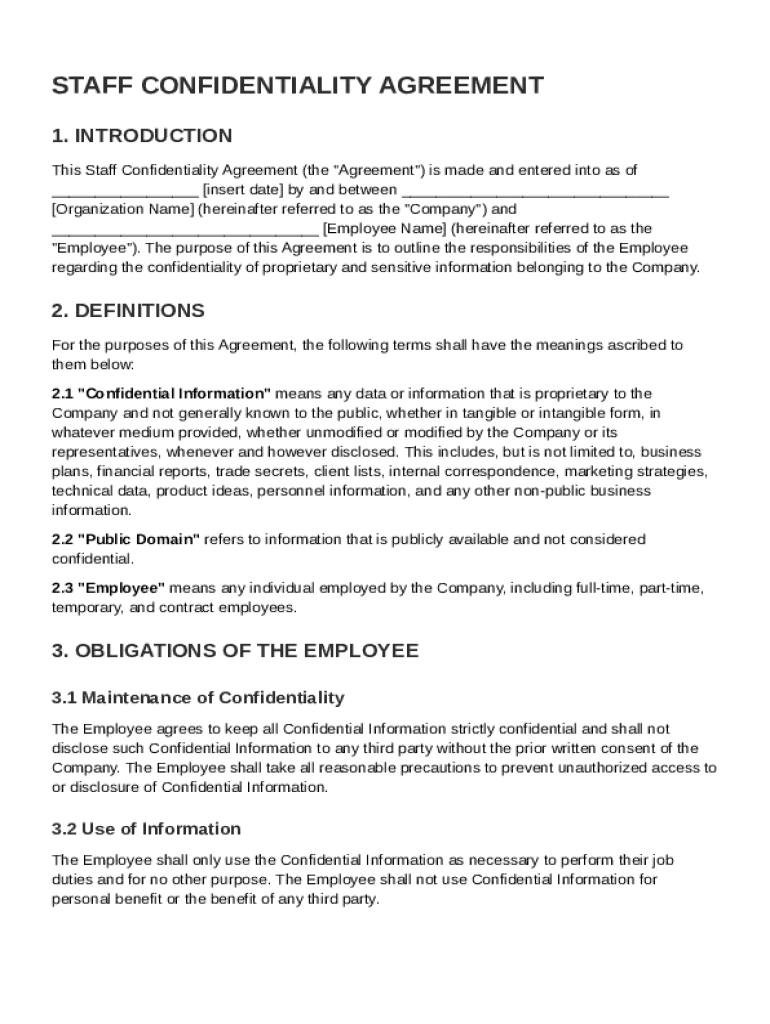
Insert date by and between Organization Name (hereinafter referred to as the "Company") and Employee Name (hereinafter referred to as the "Employee"). The purpose of this Agreement is to outline the responsibilities of the Employee regarding the confidentiality of proprietary and sensitive information belonging to the Company. 2. DEFINITIONS For the purposes of this Agreement, the following terms shall have the meanings ascri.

Open form follow the instructions

Easily sign the form with your finger

Send filled & signed form or save
How to fill out and sign Staff Confidentiality Agreement Template online?
Get your online template and fill it in using progressive features. Enjoy smart fillable fields and interactivity.Follow the simple instructions below:
The days of distressing complicated tax and legal documents have ended. With US Legal Forms submitting legal documents is anxiety-free. The leading editor is directly close at hand supplying you with various beneficial instruments for filling out a Staff Confidentiality Agreement Template. The following tips, combined with the editor will help you through the entire process.
- Click the Get Form option to start filling out.
- Turn on the Wizard mode in the top toolbar to obtain more suggestions.
- Complete each fillable field.
- Make sure the details you add to the Staff Confidentiality Agreement Template is up-to-date and accurate.
- Add the date to the form using the Date feature.
- Select the Sign button and create a digital signature. Feel free to use 3 available choices; typing, drawing, or capturing one.
- Be sure that every area has been filled in properly.
- Click Done in the top right corne to save the template. There are many choices for receiving the doc. As an instant download, an attachment in an email or through the mail as a hard copy.
We make completing any Staff Confidentiality Agreement Template more straightforward. Start now!
Tips on how to fill out, edit and sign Staff Confidentiality Agreement Template online
How to fill and sign Staff Confidentiality Agreement Template
Get your online template and fill it in using progressive features. Enjoy smart fillable fields and interactivity.Follow the simple instructions below:
The days of distressing complicated tax and legal documents have ended. With US Legal Forms submitting legal documents is anxiety-free. The leading editor is directly close at hand supplying you with various beneficial instruments for filling out a Staff Confidentiality Agreement Template. The following tips, combined with the editor will help you through the entire process.
- Click the Get Form option to start filling out.
- Turn on the Wizard mode in the top toolbar to obtain more suggestions.
- Complete each fillable field.
- Make sure the details you add to the Staff Confidentiality Agreement Template is up-to-date and accurate.
- Add the date to the form using the Date feature.
- Select the Sign button and create a digital signature. Feel free to use 3 available choices; typing, drawing, or capturing one.
- Be sure that every area has been filled in properly.
- Click Done in the top right corne to save the template. There are many choices for receiving the doc. As an instant download, an attachment in an email or through the mail as a hard copy.
We make completing any Staff Confidentiality Agreement Template more straightforward. Start now!
How to edit Staff Confidentiality Agreement Template
Have your stressless and paper-free way of modifying Staff Confidentiality Agreement Template. Use our reliable online solution and save a lot of time.
Drafting every form, including Staff Confidentiality Agreement Template, from scratch takes too much effort, so having a tried-and-true platform of pre-uploaded document templates can do magic for your productivity.
But modifying them can be struggle, especially when it comes to the documents in PDF format. Fortunately, our huge library includes a built-in editor that enables you to quickly fill out and edit Staff Confidentiality Agreement Template without leaving our website so that you don't need to waste hours modifying your paperwork. Here's what you can do with your form utilizing our solution:
- Step 1. Locate the required document on our website.
- Step 2. Hit Get Form to open it in the editor.
- Step 3. Take advantage of professional modifying tools that allow you to insert, remove, annotate and highlight or blackout text.
- Step 4. Generate and add a legally-binding signature to your form by using the sign option from the top toolbar.
- Step 5. If the document layout doesn’t look the way you need it, utilize the tools on the right to remove, add, and re-order pages.
- step 6. Add fillable fields so other parties can be invited to fill out the document (if applicable).
- Step 7. Pass around or send out the form, print it out, or choose the format in which you’d like to get the document.
Whether you need to complete editable Staff Confidentiality Agreement Template or any other document available in our catalog, you’re well on your way with our online document editor. It's easy and safe and doesn’t require you to have particular tech background. Our web-based tool is designed to handle practical everything you can think of concerning file editing and completion.
Forget about the traditional way of working with your documents. Choose a more efficient solution to help you simplify your activities and make them less dependent on paper.
How to fill and sign Staff Confidentiality Agreement Template
Get your online template and fill it in using progressive features. Enjoy smart fillable fields and interactivity.Follow the simple instructions below:
The days of distressing complicated tax and legal documents have ended. With US Legal Forms submitting legal documents is anxiety-free. The leading editor is directly close at hand supplying you with various beneficial instruments for filling out a Staff Confidentiality Agreement Template. The following tips, combined with the editor will help you through the entire process.
- Click the Get Form option to start filling out.
- Turn on the Wizard mode in the top toolbar to obtain more suggestions.
- Complete each fillable field.
- Make sure the details you add to the Staff Confidentiality Agreement Template is up-to-date and accurate.
- Add the date to the form using the Date feature.
- Select the Sign button and create a digital signature. Feel free to use 3 available choices; typing, drawing, or capturing one.
- Be sure that every area has been filled in properly.
- Click Done in the top right corne to save the template. There are many choices for receiving the doc. As an instant download, an attachment in an email or through the mail as a hard copy.
We make completing any Staff Confidentiality Agreement Template more straightforward. Start now!
Experience a faster way to fill out and sign forms on the web. Access the most extensive library of templates available.
Related content
For purposes of this Agreement, Confidential Information shall not include any information...
The purpose of this agreement is to provide expectations and guidelines for protecting and...
May 8, 2021 — Staff.Wiki comes with a number of sample policies and procedures. We've...
Get answers to your most pressing questions about US Legal Forms API.
What is an example of a confidentiality clause for employees?
An example of a confidentiality clause for employees might state that employees are prohibited from disclosing sensitive company information during and after their employment period. It should emphasize the obligation to protect confidential data, including trade secrets and personal information. To create a comprehensive clause, consider referring to a Staff Confidentiality Agreement Template that includes such provisions.
Can I write an NDA myself?
Yes, you can write a Non-Disclosure Agreement (NDA) yourself. However, it is crucial to ensure that all necessary components are included, such as defining the confidential information, stating the obligations of both parties, and specifying the duration of the agreement. Using a Staff Confidentiality Agreement Template can help you draft an effective NDA without missing important details.
How to write a confidential agreement?
Writing a confidential agreement involves detailing the purpose of the information sharing and defining what is considered confidential. Be clear about the obligations each party has and how they should handle the disclosed information. Always include the term length for confidentiality. A Staff Confidentiality Agreement Template can help you cover all bases and simplify the writing process.
What is an example of a confidential agreement?
A confidential agreement typically outlines the terms under which confidential information will be shared and protected. For instance, it often includes clauses related to the definition of confidential materials, the duration of confidentiality, and the responsibilities of the involved parties. To craft a thorough confidential agreement, consider using a Staff Confidentiality Agreement Template for reference.
What is an example of a simple confidentiality agreement?
An example of a simple confidentiality agreement includes basic elements like the names of the parties, a definition of confidential information, and the obligations of the receiving party. It should also include the duration of confidentiality and any relevant legal requirements. You can easily create such a document using a Staff Confidentiality Agreement Template to save time and ensure compliance.
How to fill out the NDA?
Filling out a Non-Disclosure Agreement (NDA) requires careful attention to detail. Start by listing the disclosing and receiving parties, then specify the information deemed confidential. Make sure to delineate how long the information should remain confidential and the consequences for breaches. A Staff Confidentiality Agreement Template can guide you through these necessary elements efficiently.
How do you write a simple confidentiality agreement?
Writing a simple confidentiality agreement involves a few straightforward steps. Begin with the title and the date of the agreement, followed by the names of the parties. Clearly define what constitutes confidential information, state the purpose of the agreement, and include terms regarding the use and return of that information. Utilizing a Staff Confidentiality Agreement Template can help streamline this process.
How to fill out a confidentiality agreement?
To fill out a confidentiality agreement, start by clearly identifying the parties involved. Next, specify the confidential information you intend to protect. Include the duration for which the agreement is valid, and outline any obligations or restrictions on how the information can be used. Using a Staff Confidentiality Agreement Template can simplify this process and ensure that all essential details are covered.
Can you make your own confidentiality agreement?
Yes, you can create your own confidentiality agreement tailored to your specific needs. However, it's essential to ensure that it includes all necessary elements, such as definitions, obligations, and duration of confidentiality. By using a Staff Confidentiality Agreement Template from US Legal Forms, you can save time and ensure your agreement covers all critical aspects required for legal protection.
How to write a confidentiality disclaimer?
To write a confidentiality disclaimer, clearly state that the information shared is confidential and specify how it should be treated. Include any limitations on the use of this information and emphasize the importance of maintaining confidentiality. Utilizing a Staff Confidentiality Agreement Template can guide you in crafting a disclaimer that effectively protects your sensitive information.
Use professional pre-built templates to fill in and sign documents online faster. Get access to thousands of forms.
If you believe that this page should be taken down, please follow our DMCA take down process here.