Loading
Form preview
  • US Legal Forms
  • Form Library
  • Executive Forms
  • Executive Department USDA Forms
  • Usda Sf 261 1978

Get Usda Sf 261 1978-2026

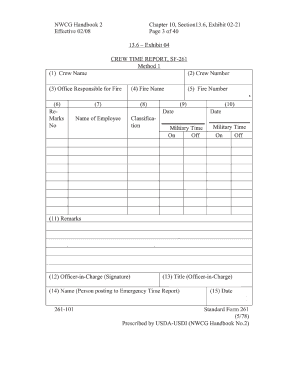
NWCG Handbook 2 Effective 02/08 Chapter 10 Section13. 6 Exhibit 02-21 Page 3 of 40 13. 6 Exhibit 04 CREW TIME REPORT SF-261 Method 1 1 Crew Name 2 Crew Number 3 Office Responsible for Fire H S. Burns GS 5 Fire Number TX-TXS- Number Date 8/8/XX Military Time On Off A. Brown E R* Wyatt WG ReMarks No 4 Fire Name Name of Employee Classification T 11 Remarks H Hazard for uncontrolled fireline duty Unable to take meal break due to blow up on Division D. 1 Wyatt traveled to incident to replace F* Johnson who was injured on 8/6. E Env* Diff 25 for uncontrolled fireline Duty unable to take meal break 12 Officer-in-Charge Signature 13 Title Officer-in-Charge Chris Port Div* Supv* 14 Name Person posting to Emergency Time Report 15 Date Michael Bell 261-101 Standard Form 261 5/78 Prescribed by USDA-USDI NWCG Handbook No*2. Brown E R* Wyatt WG ReMarks No 4 Fire Name Name of Employee Classification T 11 Remarks H Hazard for uncontrolled fireline duty Unable to take meal break due to blow up on ....

How it works

  1. Open form

    Open form follow the instructions

  2. Easily sign form

    Easily sign the form with your finger

  3. Share form

    Send filled & signed form or save

How to fill out the USDA SF 261 online

The USDA SF 261, also known as the Crew Time Report, is an essential form used for documenting the time and tasks performed by fire crews. Filling out this form accurately is crucial for effective record-keeping within fire management operations.

Follow the steps to successfully complete the USDA SF 261 online.

  1. Click ‘Get Form’ button to obtain the form and open it in the editor.
  2. Begin by entering the crew name in the designated field. Ensure the name reflects the official designation of the crew being reported.
  3. Next, input the crew number associated with the team. This number is used for tracking and record-keeping purposes.
  4. In the ‘Office Responsible for Fire’ field, write the name of the office that is managing the fire incident. This should be the office in charge of operations.
  5. Fill in the ‘Fire Number’ which corresponds to the specific fire incident being addressed. Use the proper format (e.g., TX-TXS-Number) to ensure clarity.
  6. Enter the date of the report. Use the format MM/DD/YY for consistency.
  7. Document the time personnel reported on and off duty in military time. Ensure that you use the correct 24-hour format to avoid confusion.
  8. In the next section, list the name of each employee who worked during the reporting period, along with their classification code.
  9. Provide remarks in the designated section to note any significant information, such as hazards encountered or reasons for missed breaks.
  10. Have the Officer-in-Charge sign the form in the ‘Officer-in-Charge (Signature)’ field to validate the report.
  11. The officer should also print their title below their signature for official records.
  12. Finally, include the name of the person posting the report, along with the date of submission, in the appropriate fields.
  13. After filling out all required fields, review the form for accuracy. You can then save changes, download, print, or share the completed form as needed.

Complete your USDA SF 261 online today to ensure accurate fire crew reporting.

Get form

Experience a faster way to fill out and sign forms on the web. Access the most extensive library of templates available.
Get form

Related content

Standard Form 261 - Crew Time Report
a. Clock hours of travel. b. Hazard Duty Entitlement. Show an "H" for regular employees...
Learn more
Incident Command System Staging Area Manager...
SF-261 , Crew Time Report or OF-288 , Emergency Firefighter Time Report. •...
Learn more
USDA Database for the Flavonoid Content of...
by S Bhagwat · 2013 · Cited by 393 — USDA National Nutrient Database for Standard...
Learn more

Related links form

Community Ccrx Pdp Online Form New Employee Form Packet - Norris University Center ... - Norris Northwestern Child Health Plus Health Insurance Renewal Form Printable Rx Outreach Form

Questions & Answers

Get answers to your most pressing questions about US Legal Forms API.

Contact support

Filling out a time report, such as the USDA SF 261, involves logging the start and end times for each work session. You should record any breaks taken, as well as noting any additional details relevant to the work performed. After completing the report, review it thoroughly for errors and confirm the totals are correct to ensure efficient processing and accurate payroll calculations.

Filling out a crew time report requires a few simple steps. First, gather the necessary information, such as the crew members' names and hours worked. Then, using the USDA SF 261 form, fill in the required fields with accurate data, ensuring clarity and neatness. Finally, review the information to ensure all details are correct before submission.

To correctly fill out a crew time report using the USDA SF 261 form, start by entering the date and the name of the crew leader. Next, include the names of crew members and their respective hours worked during the reporting period. Ensure that you accurately record the total hours for each member and submit the report on time to maintain compliance with USDA requirements.

A Personnel Time Recorder is responsible for establishing, recording and maintaining incident personnel time records for overhead personnel and crews, as well as agency engine and aircraft staff. The PTRC is supervised by the Time Unit Leader (TIME). The PTRC works in the Finance functional area.

Standard assignment length is 14 days, exclusive of travel from and to home unit, with possible extensions identified below.

The NWCG Incident Response Pocket Guide (IRPG) establishes standards for wildland fire incident response. The guide provides critical information on operational engagement, risk management, fire environment, all hazard response, and aviation management.

Crew Time Reports (CTRs) are used to accurately complete the Incident Time Report. Timekeepers and Finance Unit Leaders have direct responsibilities and knowledge requirements for the completion of this form.

0:51 7:38 How to Fill Out a Crew Time Report (CTR) - YouTube YouTube Start of suggested clip End of suggested clip For the fire name. And block 5 the fire number. The information on the resource. Order needs to beMoreFor the fire name. And block 5 the fire number. The information on the resource. Order needs to be accurately transferred to the CTR.

Get This Form Now!

Use professional pre-built templates to fill in and sign documents online faster. Get access to thousands of forms.
Get form
If you believe that this page should be taken down, please follow our DMCA take down processhere.

Industry-leading security and compliance

US Legal Forms protects your data by complying with industry-specific security standards.
  • In businnes since 1997
    25+ years providing professional legal documents.
  • Accredited business
    Guarantees that a business meets BBB accreditation standards in the US and Canada.
  • Secured by Braintree
    Validated Level 1 PCI DSS compliant payment gateway that accepts most major credit and debit card brands from across the globe.
Get USDA SF 261
Get form
Form Packages
Adoption
Bankruptcy
Contractors
Divorce
Home Sales
Employment
Identity Theft
Incorporation
Landlord Tenant
Living Trust
Name Change
Personal Planning
Small Business
Wills & Estates
Packages A-Z
Form Categories
Affidavits
Bankruptcy
Bill of Sale
Corporate - LLC
Divorce
Employment
Identity Theft
Internet Technology
Landlord Tenant
Living Wills
Name Change
Power of Attorney
Real Estate
Small Estates
Wills
All Forms
Forms A-Z
Form Library
Customer Service
Your Privacy Choices
Terms of Service
Privacy Notice
Legal Hub
Content Takedown Policy
Bug Bounty Program
About Us
Help Portal
Legal Resources
Blog
Affiliates
Contact Us
Delete My Account
Site Map
Industries
Forms in Spanish
Localized Forms
State-specific Forms
Forms Kit
Legal Guides
Real Estate Handbook
All Guides
Prepared for You
Notarize
Incorporation services
Our Customers
For Consumers
For Small Business
For Attorneys
Our Sites
US Legal Forms
USLegal
FormsPass
pdfFiller
signNow
altaFlow
DocHub
Instapage
Social Media
Call us now toll free:
+1 833 426 79 33
As seen in:
  • USA Today logo picture
  • CBC News logo picture
  • LA Times logo picture
  • The Washington Post logo picture
  • AP logo picture
  • Forbes logo picture
© Copyright 1997-2026
airSlate Legal Forms, Inc.
3720 Flowood Dr, Flowood, Mississippi 39232
Form Packages
Adoption
Bankruptcy
Contractors
Divorce
Home Sales
Employment
Identity Theft
Incorporation
Landlord Tenant
Living Trust
Name Change
Personal Planning
Small Business
Wills & Estates
Packages A-Z
Form Categories
Affidavits
Bankruptcy
Bill of Sale
Corporate - LLC
Divorce
Employment
Identity Theft
Internet Technology
Landlord Tenant
Living Wills
Name Change
Power of Attorney
Real Estate
Small Estates
Wills
All Forms
Forms A-Z
Form Library
Customer Service
Your Privacy Choices
Terms of Service
Privacy Notice
Legal Hub
Content Takedown Policy
Bug Bounty Program
About Us
Help Portal
Legal Resources
Blog
Affiliates
Contact Us
Delete My Account
Site Map
Industries
Forms in Spanish
Localized Forms
State-specific Forms
Forms Kit
Legal Guides
Real Estate Handbook
All Guides
Prepared for You
Notarize
Incorporation services
Our Customers
For Consumers
For Small Business
For Attorneys
Our Sites
US Legal Forms
USLegal
FormsPass
pdfFiller
signNow
altaFlow
DocHub
Instapage
Social Media
Call us now toll free:
+1 833 426 79 33
As seen in:
  • USA Today logo picture
  • CBC News logo picture
  • LA Times logo picture
  • The Washington Post logo picture
  • AP logo picture
  • Forbes logo picture
© Copyright 1997-2026
airSlate Legal Forms, Inc.
3720 Flowood Dr, Flowood, Mississippi 39232