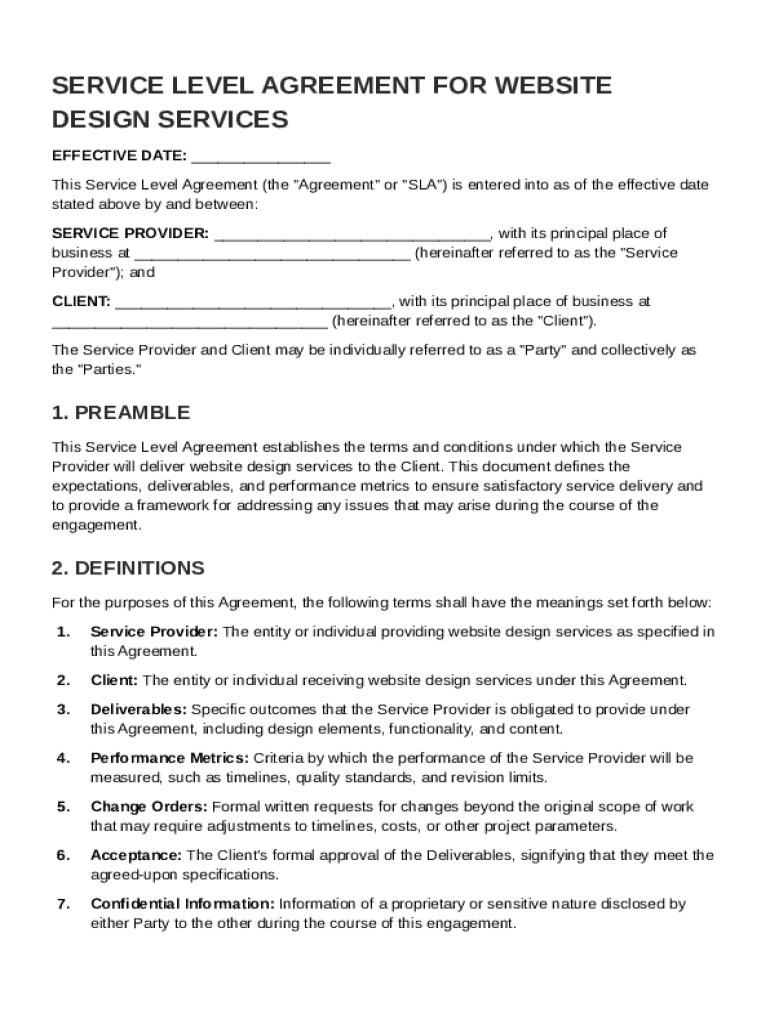
And between: SERVICE PROVIDER: , with its principal place of business at (hereinafter referred to as the "Service Provider"); and CLIENT: , with its principal place of business at (hereinafter referred to as the "Client"). The Service Provider and Client may be individually referred to as a "Party" and collectively as the "Parties." 1. PREAMBLE This Service Level Ag.

Open form follow the instructions

Easily sign the form with your finger

Send filled & signed form or save
How to fill out and sign Service Level For Website Design Agreement Template online?
Get your online template and fill it in using progressive features. Enjoy smart fillable fields and interactivity.Follow the simple instructions below:
Have you been trying to find a quick and practical tool to fill in Service Level For Website Design Agreement Template at an affordable price? Our platform gives you an extensive variety of templates that are available for filling out on the internet. It only takes a couple of minutes.
Stick to these simple actions to get Service Level For Website Design Agreement Template prepared for sending:
- Get the sample you want in our collection of templates.
- Open the document in the online editor.
- Go through the instructions to find out which details you must give.
- Click the fillable fields and include the required information.
- Put the relevant date and place your e-autograph after you complete all of the fields.
- Check the completed document for misprints as well as other mistakes. If there?s a need to change some information, the online editing tool as well as its wide variety of instruments are available for you.
- Download the filled out document to your gadget by hitting Done.
- Send the e-form to the intended recipient.
Completing Service Level For Website Design Agreement Template doesn?t have to be confusing any longer. From now on simply cope with it from home or at your business office right from your mobile or PC.
Tips on how to fill out, edit and sign Service Level For Website Design Agreement Template online
How to fill and sign Service Level For Website Design Agreement Template
Get your online template and fill it in using progressive features. Enjoy smart fillable fields and interactivity.Follow the simple instructions below:
Have you been trying to find a quick and practical tool to fill in Service Level For Website Design Agreement Template at an affordable price? Our platform gives you an extensive variety of templates that are available for filling out on the internet. It only takes a couple of minutes.
Stick to these simple actions to get Service Level For Website Design Agreement Template prepared for sending:
- Get the sample you want in our collection of templates.
- Open the document in the online editor.
- Go through the instructions to find out which details you must give.
- Click the fillable fields and include the required information.
- Put the relevant date and place your e-autograph after you complete all of the fields.
- Check the completed document for misprints as well as other mistakes. If there?s a need to change some information, the online editing tool as well as its wide variety of instruments are available for you.
- Download the filled out document to your gadget by hitting Done.
- Send the e-form to the intended recipient.
Completing Service Level For Website Design Agreement Template doesn?t have to be confusing any longer. From now on simply cope with it from home or at your business office right from your mobile or PC.
How to edit Service Level For Website Design Agreement Template
Use our advanced editor to turn a simple online template into a completed document. Continue reading to learn how to edit Service Level For Website Design Agreement Template online easily.
Once you find a perfect Service Level For Website Design Agreement Template, all you have to do is adjust the template to your needs or legal requirements. Apart from completing the fillable form with accurate details, you might need to remove some provisions in the document that are irrelevant to your circumstance. Alternatively, you might like to add some missing conditions in the original template. Our advanced document editing features are the best way to fix and adjust the document.
The editor allows you to modify the content of any form, even if the file is in PDF format. You can add and erase text, insert fillable fields, and make further changes while keeping the original formatting of the document. Also you can rearrange the structure of the document by changing page order.
You don’t have to print the Service Level For Website Design Agreement Template to sign it. The editor comes along with electronic signature capabilities. The majority of the forms already have signature fields. So, you only need to add your signature and request one from the other signing party via email.
Follow this step-by-step guide to create your Service Level For Website Design Agreement Template:
- Open the preferred template.
- Use the toolbar to adjust the template to your preferences.
- Complete the form providing accurate details.
- Click on the signature field and add your eSignature.
- Send the document for signature to other signers if necessary.
Once all parties sign the document, you will receive a signed copy which you can download, print, and share with other people.
Our solutions let you save tons of your time and minimize the risk of an error in your documents. Streamline your document workflows with effective editing tools and a powerful eSignature solution.
How to fill and sign Service Level For Website Design Agreement Template
Get your online template and fill it in using progressive features. Enjoy smart fillable fields and interactivity.Follow the simple instructions below:
Have you been trying to find a quick and practical tool to fill in Service Level For Website Design Agreement Template at an affordable price? Our platform gives you an extensive variety of templates that are available for filling out on the internet. It only takes a couple of minutes.
Stick to these simple actions to get Service Level For Website Design Agreement Template prepared for sending:
- Get the sample you want in our collection of templates.
- Open the document in the online editor.
- Go through the instructions to find out which details you must give.
- Click the fillable fields and include the required information.
- Put the relevant date and place your e-autograph after you complete all of the fields.
- Check the completed document for misprints as well as other mistakes. If there?s a need to change some information, the online editing tool as well as its wide variety of instruments are available for you.
- Download the filled out document to your gadget by hitting Done.
- Send the e-form to the intended recipient.
Completing Service Level For Website Design Agreement Template doesn?t have to be confusing any longer. From now on simply cope with it from home or at your business office right from your mobile or PC.
Experience a faster way to fill out and sign forms on the web. Access the most extensive library of templates available.
Related content
Website Design/Redesign/Development. This Service Agreement forms a part of the Memorandum...
Jan 10, 2019 — Included Services: • Website project planning: Plan information...
Mar 24, 2022 — Discover the essential components of a robust consulting agreement. Learn...
Get answers to your most pressing questions about US Legal Forms API.
How to calculate service level agreement?
Calculating a service level agreement involves quantifying your performance data against established metrics found in your Service Level For Website Design Agreement Template. You can measure things like availability, response times, and client satisfaction rates. Regularly reviewing these calculations allows for adjustments to maintain high service standards.
How to determine service level agreement?
Determining a service level agreement involves analyzing both your operational capabilities and your customers' service expectations. Begin by reviewing your Service Level For Website Design Agreement Template to align what you can offer with what your clients seek. This collaboration ensures that both parties have a clear understanding of the service levels to be met.
How to identify SLA?
Identifying a service level agreement starts with defining the key services your business offers and the specific metrics that pertain to those services. Review your Service Level For Website Design Agreement Template to outline necessary performance indicators such as uptime, response times, and user satisfaction. This outlines what both parties can expect in terms of service delivery.
How to decide SLA?
Deciding on a service level agreement requires understanding your business needs and customer expectations. You should consult your stakeholders and assess what levels of service are necessary for your website design project. Using a Service Level For Website Design Agreement Template can help clarify these requirements and streamline the decision-making process.
How to measure service level agreement?
Measuring a service level agreement involves assessing the performance metrics defined in your Service Level For Website Design Agreement Template. This means tracking response times, resolution rates, and overall service quality. Regular reviews and audits can help ensure compliance with the established metrics and identify areas for improvement.
Use professional pre-built templates to fill in and sign documents online faster. Get access to thousands of forms.
If you believe that this page should be taken down, please follow our DMCA take down process here.