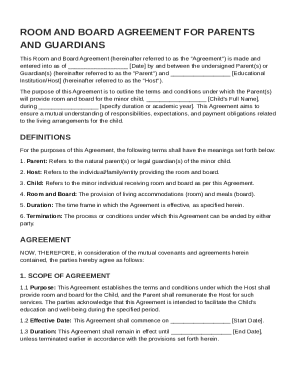
Get Room And Board For Parents Agreement Template
How it works
-

Open form follow the instructions
-

Easily sign the form with your finger
-

Send filled & signed form or save
How to fill out and sign Room And Board For Parents Agreement Template online?
Get your online template and fill it in using progressive features. Enjoy smart fillable fields and interactivity.Follow the simple instructions below:Legal, tax, business as well as other documents require higher of protection and compliance with the legislation. Our documents are regularly updated in accordance with the latest legislative changes. Additionally, with our service, all of the information you provide in the Room And Board For Parents Agreement Template is well-protected against loss or damage via top-notch encryption.
The tips below will allow you to fill in Room And Board For Parents Agreement Template quickly and easily:
- Open the document in the feature-rich online editing tool by hitting Get form.
- Complete the required fields that are marked in yellow.
- Press the arrow with the inscription Next to move from field to field.
- Go to the e-signature tool to add an electronic signature to the form.
- Add the relevant date.
- Check the whole e-document to be sure that you haven?t skipped anything.
- Click Done and save the resulting form.
Our service allows you to take the whole procedure of completing legal documents online. Consequently, you save hours (if not days or even weeks) and eliminate extra costs. From now on, fill in Room And Board For Parents Agreement Template from home, business office, or even on the move.
Tips on how to fill out, edit and sign Room And Board For Parents Agreement Template online
How to fill out and sign Room And Board For Parents Agreement Template online?
Get your online template and fill it in using progressive features. Enjoy smart fillable fields and interactivity.Follow the simple instructions below:
Legal, tax, business as well as other documents require higher of protection and compliance with the legislation. Our documents are regularly updated in accordance with the latest legislative changes. Additionally, with our service, all of the information you provide in the Room And Board For Parents Agreement Template is well-protected against loss or damage via top-notch encryption.
The tips below will allow you to fill in Room And Board For Parents Agreement Template quickly and easily:
- Open the document in the feature-rich online editing tool by hitting Get form.
- Complete the required fields that are marked in yellow.
- Press the arrow with the inscription Next to move from field to field.
- Go to the e-signature tool to add an electronic signature to the form.
- Add the relevant date.
- Check the whole e-document to be sure that you haven?t skipped anything.
- Click Done and save the resulting form.
Our service allows you to take the whole procedure of completing legal documents online. Consequently, you save hours (if not days or even weeks) and eliminate extra costs. From now on, fill in Room And Board For Parents Agreement Template from home, business office, or even on the move.
How to edit Room And Board For Parents Agreement Template: customize forms online
Check out a standalone service to manage all of your paperwork easily. Find, edit, and complete your Room And Board For Parents Agreement Template in a single interface with the help of smart instruments.
The days when people had to print forms or even write them by hand are long gone. Nowadays, all it takes to get and complete any form, such as Room And Board For Parents Agreement Template, is opening a single browser tab. Here, you will find the Room And Board For Parents Agreement Template form and customize it any way you need, from inserting the text directly in the document to drawing it on a digital sticky note and attaching it to the document. Discover instruments that will streamline your paperwork without additional effort.
Click the Get form button to prepare your Room And Board For Parents Agreement Template paperwork quickly and start modifying it instantly. In the editing mode, you can easily fill in the template with your details for submission. Simply click on the field you need to change and enter the information right away. The editor's interface does not need any specific skills to use it. When finished with the edits, check the information's accuracy once more and sign the document. Click on the signature field and follow the instructions to eSign the form in a moment.
Use Additional instruments to customize your form:
- Use Cross, Check, or Circle instruments to pinpoint the document's data.
- Add text or fillable text fields with text customization tools.
- Erase, Highlight, or Blackout text blocks in the document using corresponding instruments.
- Add a date, initials, or even an image to the document if necessary.
- Make use of the Sticky note tool to annotate the form.
- Use the Arrow and Line, or Draw tool to add graphic components to your document.
Preparing Room And Board For Parents Agreement Template paperwork will never be perplexing again if you know where to look for the suitable template and prepare it easily. Do not hesitate to try it yourself.
Yes, you can create your own tenancy agreement as long as it complies with local laws. Start by stating the names of the landlord and tenant, followed by property details and terms of the lease. Ensure to cover essential elements such as rent amounts and responsibilities. A Room And Board For Parents Agreement Template can serve as a helpful reference while drafting your tenancy agreement.