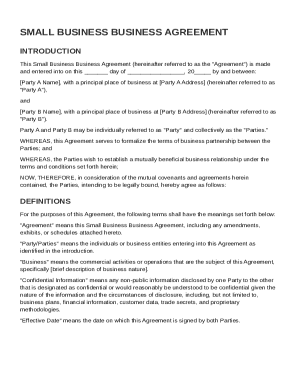
Get Small Business Business Agreement Template
How it works
-

Open form follow the instructions
-

Easily sign the form with your finger
-

Send filled & signed form or save
How to fill out and sign Small Business Business Agreement Template online?
Get your online template and fill it in using progressive features. Enjoy smart fillable fields and interactivity.Follow the simple instructions below:Getting a authorized professional, creating a scheduled appointment and going to the workplace for a private meeting makes finishing a Small Business Business Agreement Template from beginning to end tiring. US Legal Forms lets you rapidly create legally-compliant papers based on pre-built web-based blanks.
Prepare your docs in minutes using our easy step-by-step guide:
- Find the Small Business Business Agreement Template you want.
- Open it up using the online editor and begin adjusting.
- Fill the blank areas; involved parties names, places of residence and phone numbers etc.
- Customize the blanks with exclusive fillable fields.
- Add the date and place your e-signature.
- Click Done after double-examining all the data.
- Save the ready-made document to your device or print it out like a hard copy.
Swiftly generate a Small Business Business Agreement Template without having to involve experts. We already have more than 3 million customers benefiting from our unique library of legal documents. Join us right now and gain access to the #1 collection of web blanks. Give it a try yourself!
Tips on how to fill out, edit and sign Small Business Business Agreement Template online
How to fill out and sign Small Business Business Agreement Template online?
Get your online template and fill it in using progressive features. Enjoy smart fillable fields and interactivity.Follow the simple instructions below:
Getting a authorized professional, creating a scheduled appointment and going to the workplace for a private meeting makes finishing a Small Business Business Agreement Template from beginning to end tiring. US Legal Forms lets you rapidly create legally-compliant papers based on pre-built web-based blanks.
Prepare your docs in minutes using our easy step-by-step guide:
- Find the Small Business Business Agreement Template you want.
- Open it up using the online editor and begin adjusting.
- Fill the blank areas; involved parties names, places of residence and phone numbers etc.
- Customize the blanks with exclusive fillable fields.
- Add the date and place your e-signature.
- Click Done after double-examining all the data.
- Save the ready-made document to your device or print it out like a hard copy.
Swiftly generate a Small Business Business Agreement Template without having to involve experts. We already have more than 3 million customers benefiting from our unique library of legal documents. Join us right now and gain access to the #1 collection of web blanks. Give it a try yourself!
How to modify Small Business Business Agreement Template: customize forms online
Completing paperwork is more comfortable with smart online instruments. Eliminate paperwork with easily downloadable Small Business Business Agreement Template templates you can modify online and print out.
Preparing documents and documents must be more accessible, whether it is a regular element of one’s job or occasional work. When a person must file a Small Business Business Agreement Template, studying regulations and guides on how to complete a form properly and what it should include may take a lot of time and effort. Nevertheless, if you find the proper Small Business Business Agreement Template template, finishing a document will stop being a struggle with a smart editor at hand.
Discover a wider selection of features you can add to your document flow routine. No need to print out, fill out, and annotate forms manually. With a smart modifying platform, all of the essential document processing features will always be at hand. If you want to make your work process with Small Business Business Agreement Template forms more efficient, find the template in the catalog, click on it, and see a simpler method to fill it in.
- If you want to add text in a random area of the form or insert a text field, use the Text and Text field tools and expand the text in the form as much as you want.
- Utilize the Highlight instrument to stress the key aspects of the form. If you want to hide or remove some text parts, use the Blackout or Erase instruments.
- Customize the form by adding default graphic components to it. Use the Circle, Check, and Cross instruments to add these elements to the forms, if necessary.
- If you need additional annotations, make use of the Sticky note resource and place as many notes on the forms page as required.
- If the form needs your initials or date, the editor has instruments for that too. Minimize the possibility of errors using the Initials and Date tools.
- It is also easy to add custom visual components to the form. Use the Arrow, Line, and Draw instruments to customize the file.
The more instruments you are familiar with, the better it is to work with Small Business Business Agreement Template. Try the solution that provides everything necessary to find and modify forms in one tab of your browser and forget about manual paperwork.
Creating a business agreement between two parties requires clear communication of expectations and responsibilities. Begin by identifying the parties and outlining the agreement’s purpose. A Small Business Business Agreement Template can streamline this process, helping you cover all essential terms in a straightforward manner.