Loading
Form preview
  • US Legal Forms
  • Other Templates
  • More Forms
  • More Multi-State Forms
  • Sale For Business Agreement Template

Get Sale For Business Agreement Template

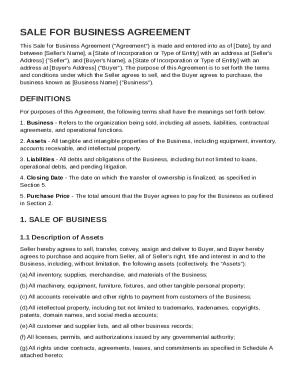
F Entity with an address at Seller's Address ("Seller"), and Buyer's Name , a State of Incorporation or Type of Entity with an address at Buyer's Address ("Buyer"). The purpose of this Agreement is to set forth the terms and conditions under which the Seller agrees to sell, and the Buyer agrees to purchase, the business known as Business Name ("Business"). DEFINITIONS For purposes of this Agreement, the following terms shall have the meanings set forth below: 1. Business - Refers to t.

How it works

  1. Open form

    Open form follow the instructions

  2. Easily sign form

    Easily sign the form with your finger

  3. Share form

    Send filled & signed form or save

How to fill out and sign Sale For Business Agreement Template online?

Get your online template and fill it in using progressive features. Enjoy smart fillable fields and interactivity.Follow the simple instructions below:

The preparing of legal documents can be expensive and time-consuming. However, with our preconfigured online templates, things get simpler. Now, working with a Sale For Business Agreement Template takes not more than 5 minutes. Our state-specific online blanks and crystal-clear guidelines eliminate human-prone faults.

Comply with our simple steps to get your Sale For Business Agreement Template prepared rapidly:

  1. Pick the web sample from the library.
  2. Type all necessary information in the necessary fillable areas. The user-friendly drag&drop graphical user interface allows you to include or move fields.
  3. Check if everything is filled in appropriately, without any typos or lacking blocks.
  4. Place your e-signature to the PDF page.
  5. Click Done to save the alterations.
  6. Download the papers or print your copy.
  7. Distribute instantly towards the recipient.

Take advantage of the fast search and powerful cloud editor to produce a correct Sale For Business Agreement Template. Remove the routine and produce documents on the internet!

Tips on how to fill out, edit and sign Sale For Business Agreement Template online

How to fill out and sign Sale For Business Agreement Template online?

Get your online template and fill it in using progressive features. Enjoy smart fillable fields and interactivity.Follow the simple instructions below:

The preparing of legal documents can be expensive and time-consuming. However, with our preconfigured online templates, things get simpler. Now, working with a Sale For Business Agreement Template takes not more than 5 minutes. Our state-specific online blanks and crystal-clear guidelines eliminate human-prone faults.

Comply with our simple steps to get your Sale For Business Agreement Template prepared rapidly:

  1. Pick the web sample from the library.
  2. Type all necessary information in the necessary fillable areas. The user-friendly drag&drop graphical user interface allows you to include or move fields.
  3. Check if everything is filled in appropriately, without any typos or lacking blocks.
  4. Place your e-signature to the PDF page.
  5. Click Done to save the alterations.
  6. Download the papers or print your copy.
  7. Distribute instantly towards the recipient.

Take advantage of the fast search and powerful cloud editor to produce a correct Sale For Business Agreement Template. Remove the routine and produce documents on the internet!

How to edit Sale For Business Agreement Template: customize forms online

Make the best use of our comprehensive online document editor while preparing your forms. Fill out the Sale For Business Agreement Template, point out the most important details, and easily make any other necessary changes to its content.

Preparing paperwork electronically is not only time-saving but also comes with an opportunity to modify the sample according to your demands. If you’re about to manage the Sale For Business Agreement Template, consider completing it with our comprehensive online editing tools. Whether you make a typo or enter the requested details into the wrong area, you can instantly make adjustments to the document without the need to restart it from the beginning as during manual fill-out. In addition to that, you can stress on the critical information in your document by highlighting certain pieces of content with colors, underlining them, or circling them.

Adhere to these quick and simple actions to complete and adjust your Sale For Business Agreement Template online:

  1. Open the file in the editor.
  2. Provide the necessary information in the empty fields using Text, Check, and Cross tools.
  3. Follow the document navigation not to miss any mandatory fields in the sample.
  4. Circle some of the critical details and add a URL to it if needed.
  5. Use the Highlight or Line options to stress on the most important pieces of content.
  6. Choose colors and thickness for these lines to make your sample look professional.
  7. Erase or blackout the facts you don’t want to be visible to others.
  8. Replace pieces of content that contain errors and type in text that you need.
  9. End up editing with the Done key when you ensure everything is correct in the document.

Our robust online solutions are the best way to fill out and modify Sale For Business Agreement Template according to your needs. Use it to manage personal or professional paperwork from anywhere. Open it in a browser, make any alterations in your forms, and get back to them anytime in the future - they all will be securely stored in the cloud.

Get form

Experience a faster way to fill out and sign forms on the web. Access the most extensive library of templates available.
Get form

Related content

Contract for the Purchase and Sale of a Business
Seller needs to provide Buyer a Certificate of No Tax Due for sales tax (and or a Tax...
Learn more
A Specimen of Deed of Sale of a Business and...
The deed includes the sale of all interest and goodwill, debts, stock-in-trade, effects...
Learn more
GENERAL CONDITIONS OF SALE AND GUARANTEE ...
These Conditions of Sale and Guarantee. (hereinafter referred to as (hereinafter referred...
Learn more

Related links form

Tooele County Affiliation Form SEALED PROPOSAL DO NOT OPEN Real Forestry For Real Estate Albemarle.pdf PERMIT EXTENSION REQUEST - Pinellas County

Questions & Answers

Get answers to your most pressing questions about US Legal Forms API.

Contact support

To put your business for sale, begin by evaluating its worth. You can get an accurate valuation by reviewing your financial statements, assets, and future earning potential. Next, formulate a Sale For Business Agreement Template to outline key terms and conditions, then market your business through online platforms or local listings. Engaging a business broker can also help attract potential buyers.

To write a sales contract sample, you should clearly define the involved parties, the products or services being sold, and the terms of the sale. Ensure that all expectations, including payment terms and delivery schedules, are articulated. A Sale For Business Agreement Template can provide a helpful framework to create an effective and professional sales contract.

Creating a contract of sale involves drafting a document that outlines the agreement between buyer and seller regarding the sale of goods or property. Start with identifying the parties, then describe the item, and include payment terms and delivery details. Using a Sale For Business Agreement Template helps streamline the process and ensures you adhere to legal standards.

Writing a simple agreement starts with a clear introduction of the parties and the purpose of the agreement. Include specific terms related to the agreement, such as dates, conditions, and responsibilities. For ease and accuracy, consider using a Sale For Business Agreement Template, which guides you through the essential components of the document.

To find a sales agreement, consider searching online for templates that meet your specific needs. Numerous websites specialize in legal forms and documents, providing a variety of templates for different sales scenarios. You can also explore the offerings of platforms like uslegalforms, where you can find a tailored Sale For Business Agreement Template to suit your requirements.

Get This Form Now!

Use professional pre-built templates to fill in and sign documents online faster. Get access to thousands of forms.
Get form
If you believe that this page should be taken down, please follow our DMCA take down processhere.
Get Sale For Business Agreement Template
Get form
  • Adoption
  • Bankruptcy
  • Contractors
  • Divorce
  • Home Sales
  • Employment
  • Identity Theft
  • Incorporation
  • Landlord Tenant
  • Living Trust
  • Name Change
  • Personal Planning
  • Small Business
  • Wills & Estates
  • Packages A-Z
  • Affidavits
  • Bankruptcy
  • Bill of Sale
  • Corporate - LLC
  • Divorce
  • Employment
  • Identity Theft
  • Internet Technology
  • Landlord Tenant
  • Living Wills
  • Name Change
  • Power of Attorney
  • Real Estate
  • Small Estates
  • Wills
  • All Forms
  • Forms A-Z
  • Other Templates
  • Legal Hub
  • About Us
  • Help Portal
  • Legal Resources
  • Blog
  • Affiliates
  • Contact Us
  • Delete My Account
  • Site Map
  • Industries
  • Forms in Spanish
  • Localized Forms
  • State-specific Forms
  • Forms Kit
  • Real Estate Handbook
  • All Guides
  • Notarize
  • Incorporation services
  • For Consumers
  • For Small Business
  • For Attorneys
  • USLegal
  • FormsPass
  • pdfFiller
  • signNow
  • altaFlow
  • DocHub
  • Instapage
Form Packages
  • Adoption
  • Bankruptcy
  • Contractors
  • Divorce
  • Home Sales
  • Employment
  • Identity Theft
  • Incorporation
  • Landlord Tenant
  • Living Trust
  • Name Change
  • Personal Planning
  • Small Business
  • Wills & Estates
  • Packages A-Z
Form Categories
  • Affidavits
  • Bankruptcy
  • Bill of Sale
  • Corporate - LLC
  • Divorce
  • Employment
  • Identity Theft
  • Internet Technology
  • Landlord Tenant
  • Living Wills
  • Name Change
  • Power of Attorney
  • Real Estate
  • Small Estates
  • Wills
  • All Forms
  • Forms A-Z
  • Other Templates
Customer Service
  • Legal Hub
  • About Us
  • Help Portal
  • Legal Resources
  • Blog
  • Affiliates
  • Contact Us
  • Delete My Account
  • Site Map
  • Industries
  • Forms in Spanish
  • Localized Forms
  • State-specific Forms
  • Forms Kit
Legal Guides
  • Real Estate Handbook
  • All Guides
Prepared for you
  • Notarize
  • Incorporation services
Our Customers
  • For Consumers
  • For Small Business
  • For Attorneys
Our Sites
  • USLegal
  • FormsPass
  • pdfFiller
  • signNow
  • altaFlow
  • DocHub
  • Instapage
Social Media
Call us now toll free:
+1 833 426 79 33
As seen in:
© Copyright 1999-2026 airSlate Legal Forms, Inc. 17 Station Street, Ste. 203, Brookline, MA 02445
  • Your Privacy Choices
  • Terms of Service
  • Privacy Notice
  • Content Takedown Policy
  • Bug Bounty Program