Loading
Form preview
  • US Legal Forms
  • Other Templates
  • More Forms
  • More Multi-State Forms
  • Service Virtual Assistant Agreement Template

Get Service Virtual Assistant Agreement Template

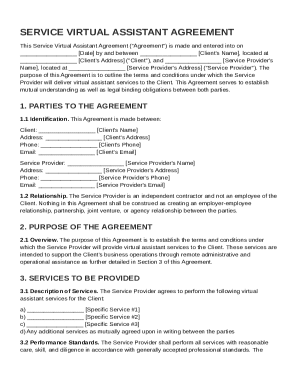
At Client's Address ("Client"), and Service Provider's Name , located at Service Provider's Address ("Service Provider"). The purpose of this Agreement is to outline the terms and conditions under which the Service Provider will deliver virtual assistant services to the Client. This Agreement serves to establish mutual understanding as well as legal binding obligations between both parties. 1. PARTIES TO THE AGREEMENT 1.1 Identificatio.

How it works

  1. Open form

    Open form follow the instructions

  2. Easily sign form

    Easily sign the form with your finger

  3. Share form

    Send filled & signed form or save

How to fill out and sign Service Virtual Assistant Agreement Template online?

Get your online template and fill it in using progressive features. Enjoy smart fillable fields and interactivity.Follow the simple instructions below:

Choosing a authorized specialist, making an appointment and going to the business office for a private conference makes completing a Service Virtual Assistant Agreement Template from beginning to end tiring. US Legal Forms enables you to quickly make legally binding papers according to pre-constructed browser-based templates.

Perform your docs in minutes using our simple step-by-step instructions:

  1. Get the Service Virtual Assistant Agreement Template you require.
  2. Open it up using the online editor and begin altering.
  3. Fill the blank fields; involved parties names, places of residence and numbers etc.
  4. Customize the template with unique fillable areas.
  5. Add the day/time and place your electronic signature.
  6. Click on Done after double-examining all the data.
  7. Save the ready-created record to your device or print it as a hard copy.

Quickly create a Service Virtual Assistant Agreement Template without needing to involve specialists. We already have over 3 million users benefiting from our unique catalogue of legal forms. Join us right now and get access to the top library of browser-based templates. Try it out yourself!

Tips on how to fill out, edit and sign Service Virtual Assistant Agreement Template online

How to fill out and sign Service Virtual Assistant Agreement Template online?

Get your online template and fill it in using progressive features. Enjoy smart fillable fields and interactivity.Follow the simple instructions below:

Choosing a authorized specialist, making an appointment and going to the business office for a private conference makes completing a Service Virtual Assistant Agreement Template from beginning to end tiring. US Legal Forms enables you to quickly make legally binding papers according to pre-constructed browser-based templates.

Perform your docs in minutes using our simple step-by-step instructions:

  1. Get the Service Virtual Assistant Agreement Template you require.
  2. Open it up using the online editor and begin altering.
  3. Fill the blank fields; involved parties names, places of residence and numbers etc.
  4. Customize the template with unique fillable areas.
  5. Add the day/time and place your electronic signature.
  6. Click on Done after double-examining all the data.
  7. Save the ready-created record to your device or print it as a hard copy.

Quickly create a Service Virtual Assistant Agreement Template without needing to involve specialists. We already have over 3 million users benefiting from our unique catalogue of legal forms. Join us right now and get access to the top library of browser-based templates. Try it out yourself!

How to edit Service Virtual Assistant Agreement Template: customize forms online

Check out a single service to manage all of your paperwork with ease. Find, edit, and complete your Service Virtual Assistant Agreement Template in a single interface with the help of smart instruments.

The days when people needed to print forms or even write them by hand are gone. Nowadays, all it takes to get and complete any form, such as Service Virtual Assistant Agreement Template, is opening just one browser tab. Here, you can find the Service Virtual Assistant Agreement Template form and customize it any way you need, from inserting the text directly in the document to drawing it on a digital sticky note and attaching it to the document. Discover instruments that will simplify your paperwork without additional effort.

Click on the Get form button to prepare your Service Virtual Assistant Agreement Template paperwork rapidly and start modifying it instantly. In the editing mode, you can easily fill in the template with your information for submission. Just click on the field you need to change and enter the data right away. The editor's interface does not need any specific skills to use it. When done with the edits, check the information's accuracy once again and sign the document. Click on the signature field and follow the instructions to eSign the form in a moment.

Use More instruments to customize your form:

  • Use Cross, Check, or Circle instruments to pinpoint the document's data.
  • Add text or fillable text fields with text customization tools.
  • Erase, Highlight, or Blackout text blocks in the document using corresponding instruments.
  • Add a date, initials, or even an image to the document if necessary.
  • Utilize the Sticky note tool to annotate the form.
  • Use the Arrow and Line, or Draw tool to add visual elements to your document.

Preparing Service Virtual Assistant Agreement Template paperwork will never be puzzling again if you know where to search for the suitable template and prepare it quickly. Do not hesitate to try it yourself.

Get form

Experience a faster way to fill out and sign forms on the web. Access the most extensive library of templates available.
Get form

Related content

Business Associate Agreement Template
This Agreement shall remain in effect for the duration of this Agreement and shall apply...
Learn more
Sample Independent Contractor Agreement This...
This includes automobile, truck, and other travel expenses; vehicle maintenance and repair...
Learn more
Services Entitlement Overview
An Entitlement is the set of privileges Customers & Partners receive when purchasing a...
Learn more

Related links form

A Flyer Tells Families Your Child Care Business Is Special Sanitary Sewer Agreement - Fairfax County Government Celebrated Big Trees Nomination Form - Fairfax County Government Print Clear Form Dutchess County Youth Council Application 2009 - 2010 Name: Birth Date: Gender (M

Questions & Answers

Get answers to your most pressing questions about US Legal Forms API.

Contact support

To write a contract agreement for services, start with a title and include the names of both parties involved. Outline the scope of services, payment arrangement, and deadlines clearly. Including terms for revisions, confidentiality, and termination protects both parties. Using a Service Virtual Assistant Agreement Template can provide a clear structure and examples to help you craft an effective contract.

Invoicing as a virtual assistant can be simple with the right tools. Start by using professional templates that include your business name, client details, descriptions of services provided, and payment terms. Be sure to maintain a consistent format to establish professionalism. A Service Virtual Assistant Agreement Template can include invoicing guidelines that ensure clarity and accuracy in your billing.

Writing a virtual assistant contract requires clear language and specific details. Begin by stating the services offered, payment terms, and timelines. Include sections for confidentiality, liabilities, and termination clauses to ensure both parties are protected. A Service Virtual Assistant Agreement Template provides a solid foundation and helps you stay organized during the writing process.

Filling out a service contract involves carefully reviewing each section before completing it. Input the parties' information, specify the service details, and set clear payment terms. Ensure you also include timelines, revisions, and termination clauses to protect interests. You can use a Service Virtual Assistant Agreement Template to streamline this process and ensure you cover all critical areas.

Creating a contract for a virtual assistant begins with outlining the scope of work and the specific services offered. You should include payment terms, deadlines, and confidentiality agreements to protect both parties. Additionally, incorporating clauses for revisions and termination can help avoid misunderstandings. A Service Virtual Assistant Agreement Template can be a useful tool to guide you in crafting a comprehensive contract.

Yes, earning 10k a month as a virtual assistant is possible, but it requires strategic planning and effective time management. By specializing in high-demand services and building a strong client base, you can increase your rates and workload. Additionally, learning how to negotiate your fees, along with efficient invoicing practices, can help you reach that financial goal. Consider using a Service Virtual Assistant Agreement Template to standardize your contracts and facilitate better client relationships.

To draw up a service agreement, start by clearly defining the services to be provided. Specify the terms and conditions, including payment details and deadlines. It is also important to outline responsibilities, confidentiality, and termination clauses. Using a Service Virtual Assistant Agreement Template can simplify this process and ensure you cover all necessary aspects.

Get This Form Now!

Use professional pre-built templates to fill in and sign documents online faster. Get access to thousands of forms.
Get form
If you believe that this page should be taken down, please follow our DMCA take down processhere.
Get Service Virtual Assistant Agreement Template
Get form
  • Adoption
  • Bankruptcy
  • Contractors
  • Divorce
  • Home Sales
  • Employment
  • Identity Theft
  • Incorporation
  • Landlord Tenant
  • Living Trust
  • Name Change
  • Personal Planning
  • Small Business
  • Wills & Estates
  • Packages A-Z
  • Affidavits
  • Bankruptcy
  • Bill of Sale
  • Corporate - LLC
  • Divorce
  • Employment
  • Identity Theft
  • Internet Technology
  • Landlord Tenant
  • Living Wills
  • Name Change
  • Power of Attorney
  • Real Estate
  • Small Estates
  • Wills
  • All Forms
  • Forms A-Z
  • Other Templates
  • Legal Hub
  • About Us
  • Help Portal
  • Legal Resources
  • Blog
  • Affiliates
  • Contact Us
  • Delete My Account
  • Site Map
  • Industries
  • Forms in Spanish
  • Localized Forms
  • State-specific Forms
  • Forms Kit
  • Real Estate Handbook
  • All Guides
  • Notarize
  • Incorporation services
  • For Consumers
  • For Small Business
  • For Attorneys
  • USLegal
  • FormsPass
  • pdfFiller
  • signNow
  • altaFlow
  • DocHub
  • Instapage
Form Packages
  • Adoption
  • Bankruptcy
  • Contractors
  • Divorce
  • Home Sales
  • Employment
  • Identity Theft
  • Incorporation
  • Landlord Tenant
  • Living Trust
  • Name Change
  • Personal Planning
  • Small Business
  • Wills & Estates
  • Packages A-Z
Form Categories
  • Affidavits
  • Bankruptcy
  • Bill of Sale
  • Corporate - LLC
  • Divorce
  • Employment
  • Identity Theft
  • Internet Technology
  • Landlord Tenant
  • Living Wills
  • Name Change
  • Power of Attorney
  • Real Estate
  • Small Estates
  • Wills
  • All Forms
  • Forms A-Z
  • Other Templates
Customer Service
  • Legal Hub
  • About Us
  • Help Portal
  • Legal Resources
  • Blog
  • Affiliates
  • Contact Us
  • Delete My Account
  • Site Map
  • Industries
  • Forms in Spanish
  • Localized Forms
  • State-specific Forms
  • Forms Kit
Legal Guides
  • Real Estate Handbook
  • All Guides
Prepared for you
  • Notarize
  • Incorporation services
Our Customers
  • For Consumers
  • For Small Business
  • For Attorneys
Our Sites
  • USLegal
  • FormsPass
  • pdfFiller
  • signNow
  • altaFlow
  • DocHub
  • Instapage
Social Media
Call us now toll free:
+1 833 426 79 33
As seen in:
© Copyright 1999-2026 airSlate Legal Forms, Inc. 17 Station Street, Ste. 203, Brookline, MA 02445
  • Your Privacy Choices
  • Terms of Service
  • Privacy Notice
  • Content Takedown Policy
  • Bug Bounty Program