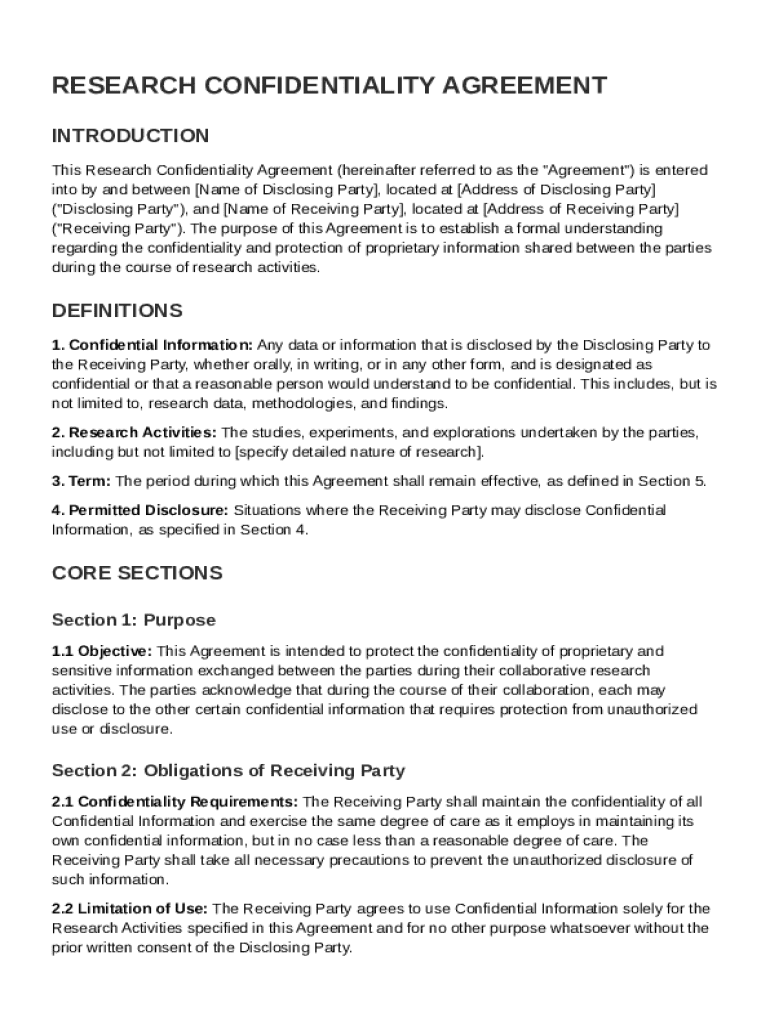
Disclosing Party , located at Address of Disclosing Party ("Disclosing Party"), and Name of Receiving Party , located at Address of Receiving Party ("Receiving Party"). The purpose of this Agreement is to establish a formal understanding regarding the confidentiality and protection of proprietary information shared between the parties during the course of research activities. DEFINITIONS 1. Confidential Information: Any data or information that is disclosed by the Disclosing Party to the.
Loading

Open form follow the instructions

Easily sign the form with your finger

Send filled & signed form or save
How to fill out and sign Research Confidentiality Agreement Template online?
Get your online template and fill it in using progressive features. Enjoy smart fillable fields and interactivity.Follow the simple instructions below:
The times of terrifying complex tax and legal documents have ended. With US Legal Forms the whole process of submitting official documents is anxiety-free. The best editor is right at your fingertips offering you a wide variety of beneficial tools for filling out a Research Confidentiality Agreement Template. These tips, combined with the editor will help you through the complete process.
- Click on the orange Get Form button to begin modifying.
- Switch on the Wizard mode in the top toolbar to have additional suggestions.
- Complete every fillable area.
- Ensure that the data you fill in Research Confidentiality Agreement Template is up-to-date and correct.
- Include the date to the sample using the Date tool.
- Click on the Sign icon and create a signature. Feel free to use 3 available choices; typing, drawing, or capturing one.
- Make sure that every field has been filled in correctly.
- Click Done in the top right corne to save and send or download the record. There are many choices for receiving the doc. As an instant download, an attachment in an email or through the mail as a hard copy.
We make completing any Research Confidentiality Agreement Template faster. Get started now!
Tips on how to fill out, edit and sign Research Confidentiality Agreement Template online
How to fill and sign Research Confidentiality Agreement Template
Get your online template and fill it in using progressive features. Enjoy smart fillable fields and interactivity.Follow the simple instructions below:
The times of terrifying complex tax and legal documents have ended. With US Legal Forms the whole process of submitting official documents is anxiety-free. The best editor is right at your fingertips offering you a wide variety of beneficial tools for filling out a Research Confidentiality Agreement Template. These tips, combined with the editor will help you through the complete process.
- Click on the orange Get Form button to begin modifying.
- Switch on the Wizard mode in the top toolbar to have additional suggestions.
- Complete every fillable area.
- Ensure that the data you fill in Research Confidentiality Agreement Template is up-to-date and correct.
- Include the date to the sample using the Date tool.
- Click on the Sign icon and create a signature. Feel free to use 3 available choices; typing, drawing, or capturing one.
- Make sure that every field has been filled in correctly.
- Click Done in the top right corne to save and send or download the record. There are many choices for receiving the doc. As an instant download, an attachment in an email or through the mail as a hard copy.
We make completing any Research Confidentiality Agreement Template faster. Get started now!
How to edit Research Confidentiality Agreement Template
Take away the mess from your paperwork routine. Discover the easiest way to find and edit, and file a Research Confidentiality Agreement Template
The process of preparing Research Confidentiality Agreement Template needs accuracy and focus, especially from those who are not well familiar with this type of job. It is important to get a suitable template and fill it in with the correct information. With the proper solution for processing paperwork, you can get all the tools at hand. It is simple to streamline your editing process without learning new skills. Locate the right sample of Research Confidentiality Agreement Template and fill it out immediately without switching between your browser tabs. Discover more instruments to customize your Research Confidentiality Agreement Template form in the editing mode.
While on the Research Confidentiality Agreement Template page, just click the Get form button to start editing it. Add your data to the form on the spot, as all the necessary tools are at hand right here. The sample is pre-designed, so the work required from the user is minimal. Simply use the interactive fillable fields in the editor to easily complete your paperwork. Simply click on the form and proceed to the editor mode without delay. Fill out the interactive field, and your document is all set.
Try out more instruments to customize your form:
- Place more text around the document if needed. Use the Text and Text Box instruments to insert text in a separate box.
- Add pre-designed visual components like Circle, Cross, and Check with respective instruments.
- If needed, capture or upload images to the document with the Image tool.
- If you need to draw something in the document, use Line, Arrow, and Draw instruments.
- Try the Highlight, Erase, and Blackout tools to change the text in the document.
- If you need to add comments to specific document parts, click the Sticky tool and place a note where you want.
Sometimes, a small error can wreck the whole form when someone fills it by hand. Forget about inaccuracies in your paperwork. Find the templates you require in moments and complete them electronically via a smart editing solution.
How to fill and sign Research Confidentiality Agreement Template
Get your online template and fill it in using progressive features. Enjoy smart fillable fields and interactivity.Follow the simple instructions below:
The times of terrifying complex tax and legal documents have ended. With US Legal Forms the whole process of submitting official documents is anxiety-free. The best editor is right at your fingertips offering you a wide variety of beneficial tools for filling out a Research Confidentiality Agreement Template. These tips, combined with the editor will help you through the complete process.
- Click on the orange Get Form button to begin modifying.
- Switch on the Wizard mode in the top toolbar to have additional suggestions.
- Complete every fillable area.
- Ensure that the data you fill in Research Confidentiality Agreement Template is up-to-date and correct.
- Include the date to the sample using the Date tool.
- Click on the Sign icon and create a signature. Feel free to use 3 available choices; typing, drawing, or capturing one.
- Make sure that every field has been filled in correctly.
- Click Done in the top right corne to save and send or download the record. There are many choices for receiving the doc. As an instant download, an attachment in an email or through the mail as a hard copy.
We make completing any Research Confidentiality Agreement Template faster. Get started now!
Experience a faster way to fill out and sign forms on the web. Access the most extensive library of templates available.
Related content
Oct 25, 2021 — A NDA, sometimes referred to as Confidentiality Agreement, is used with...
1. Keep all the research information shared with me confidential. I will not discuss or...
A CoC generally protects a researcher from being compelled to disclose identifiable...
Get answers to your most pressing questions about US Legal Forms API.
What is an example of confidentiality in research?
Confidentiality in research refers to the practice of keeping participant information private and secure. An example includes using a Research Confidentiality Agreement Template to restrict access to sensitive data collected during a study. Researchers commit to only sharing results in aggregate form to protect individual identities. This essential practice fosters trust between researchers and participants, enhancing the integrity of the research process.
What is the sample confidentiality agreement for research participants?
A sample confidentiality agreement for research participants outlines how their personal information will be safeguarded during the study. This agreement usually includes a Research Confidentiality Agreement Template that specifies the data collection methods and the limitations on the use of personal data. It aims to build trust and encourage participation by assuring individuals that their information will remain confidential. Researchers often customize these templates to fit specific study requirements.
What is a CDA in research?
A CDA, or Confidential Disclosure Agreement, is a document that allows parties to share confidential information for research purposes. This agreement often utilizes a Research Confidentiality Agreement Template to ensure both parties commit to keeping the shared information secure. It is crucial in protecting proprietary data, especially in collaborative projects. By implementing a CDA, researchers can focus on innovation while confidently sharing necessary information.
How to fill out a confidentiality agreement?
Filling out a confidentiality agreement involves providing relevant details such as the names of the parties, the definition of confidential information, and the duration of the agreement. To effortlessly create this document, you can use a Research Confidentiality Agreement Template tailored to your needs. Make sure to clearly state any exceptions and the obligations of each party to ensure clarity. It is advisable to review the completed agreement carefully before signing.
What is an example of a confidentiality agreement?
A confidentiality agreement, or non-disclosure agreement, is a legal contract that defines the information a party wishes to keep confidential. For example, in a business setting, a Research Confidentiality Agreement Template might outline how proprietary data will be protected when sharing it with a partner. This ensures both parties understand their responsibilities regarding confidentiality. Using a well-crafted template can simplify the process of creating a comprehensive agreement.
What is an example of a confidentiality agreement for research?
A confidentiality agreement for research protects sensitive information shared between parties involved in a study. For instance, when conducting clinical trials, researchers can utilize a Research Confidentiality Agreement Template to ensure that patient data remains private. This document outlines the obligations of each party regarding the handling and protection of confidential information. You can easily find templates online to suit your specific research needs.
Can you make your own confidentiality agreement?
Yes, you can create your own confidentiality agreement, but it’s crucial to ensure that it covers all necessary legal aspects. Include essential elements such as definitions of confidential information and the responsibilities of both parties. If you're unsure about drafting it yourself, using a Research Confidentiality Agreement Template can simplify the process and ensure legality.
Use professional pre-built templates to fill in and sign documents online faster. Get access to thousands of forms.
If you believe that this page should be taken down, please follow our DMCA take down process here.