Loading
Form preview
  • US Legal Forms
  • Other Templates
  • More Forms
  • More Multi-State Forms
  • Draft Separation Agreement Template

Get Draft Separation Agreement Template

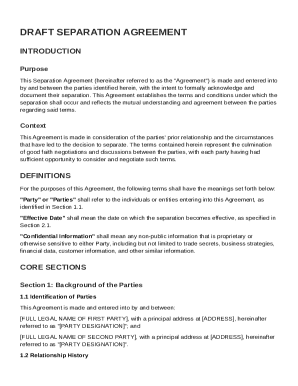
With the intent to formally acknowledge and document their separation. This Agreement establishes the terms and conditions under which the separation shall occur and reflects the mutual understanding and agreement between the parties regarding said terms. Context This Agreement is made in consideration of the parties' prior relationship and the circumstances that have led to the decision to separate. The terms contained herein represent the culmination of good faith negotiations and discussions.

How it works

  1. Open form

    Open form follow the instructions

  2. Easily sign form

    Easily sign the form with your finger

  3. Share form

    Send filled & signed form or save

How to fill out and sign Draft Separation Agreement Template online?

Get your online template and fill it in using progressive features. Enjoy smart fillable fields and interactivity.Follow the simple instructions below:

Experience all the advantages of completing and submitting legal forms on the internet. Using our solution filling in Draft Separation Agreement Template usually takes a few minutes. We make that possible by offering you access to our full-fledged editor capable of transforming/correcting a document?s original text, inserting unique boxes, and e-signing.

Execute Draft Separation Agreement Template in a few moments following the recommendations below:

  1. Find the document template you want in the library of legal forms.
  2. Click on the Get form key to open the document and begin editing.
  3. Fill out the necessary boxes (they are marked in yellow).
  4. The Signature Wizard will enable you to put your e-autograph after you have finished imputing details.
  5. Insert the relevant date.
  6. Check the whole template to make sure you?ve filled in all the information and no changes are needed.
  7. Press Done and download the ecompleted template to the computer.

Send your new Draft Separation Agreement Template in a digital form when you finish filling it out. Your data is well-protected, because we adhere to the newest security criteria. Become one of numerous happy users who are already filling in legal forms from their homes.

Tips on how to fill out, edit and sign Draft Separation Agreement Template online

How to fill out and sign Draft Separation Agreement Template online?

Get your online template and fill it in using progressive features. Enjoy smart fillable fields and interactivity.Follow the simple instructions below:

Experience all the advantages of completing and submitting legal forms on the internet. Using our solution filling in Draft Separation Agreement Template usually takes a few minutes. We make that possible by offering you access to our full-fledged editor capable of transforming/correcting a document?s original text, inserting unique boxes, and e-signing.

Execute Draft Separation Agreement Template in a few moments following the recommendations below:

  1. Find the document template you want in the library of legal forms.
  2. Click on the Get form key to open the document and begin editing.
  3. Fill out the necessary boxes (they are marked in yellow).
  4. The Signature Wizard will enable you to put your e-autograph after you have finished imputing details.
  5. Insert the relevant date.
  6. Check the whole template to make sure you?ve filled in all the information and no changes are needed.
  7. Press Done and download the ecompleted template to the computer.

Send your new Draft Separation Agreement Template in a digital form when you finish filling it out. Your data is well-protected, because we adhere to the newest security criteria. Become one of numerous happy users who are already filling in legal forms from their homes.

How to edit Draft Separation Agreement Template: customize forms online

Choose the right Draft Separation Agreement Template template and edit it on the spot. Streamline your paperwork with a smart document editing solution for online forms.

Your everyday workflow with paperwork and forms can be more effective when you have all you need in one place. For example, you can find, obtain, and edit Draft Separation Agreement Template in one browser tab. Should you need a specific Draft Separation Agreement Template, it is simple to find it with the help of the smart search engine and access it immediately. You do not need to download it or look for a third-party editor to edit it and add your details. All of the resources for effective work go in one packaged solution.

This modifying solution enables you to customize, fill, and sign your Draft Separation Agreement Template form right on the spot. Once you see a suitable template, click on it to go to the modifying mode. Once you open the form in the editor, you have all the necessary instruments at your fingertips. You can easily fill in the dedicated fields and erase them if necessary with the help of a simple yet multifunctional toolbar. Apply all the changes immediately, and sign the form without leaving the tab by merely clicking the signature field. After that, you can send or print your document if needed.

Make more custom edits with available instruments.

  • Annotate your document with the Sticky note tool by putting a note at any spot within the document.
  • Add required graphic components, if required, with the Circle, Check, or Cross instruments.
  • Modify or add text anywhere in the document using Texts and Text box instruments. Add content with the Initials or Date tool.
  • Modify the template text with the Highlight and Blackout, or Erase instruments.
  • Add custom graphic components with the Arrow and Line, or Draw tools.

Discover new opportunities in efficient and simple paperwork. Find the Draft Separation Agreement Template you need in minutes and fill it in in the same tab. Clear the mess in your paperwork for good with the help of online forms.

Get form

Experience a faster way to fill out and sign forms on the web. Access the most extensive library of templates available.
Get form

Related content

Sample Separation Agreement
Sep 19, 2024 — This Sample Separation Agreement is best used by people without...
Learn more
Separation Agreement Template - LearnTech Hub
A separation agreement template serves as a comprehensive document outlining the terms and...
Learn more
FL-160 Property Declaration - California Courts...
Complete all columns on the form. For more information about forms required to process and...
Learn more

Related links form

Minority Health Health Media Mini-Catalog - Texas Department Of ... - Dshs State Tx Department Of State Health Services Agenda Item For State Health Services Council January 12-13 Agenda Item Title Proposed Repeal Of 25 TAC, Chapter141 And New Rules Chapter 140, Subchapter H RADIATION SAFETY LICENSING BRANCH (RSLB) - Dshs State Tx

Questions & Answers

Get answers to your most pressing questions about US Legal Forms API.

Contact support

An example of an agreement is the Draft Separation Agreement Template, which outlines the terms under which two parties agree to separate. This document may encompass various aspects such as asset distribution, child custody arrangements, and support obligations. It serves as a legal record that can protect both parties’ interests.

To write a simple agreement, start with the Draft Separation Agreement Template for structure. Clearly define the purpose of the agreement, followed by concise terms and conditions. Use everyday language that is easy to understand, ensuring both parties can interpret the agreement without ambiguity.

Writing a short-form agreement is straightforward with the Draft Separation Agreement Template. Summarize key points clearly without losing essential details, such as responsibilities and obligations. Keep the language precise and include only critical terms to maintain readability and function.

Proof of separation typically includes documentation that can validate your status, such as the Draft Separation Agreement Template you created. This document should detail the terms of your separation, including financial arrangements and living situations. Additional proof may involve email communications, shared bills, or utility statements indicating different addresses.

Filling out an agreement form requires attention to detail. Use the Draft Separation Agreement Template as your guide, making sure to enter accurate and complete information in each required field. After completing the form, review it for any errors before finalizing your agreement.

Drafting a separation agreement begins with the Draft Separation Agreement Template. This template provides a clear structure, helping you to outline your terms regarding asset division, child custody, and support payments. It is advisable to consult legal resources or professionals to ensure compliance with state laws.

To fill an agreement form, start by obtaining the Draft Separation Agreement Template that suits your needs. Carefully read each section and input relevant information, such as names, dates, and specific terms of the separation. Ensure you understand each clause to prevent misunderstandings later.

A letter of proof of separation is a document that verifies you and your spouse have separated. It outlines the details of your separation including dates, living conditions, and any agreements made. When creating this letter, referencing a Draft Separation Agreement Template can help you ensure that all pertinent information is included. This letter may be required for legal purposes such as divorce proceedings.

Get This Form Now!

Use professional pre-built templates to fill in and sign documents online faster. Get access to thousands of forms.
Get form
If you believe that this page should be taken down, please follow our DMCA take down processhere.
Get Draft Separation Agreement Template
Get form
  • Adoption
  • Bankruptcy
  • Contractors
  • Divorce
  • Home Sales
  • Employment
  • Identity Theft
  • Incorporation
  • Landlord Tenant
  • Living Trust
  • Name Change
  • Personal Planning
  • Small Business
  • Wills & Estates
  • Packages A-Z
  • Affidavits
  • Bankruptcy
  • Bill of Sale
  • Corporate - LLC
  • Divorce
  • Employment
  • Identity Theft
  • Internet Technology
  • Landlord Tenant
  • Living Wills
  • Name Change
  • Power of Attorney
  • Real Estate
  • Small Estates
  • Wills
  • All Forms
  • Forms A-Z
  • Other Templates
  • Legal Hub
  • About Us
  • Help Portal
  • Legal Resources
  • Blog
  • Affiliates
  • Contact Us
  • Delete My Account
  • Site Map
  • Industries
  • Forms in Spanish
  • Localized Forms
  • State-specific Forms
  • Forms Kit
  • Real Estate Handbook
  • All Guides
  • Notarize
  • Incorporation services
  • For Consumers
  • For Small Business
  • For Attorneys
  • USLegal
  • FormsPass
  • pdfFiller
  • signNow
  • altaFlow
  • DocHub
  • Instapage
Form Packages
  • Adoption
  • Bankruptcy
  • Contractors
  • Divorce
  • Home Sales
  • Employment
  • Identity Theft
  • Incorporation
  • Landlord Tenant
  • Living Trust
  • Name Change
  • Personal Planning
  • Small Business
  • Wills & Estates
  • Packages A-Z
Form Categories
  • Affidavits
  • Bankruptcy
  • Bill of Sale
  • Corporate - LLC
  • Divorce
  • Employment
  • Identity Theft
  • Internet Technology
  • Landlord Tenant
  • Living Wills
  • Name Change
  • Power of Attorney
  • Real Estate
  • Small Estates
  • Wills
  • All Forms
  • Forms A-Z
  • Other Templates
Customer Service
  • Legal Hub
  • About Us
  • Help Portal
  • Legal Resources
  • Blog
  • Affiliates
  • Contact Us
  • Delete My Account
  • Site Map
  • Industries
  • Forms in Spanish
  • Localized Forms
  • State-specific Forms
  • Forms Kit
Legal Guides
  • Real Estate Handbook
  • All Guides
Prepared for you
  • Notarize
  • Incorporation services
Our Customers
  • For Consumers
  • For Small Business
  • For Attorneys
Our Sites
  • USLegal
  • FormsPass
  • pdfFiller
  • signNow
  • altaFlow
  • DocHub
  • Instapage
Social Media
Call us now toll free:
+1 833 426 79 33
As seen in:
© Copyright 1999-2026 airSlate Legal Forms, Inc. 17 Station Street, Ste. 203, Brookline, MA 02445
  • Your Privacy Choices
  • Terms of Service
  • Privacy Notice
  • Content Takedown Policy
  • Bug Bounty Program