Loading
Form preview
  • US Legal Forms
  • Other Templates
  • More Forms
  • More Multi-State Forms
  • Divorce Financial Settlement Agreement Template

Get Divorce Financial Settlement Agreement Template

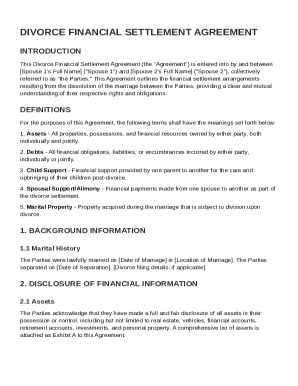
Full Name ("Spouse 2"), collectively referred to as "the Parties." This Agreement outlines the financial settlement arrangements resulting from the dissolution of the marriage between the Parties, providing a clear and mutual understanding of their respective rights and obligations. DEFINITIONS For the purposes of this Agreement, the following terms shall have the meanings set forth below: 1. Assets - All properties, possessions, and financial resources owned by either party, both individuall.

How it works

  1. Open form

    Open form follow the instructions

  2. Easily sign form

    Easily sign the form with your finger

  3. Share form

    Send filled & signed form or save

How to fill out and sign Divorce Financial Settlement Agreement Template online?

Get your online template and fill it in using progressive features. Enjoy smart fillable fields and interactivity.Follow the simple instructions below:

Are you searching for a fast and practical tool to fill out Divorce Financial Settlement Agreement Template at a reasonable cost? Our platform will provide you with an extensive variety of forms that are offered for completing on the internet. It only takes a couple of minutes.

Stick to these simple actions to get Divorce Financial Settlement Agreement Template completely ready for submitting:

  1. Get the form you will need in the collection of legal templates.
  2. Open the form in the online editing tool.
  3. Read the recommendations to learn which details you will need to include.
  4. Click the fillable fields and add the requested information.
  5. Put the date and insert your electronic autograph once you fill out all other boxes.
  6. Examine the document for misprints along with other mistakes. If there?s a need to change something, our online editor and its wide range of instruments are at your disposal.
  7. Download the new form to your computer by hitting Done.
  8. Send the electronic document to the parties involved.

Completing Divorce Financial Settlement Agreement Template does not have to be confusing any longer. From now on simply cope with it from your home or at your office from your mobile device or desktop computer.

Tips on how to fill out, edit and sign Divorce Financial Settlement Agreement Template online

How to fill out and sign Divorce Financial Settlement Agreement Template online?

Get your online template and fill it in using progressive features. Enjoy smart fillable fields and interactivity.Follow the simple instructions below:

Are you searching for a fast and practical tool to fill out Divorce Financial Settlement Agreement Template at a reasonable cost? Our platform will provide you with an extensive variety of forms that are offered for completing on the internet. It only takes a couple of minutes.

Stick to these simple actions to get Divorce Financial Settlement Agreement Template completely ready for submitting:

  1. Get the form you will need in the collection of legal templates.
  2. Open the form in the online editing tool.
  3. Read the recommendations to learn which details you will need to include.
  4. Click the fillable fields and add the requested information.
  5. Put the date and insert your electronic autograph once you fill out all other boxes.
  6. Examine the document for misprints along with other mistakes. If there?s a need to change something, our online editor and its wide range of instruments are at your disposal.
  7. Download the new form to your computer by hitting Done.
  8. Send the electronic document to the parties involved.

Completing Divorce Financial Settlement Agreement Template does not have to be confusing any longer. From now on simply cope with it from your home or at your office from your mobile device or desktop computer.

How to edit Divorce Financial Settlement Agreement Template: customize forms online

Enjoy the usability of the multi-featured online editor while filling out your Divorce Financial Settlement Agreement Template. Use the range of tools to rapidly complete the blanks and provide the requested information right away.

Preparing paperwork is time-taking and pricey unless you have ready-made fillable forms and complete them electronically. The easiest way to deal with the Divorce Financial Settlement Agreement Template is to use our professional and multi-featured online editing tools. We provide you with all the necessary tools for quick form fill-out and enable you to make any adjustments to your forms, adapting them to any demands. In addition to that, you can comment on the updates and leave notes for other people involved.

Here’s what you can do with your Divorce Financial Settlement Agreement Template in our editor:

  1. Fill out the blanks utilizing Text, Cross, Check, Initials, Date, and Sign tools.
  2. Highlight essential information with a favorite color or underline them.
  3. Conceal sensitive details with the Blackout tool or simply erase them.
  4. Import images to visualize your Divorce Financial Settlement Agreement Template.
  5. Substitute the original text with the one suiting your requirements.
  6. Leave comments or sticky notes to inform others on the updates.
  7. Drop extra fillable fields and assign them to specific people.
  8. Protect the sample with watermarks, add dates, and bates numbers.
  9. Share the paperwork in various ways and save it on your device or the cloud in different formats once you finish modifying.

Dealing with Divorce Financial Settlement Agreement Template in our powerful online editor is the quickest and most effective way to manage, submit, and share your documentation the way you need it from anywhere. The tool works from the cloud so that you can utilize it from any location on any internet-connected device. All forms you generate or complete are safely stored in the cloud, so you can always open them whenever needed and be assured of not losing them. Stop wasting time on manual document completion and get rid of papers; make it all on the web with minimum effort.

Get form

Experience a faster way to fill out and sign forms on the web. Access the most extensive library of templates available.
Get form

Related content

ccdr116.pdf
MARITAL SETTLEMENT AGREEMENT. (Family Law Art., § 7-103(a)(3)). If this submission...
Learn more
Divorce Settlement Agreement Template - LearnTech...
A Divorce Settlement Agreement Template is a pre-designed document that serves as a...
Learn more
2017 Publication 523
Jan 30, 2018 — Your spouse or former spouse is allowed to live in the home under a...
Learn more

Related links form

Official Contest Rules Compromise In A ... - State Bar Of Texas 124 Medical Radiologic Technologist Certification Program ... - Dshs State Tx ProSafeformatted.doc New User Welcome Kit - Texas Department Of State Health Services

Questions & Answers

Get answers to your most pressing questions about US Legal Forms API.

Contact support

To write a simple settlement agreement, focus on clarity and organization. Start with an introduction, then list the terms of the agreement in a logical order. Using a Divorce Financial Settlement Agreement Template will help you cover all necessary details and make the process less overwhelming.

To write a simple settlement agreement, begin by identifying the key issues both parties need to resolve. Clearly outline each party's responsibilities regarding finances and assets. A Divorce Financial Settlement Agreement Template can provide a straightforward structure to help you create an effective agreement.

A settlement agreement should be clear, detailed, and organized, covering all relevant aspects of the divorce. It commonly includes sections on property division, financial responsibilities, and child arrangements. Utilizing a Divorce Financial Settlement Agreement Template ensures you include all necessary information and maintain a professional format.

Moving out can complicate your divorce proceedings, especially regarding custody and asset division. By leaving the family home, you may unintentionally weaken your legal position. Having a solid Divorce Financial Settlement Agreement Template can help you address your living situation and other important aspects before making such a significant decision.

Yes, you can draft a settlement agreement without a solicitor, especially if both parties are in agreement. However, it's wise to ensure your agreement complies with legal requirements. A Divorce Financial Settlement Agreement Template can guide you through the necessary steps to create a legally sound document.

The easiest divorce settlement is one where both spouses agree on key issues without prolonged negotiations. An amicable conversation can lead to a mutual understanding on finances and custody arrangements. Using a Divorce Financial Settlement Agreement Template can simplify the process and help you reach an agreement quickly.

A reasonable settlement agreement clearly outlines the terms of a divorce, ensuring fairness for both parties. It typically addresses issues like asset division, alimony, and child support. Using a Divorce Financial Settlement Agreement Template can help you create a well-structured document that meets legal standards.

The most common divorce settlement often involves the division of assets, debts, and child custody arrangements. Couples typically focus on reaching a fair agreement that reflects their financial situation and future needs. Using a Divorce Financial Settlement Agreement Template can simplify this process by providing a structured format for outlining essential terms.

Get This Form Now!

Use professional pre-built templates to fill in and sign documents online faster. Get access to thousands of forms.
Get form
If you believe that this page should be taken down, please follow our DMCA take down processhere.
Get Divorce Financial Settlement Agreement Template
Get form
  • Adoption
  • Bankruptcy
  • Contractors
  • Divorce
  • Home Sales
  • Employment
  • Identity Theft
  • Incorporation
  • Landlord Tenant
  • Living Trust
  • Name Change
  • Personal Planning
  • Small Business
  • Wills & Estates
  • Packages A-Z
  • Affidavits
  • Bankruptcy
  • Bill of Sale
  • Corporate - LLC
  • Divorce
  • Employment
  • Identity Theft
  • Internet Technology
  • Landlord Tenant
  • Living Wills
  • Name Change
  • Power of Attorney
  • Real Estate
  • Small Estates
  • Wills
  • All Forms
  • Forms A-Z
  • Other Templates
  • Legal Hub
  • About Us
  • Help Portal
  • Legal Resources
  • Blog
  • Affiliates
  • Contact Us
  • Delete My Account
  • Site Map
  • Industries
  • Forms in Spanish
  • Localized Forms
  • State-specific Forms
  • Forms Kit
  • Real Estate Handbook
  • All Guides
  • Notarize
  • Incorporation services
  • For Consumers
  • For Small Business
  • For Attorneys
  • USLegal
  • FormsPass
  • pdfFiller
  • signNow
  • altaFlow
  • DocHub
  • Instapage
Form Packages
  • Adoption
  • Bankruptcy
  • Contractors
  • Divorce
  • Home Sales
  • Employment
  • Identity Theft
  • Incorporation
  • Landlord Tenant
  • Living Trust
  • Name Change
  • Personal Planning
  • Small Business
  • Wills & Estates
  • Packages A-Z
Form Categories
  • Affidavits
  • Bankruptcy
  • Bill of Sale
  • Corporate - LLC
  • Divorce
  • Employment
  • Identity Theft
  • Internet Technology
  • Landlord Tenant
  • Living Wills
  • Name Change
  • Power of Attorney
  • Real Estate
  • Small Estates
  • Wills
  • All Forms
  • Forms A-Z
  • Other Templates
Customer Service
  • Legal Hub
  • About Us
  • Help Portal
  • Legal Resources
  • Blog
  • Affiliates
  • Contact Us
  • Delete My Account
  • Site Map
  • Industries
  • Forms in Spanish
  • Localized Forms
  • State-specific Forms
  • Forms Kit
Legal Guides
  • Real Estate Handbook
  • All Guides
Prepared for you
  • Notarize
  • Incorporation services
Our Customers
  • For Consumers
  • For Small Business
  • For Attorneys
Our Sites
  • USLegal
  • FormsPass
  • pdfFiller
  • signNow
  • altaFlow
  • DocHub
  • Instapage
Social Media
Call us now toll free:
+1 833 426 79 33
As seen in:
© Copyright 1999-2026 airSlate Legal Forms, Inc. 17 Station Street, Ste. 203, Brookline, MA 02445
  • Your Privacy Choices
  • Terms of Service
  • Privacy Notice
  • Content Takedown Policy
  • Bug Bounty Program