Loading
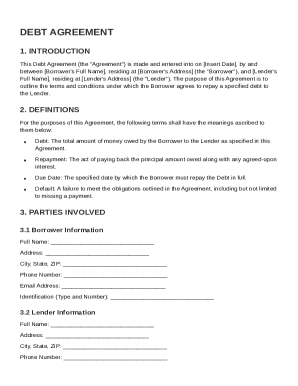
Form preview
  • US Legal Forms
  • Other Templates
  • More Forms
  • More Multi-State Forms
  • Debt Agreement Template

Get Debt Agreement Template

, and Lender's Full Name , residing at Lender's Address (the "Lender"). The purpose of this Agreement is to outline the terms and conditions under which the Borrower agrees to repay a specified debt to the Lender. 2. DEFINITIONS For the purposes of this Agreement, the following terms shall have the meanings ascribed to them below: Debt: The total amount of money owed by the Borrower to the Lender as specified in this Agreement. Repayment: The act of paying back the principal amount owed alon.

How it works

  1. Open form

    Open form follow the instructions

  2. Easily sign form

    Easily sign the form with your finger

  3. Share form

    Send filled & signed form or save

How to fill out and sign Debt Agreement Template online?

Get your online template and fill it in using progressive features. Enjoy smart fillable fields and interactivity.Follow the simple instructions below:

Business, legal, tax along with other e-documents demand a top level of compliance with the legislation and protection. Our documents are updated on a regular basis in accordance with the latest amendments in legislation. In addition, with us, all the information you provide in the Debt Agreement Template is well-protected against loss or damage via industry-leading file encryption.

The tips below can help you fill in Debt Agreement Template easily and quickly:

  1. Open the form in the full-fledged online editing tool by clicking on Get form.
  2. Fill in the necessary fields that are yellow-colored.
  3. Press the arrow with the inscription Next to move on from one field to another.
  4. Go to the e-signature solution to add an electronic signature to the template.
  5. Put the date.
  6. Check the entire template to ensure that you have not skipped anything important.
  7. Press Done and download your new template.

Our platform allows you to take the whole procedure of executing legal documents online. Due to this, you save hours (if not days or even weeks) and eliminate unnecessary costs. From now on, submit Debt Agreement Template from your home, business office, as well as while on the move.

Tips on how to fill out, edit and sign Debt Agreement Template online

How to fill out and sign Debt Agreement Template online?

Get your online template and fill it in using progressive features. Enjoy smart fillable fields and interactivity.Follow the simple instructions below:

Business, legal, tax along with other e-documents demand a top level of compliance with the legislation and protection. Our documents are updated on a regular basis in accordance with the latest amendments in legislation. In addition, with us, all the information you provide in the Debt Agreement Template is well-protected against loss or damage via industry-leading file encryption.

The tips below can help you fill in Debt Agreement Template easily and quickly:

  1. Open the form in the full-fledged online editing tool by clicking on Get form.
  2. Fill in the necessary fields that are yellow-colored.
  3. Press the arrow with the inscription Next to move on from one field to another.
  4. Go to the e-signature solution to add an electronic signature to the template.
  5. Put the date.
  6. Check the entire template to ensure that you have not skipped anything important.
  7. Press Done and download your new template.

Our platform allows you to take the whole procedure of executing legal documents online. Due to this, you save hours (if not days or even weeks) and eliminate unnecessary costs. From now on, submit Debt Agreement Template from your home, business office, as well as while on the move.

How to edit Debt Agreement Template: customize forms online

Have your stressless and paper-free way of working with Debt Agreement Template. Use our trusted online option and save a lot of time.

Drafting every document, including Debt Agreement Template, from scratch requires too much effort, so having a tried-and-true solution of pre-uploaded form templates can do wonders for your productivity.

But working with them can be problem, especially when it comes to the files in PDF format. Fortunately, our huge catalog has a built-in editor that allows you to quickly fill out and customize Debt Agreement Template without the need of leaving our website so that you don't need to waste time modifying your forms. Here's what you can do with your file using our tools:

  • Step 1. Find the necessary form on our website.
  • Step 2. Hit Get Form to open it in the editor.
  • Step 3. Take advantage of professional modifying tools that allow you to add, remove, annotate and highlight or blackout text.
  • Step 4. Generate and add a legally-binding signature to your file by using the sign option from the top toolbar.
  • Step 5. If the document layout doesn’t look the way you want it, use the tools on the right to erase, add, and arrange pages.
  • step 6. Add fillable fields so other persons can be invited to fill out the document (if applicable).
  • Step 7. Pass around or send out the document, print it out, or select the format in which you’d like to get the file.

Whether you need to complete editable Debt Agreement Template or any other document available in our catalog, you’re well on your way with our online document editor. It's easy and safe and doesn’t require you to have particular skills. Our web-based solution is set up to handle practical everything you can think of concerning file editing and completion.

Forget about the conventional way of handling your documents. Go with a a professional solution to help you simplify your activities and make them less reliant on paper.

Get form

Experience a faster way to fill out and sign forms on the web. Access the most extensive library of templates available.
Get form

Related content

Loan Agreement Templates
Loan Agreement Templates. Refer below for the process and document template changes, their...
Learn more
Repayment Agreement Form.pdf
This debt is the result of salary overpayments from. to . Repayment Schedule. Repayment of...
Learn more
Agreement for the Loan of Title Units
The Agreement comes into force when the Lender transfers the loan amount to the Debtor's...
Learn more

Related links form

Certification Appendix - Dos Ny OASAS - Professional Activities Clock Hours (IPR-6) - New York State Certification Of Retail Application For Liquor License 2008 Annual Shoreside Processor EDR - Pacific States Marine ... - Psmfc

Questions & Answers

Get answers to your most pressing questions about US Legal Forms API.

Contact support

Writing a debt settlement agreement requires you to detail the terms under which the debt will be settled. Specify the reduced amount, payment conditions, and the deadline for payment completion. A Debt Agreement Template can provide a solid foundation for this document, ensuring that all necessary elements are included for legal protection.

To write a debt agreement, start by specifying the parties involved and the total debt amount. Include terms such as the payment timeline, interest rates, and any additional fees. A well-crafted Debt Agreement Template can guide you in structuring these details effectively, ensuring both parties are on the same page and minimizing future disputes.

To create a debt contract, start by clearly identifying the parties involved and the specific amount of debt. Next, outline the repayment terms, including the payment schedule and interest rate. Finally, include clauses that describe what happens in case of default or late payments. A well-structured Debt Agreement Template can guide you through this process and help you cover all essential aspects.

To submit proof of debt, gather relevant documents, such as invoices and payment history, that validate your claim. Ensure you draft a clear cover letter explaining your submission along with the proof. Utilizing a Debt Agreement Template might aid in organizing and presenting your documents effectively. This method helps establish your claim and provides necessary documentation to support your case.

Clearing $30,000 in debt quickly requires a strategic approach, such as prioritizing high-interest debts, cutting unnecessary expenses, and increasing your income. Consider negotiating settlements with creditors to reduce the total owed. Using a Debt Agreement Template can facilitate quick, clear agreements with your creditors.

To obtain a debt agreement, first assess your financial situation and negotiate with creditors. After reaching an agreement, formalize the terms in writing. Our Debt Agreement Template is a practical tool to craft a legally binding document, ensuring that both parties clearly understand their commitments.

A debt agreement can be a beneficial option if you are struggling to manage multiple debts. It consolidates your debt into one manageable payment, often reducing the overall amount owed. Using our Debt Agreement Template can help you formalize the process and protect your interests.

Get This Form Now!

Use professional pre-built templates to fill in and sign documents online faster. Get access to thousands of forms.
Get form
If you believe that this page should be taken down, please follow our DMCA take down processhere.
Get Debt Agreement Template
Get form
  • Adoption
  • Bankruptcy
  • Contractors
  • Divorce
  • Home Sales
  • Employment
  • Identity Theft
  • Incorporation
  • Landlord Tenant
  • Living Trust
  • Name Change
  • Personal Planning
  • Small Business
  • Wills & Estates
  • Packages A-Z
  • Affidavits
  • Bankruptcy
  • Bill of Sale
  • Corporate - LLC
  • Divorce
  • Employment
  • Identity Theft
  • Internet Technology
  • Landlord Tenant
  • Living Wills
  • Name Change
  • Power of Attorney
  • Real Estate
  • Small Estates
  • Wills
  • All Forms
  • Forms A-Z
  • Other Templates
  • Legal Hub
  • About Us
  • Help Portal
  • Legal Resources
  • Blog
  • Affiliates
  • Contact Us
  • Delete My Account
  • Site Map
  • Industries
  • Forms in Spanish
  • Localized Forms
  • State-specific Forms
  • Forms Kit
  • Real Estate Handbook
  • All Guides
  • Notarize
  • Incorporation services
  • For Consumers
  • For Small Business
  • For Attorneys
  • USLegal
  • FormsPass
  • pdfFiller
  • signNow
  • altaFlow
  • DocHub
  • Instapage
Form Packages
  • Adoption
  • Bankruptcy
  • Contractors
  • Divorce
  • Home Sales
  • Employment
  • Identity Theft
  • Incorporation
  • Landlord Tenant
  • Living Trust
  • Name Change
  • Personal Planning
  • Small Business
  • Wills & Estates
  • Packages A-Z
Form Categories
  • Affidavits
  • Bankruptcy
  • Bill of Sale
  • Corporate - LLC
  • Divorce
  • Employment
  • Identity Theft
  • Internet Technology
  • Landlord Tenant
  • Living Wills
  • Name Change
  • Power of Attorney
  • Real Estate
  • Small Estates
  • Wills
  • All Forms
  • Forms A-Z
  • Other Templates
Customer Service
  • Legal Hub
  • About Us
  • Help Portal
  • Legal Resources
  • Blog
  • Affiliates
  • Contact Us
  • Delete My Account
  • Site Map
  • Industries
  • Forms in Spanish
  • Localized Forms
  • State-specific Forms
  • Forms Kit
Legal Guides
  • Real Estate Handbook
  • All Guides
Prepared for you
  • Notarize
  • Incorporation services
Our Customers
  • For Consumers
  • For Small Business
  • For Attorneys
Our Sites
  • USLegal
  • FormsPass
  • pdfFiller
  • signNow
  • altaFlow
  • DocHub
  • Instapage
Social Media
Call us now toll free:
+1 833 426 79 33
As seen in:
© Copyright 1999-2026 airSlate Legal Forms, Inc. 17 Station Street, Ste. 203, Brookline, MA 02445
  • Your Privacy Choices
  • Terms of Service
  • Privacy Notice
  • Content Takedown Policy
  • Bug Bounty Program