Loading
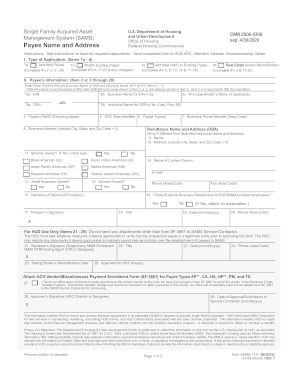
Get Hud Sams-1111 2016-2026
How it works
-

Open form follow the instructions
-

Easily sign the form with your finger
-

Send filled & signed form or save
How to fill out the HUD SAMS-1111 online
Filling out the HUD SAMS-1111 form is an essential process for managing single-family acquired assets. This guide provides a clear, step-by-step approach to completing the form online, ensuring you have the necessary information to proceed with your application.
Follow the steps to successfully complete the HUD SAMS-1111 online.
- Click 'Get Form' button to access the HUD SAMS-1111 form online.
- Select the type of application you are submitting by checking one of the options: Add New Payee, Modify Existing Payee, Add New NAID to Existing Payee, or Real Estate Broker Recertification.
- Complete the necessary fields under Payee’s Information. You must enter either the Payee’s EIN and Business Name or their SSN and Individual Name, but not both.
- If you are adding a new payee, fill in the required fields such as the Principal Broker's Name, Business Address, and Business Phone Number.
- If applicable, provide information regarding any remittance name and address if it is different from the primary Business or Individual Name.
- Indicate if the business is minority-owned, a small business, or woman-owned by checking 'Yes' or 'No' in the appropriate sections.
- Fill out the contact person’s information including their phone number, fax number, and email address.
- Complete details regarding owners or principals of the business, ensuring all names are entered correctly.
- Review the required sections for preparation, such as the Preparer’s Signature, Title, Date, and Phone Number.
- After completing the form, you can save your changes, download the form for your records, print it for submission, or share it as needed.
Complete your documents online now to streamline your application process.
You can find HUD forms on the official HUD website or through local HUD offices. For convenience, platforms like USLegalForms offer easy access to a wide array of HUD forms. These resources can save you time and ensure you are using the correct documentation for your needs.