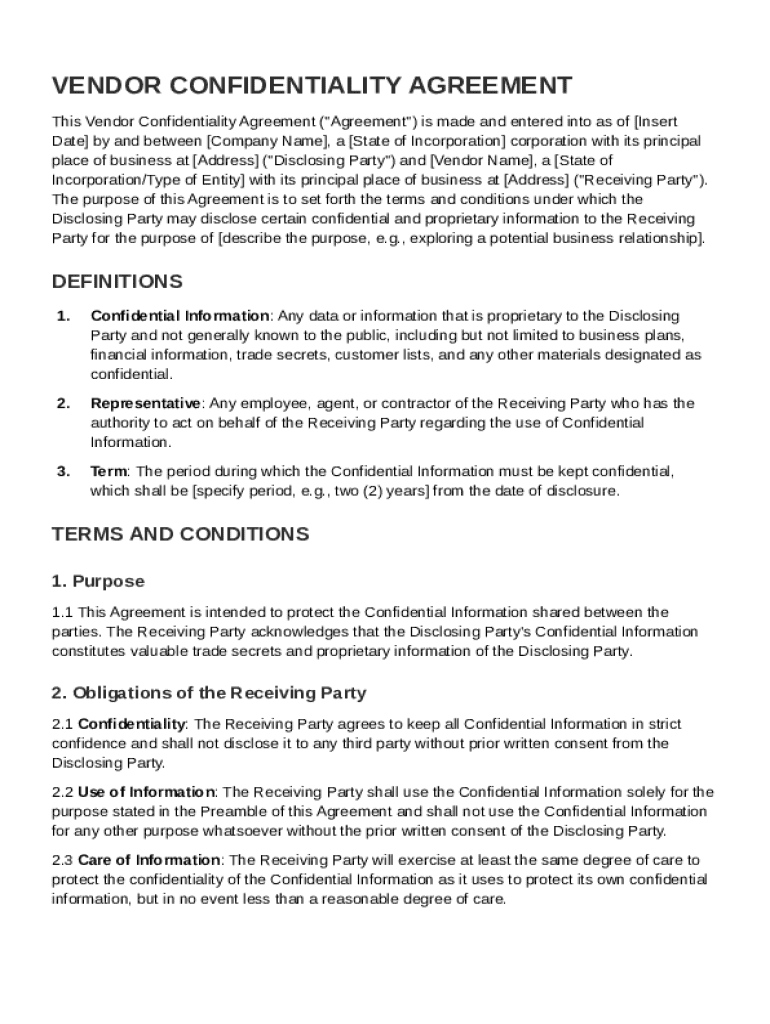
E of Incorporation corporation with its principal place of business at Address ("Disclosing Party") and Vendor Name , a State of Incorporation/Type of Entity with its principal place of business at Address ("Receiving Party"). The purpose of this Agreement is to set forth the terms and conditions under which the Disclosing Party may disclose certain confidential and proprietary information to the Receiving Party for the purpose of describe the purpose, e.g., exploring a potential busine.

Open form follow the instructions

Easily sign the form with your finger

Send filled & signed form or save
How to fill out and sign Vendor Confidentiality Agreement Template online?
Get your online template and fill it in using progressive features. Enjoy smart fillable fields and interactivity.Follow the simple instructions below:
Business, legal, tax and other documents need higher of protection and compliance with the law. Our documents are regularly updated in accordance with the latest legislative changes. Plus, with us, all of the information you provide in your Vendor Confidentiality Agreement Template is protected against loss or damage with the help of cutting-edge file encryption.
The tips below can help you complete Vendor Confidentiality Agreement Template easily and quickly:
- Open the form in the feature-rich online editor by hitting Get form.
- Fill out the requested boxes which are yellow-colored.
- Click the arrow with the inscription Next to move on from field to field.
- Use the e-signature solution to e-sign the template.
- Add the relevant date.
- Check the entire e-document to ensure that you have not skipped anything.
- Click Done and download the resulting form.
Our service enables you to take the whole process of submitting legal forms online. For that reason, you save hours (if not days or even weeks) and eliminate extra payments. From now on, fill out Vendor Confidentiality Agreement Template from home, business office, or even on the go.
Tips on how to fill out, edit and sign Vendor Confidentiality Agreement Template online
How to fill and sign Vendor Confidentiality Agreement Template
Get your online template and fill it in using progressive features. Enjoy smart fillable fields and interactivity.Follow the simple instructions below:
Business, legal, tax and other documents need higher of protection and compliance with the law. Our documents are regularly updated in accordance with the latest legislative changes. Plus, with us, all of the information you provide in your Vendor Confidentiality Agreement Template is protected against loss or damage with the help of cutting-edge file encryption.
The tips below can help you complete Vendor Confidentiality Agreement Template easily and quickly:
- Open the form in the feature-rich online editor by hitting Get form.
- Fill out the requested boxes which are yellow-colored.
- Click the arrow with the inscription Next to move on from field to field.
- Use the e-signature solution to e-sign the template.
- Add the relevant date.
- Check the entire e-document to ensure that you have not skipped anything.
- Click Done and download the resulting form.
Our service enables you to take the whole process of submitting legal forms online. For that reason, you save hours (if not days or even weeks) and eliminate extra payments. From now on, fill out Vendor Confidentiality Agreement Template from home, business office, or even on the go.
How to edit Vendor Confidentiality Agreement Template
Doing documents is easy with smart online instruments. Eliminate paperwork with easily downloadable Vendor Confidentiality Agreement Template templates you can edit online and print out.
Preparing documents and paperwork should be more accessible, whether it is an everyday part of one’s job or occasional work. When a person must file a Vendor Confidentiality Agreement Template, studying regulations and guides on how to complete a form properly and what it should include might take a lot of time and effort. Nonetheless, if you find the right Vendor Confidentiality Agreement Template template, completing a document will stop being a challenge with a smart editor at hand.
Discover a broader variety of functions you can add to your document flow routine. No need to print out, complete, and annotate forms manually. With a smart modifying platform, all the essential document processing functions will always be at hand. If you want to make your work process with Vendor Confidentiality Agreement Template forms more efficient, find the template in the catalog, click on it, and see a simpler method to fill it in.
- If you need to add text in a random area of the form or insert a text field, use the Text and Text field instruments and expand the text in the form as much as you want.
- Use the Highlight instrument to stress the main aspects of the form. If you need to cover or remove some text pieces, utilize the Blackout or Erase instruments.
- Customize the form by adding default graphic components to it. Use the Circle, Check, and Cross instruments to add these components to the forms, if needed.
- If you need additional annotations, make use of the Sticky note tool and place as many notes on the forms page as required.
- If the form needs your initials or date, the editor has instruments for that too. Minimize the possibility of errors using the Initials and Date instruments.
- It is also possible to add custom visual components to the form. Use the Arrow, Line, and Draw instruments to change the file.
The more instruments you are familiar with, the better it is to work with Vendor Confidentiality Agreement Template. Try the solution that offers everything essential to find and edit forms in one tab of your browser and forget about manual paperwork.
How to fill and sign Vendor Confidentiality Agreement Template
Get your online template and fill it in using progressive features. Enjoy smart fillable fields and interactivity.Follow the simple instructions below:
Business, legal, tax and other documents need higher of protection and compliance with the law. Our documents are regularly updated in accordance with the latest legislative changes. Plus, with us, all of the information you provide in your Vendor Confidentiality Agreement Template is protected against loss or damage with the help of cutting-edge file encryption.
The tips below can help you complete Vendor Confidentiality Agreement Template easily and quickly:
- Open the form in the feature-rich online editor by hitting Get form.
- Fill out the requested boxes which are yellow-colored.
- Click the arrow with the inscription Next to move on from field to field.
- Use the e-signature solution to e-sign the template.
- Add the relevant date.
- Check the entire e-document to ensure that you have not skipped anything.
- Click Done and download the resulting form.
Our service enables you to take the whole process of submitting legal forms online. For that reason, you save hours (if not days or even weeks) and eliminate extra payments. From now on, fill out Vendor Confidentiality Agreement Template from home, business office, or even on the go.
Experience a faster way to fill out and sign forms on the web. Access the most extensive library of templates available.
Related content
This Agreement shall be governed by the laws of the [Name of Country, other political...
VENDOR acknowledges that in the course of providing services to UNIVERSITY, VENDOR will be...
Mar 24, 2022 — Secure Confidentiality. Any consulting agreement must include a language...
Get answers to your most pressing questions about US Legal Forms API.
How do you write a simple confidentiality agreement?
To write a simple confidentiality agreement, focus on clarity and brevity. Start with the names of the parties, specify the confidential information, and outline the obligations regarding that information. A Vendor Confidentiality Agreement Template can simplify this process by providing a structured format. Ensuring everyone understands their commitments will help maintain trust throughout your business relationship.
What is the confidentiality clause in a vendor agreement?
The confidentiality clause in a vendor agreement outlines the responsibilities regarding the handling of confidential information. It clearly states what is deemed confidential and the obligations of the vendor to protect that information. Incorporating this clause using a Vendor Confidentiality Agreement Template ensures all parties understand their legal obligations. This clause provides peace of mind by safeguarding your business interests.
How to fill out the NDA?
To fill out a Non-Disclosure Agreement (NDA), start by identifying the parties and the information that needs protection. When using a Vendor Confidentiality Agreement Template, ensure you encapsulate the purpose of sharing the confidential information and include clauses on what constitutes a breach. Completing it accurately will secure your sensitive information effectively. Review the document thoroughly before finalizing it.
How to fill out a confidentiality agreement?
Filling out a confidentiality agreement involves detailing the parties involved and clearly defining the confidential information. When using a Vendor Confidentiality Agreement Template, include specifics about what information is considered confidential and the duration of the agreement. Additionally, you should outline the obligations of each party. Careful completion ensures all parties know their responsibilities.
Can you make your own confidentiality agreement?
Yes, you can create your own confidentiality agreement. Crafting a Vendor Confidentiality Agreement Template can provide a solid foundation for your needs. It allows you to specify the terms of confidentiality, including the duration and scope of the agreement. Be sure to include clear language to avoid misunderstandings about the expectations.
What's the difference between CDA and NDA?
A Confidential Disclosure Agreement (CDA) and a Non-Disclosure Agreement (NDA) serve similar purposes, but there are nuances. A CDA typically focuses on sharing information between parties, while an NDA emphasizes the obligation to keep that information confidential. Both types can benefit from a structured Vendor Confidentiality Agreement Template. Understanding these distinctions will help you choose the right agreement for your situation.
Can I write an NDA myself?
Yes, you can write a Non-Disclosure Agreement yourself, but it is crucial to ensure that it includes all necessary components. Utilizing a Vendor Confidentiality Agreement Template can guide you in covering essential clauses like confidentiality terms and penalties for breach. Customizing a template allows you to tailor the agreement to fit your specific needs. However, consider seeking legal advice to ensure its enforceability.
What is an example of a confidential agreement?
A confidential agreement, often referred to as a Non-Disclosure Agreement (NDA), is a legal document that protects sensitive information. For instance, a Vendor Confidentiality Agreement Template can be used when a business shares proprietary information with a vendor. This ensures that the vendor does not disclose any confidential data to third parties. Using a clear template can streamline the creation of such agreements.
How to create a confidentiality agreement?
To create a confidentiality agreement, start by outlining the terms you want to include, then refer to a Vendor Confidentiality Agreement Template for guidance. This template will help you incorporate necessary clauses and conditions tailored to your situation. Don't forget to consider getting legal assistance to review your final document.
Can you draft your own NDA?
Yes, you can draft your own NDA with the help of a Vendor Confidentiality Agreement Template. This resource helps outline the critical elements required for a comprehensive NDA. Additionally, seeking legal advice can further ensure your agreement is robust and legally binding.
Use professional pre-built templates to fill in and sign documents online faster. Get access to thousands of forms.
If you believe that this page should be taken down, please follow our DMCA take down process here.