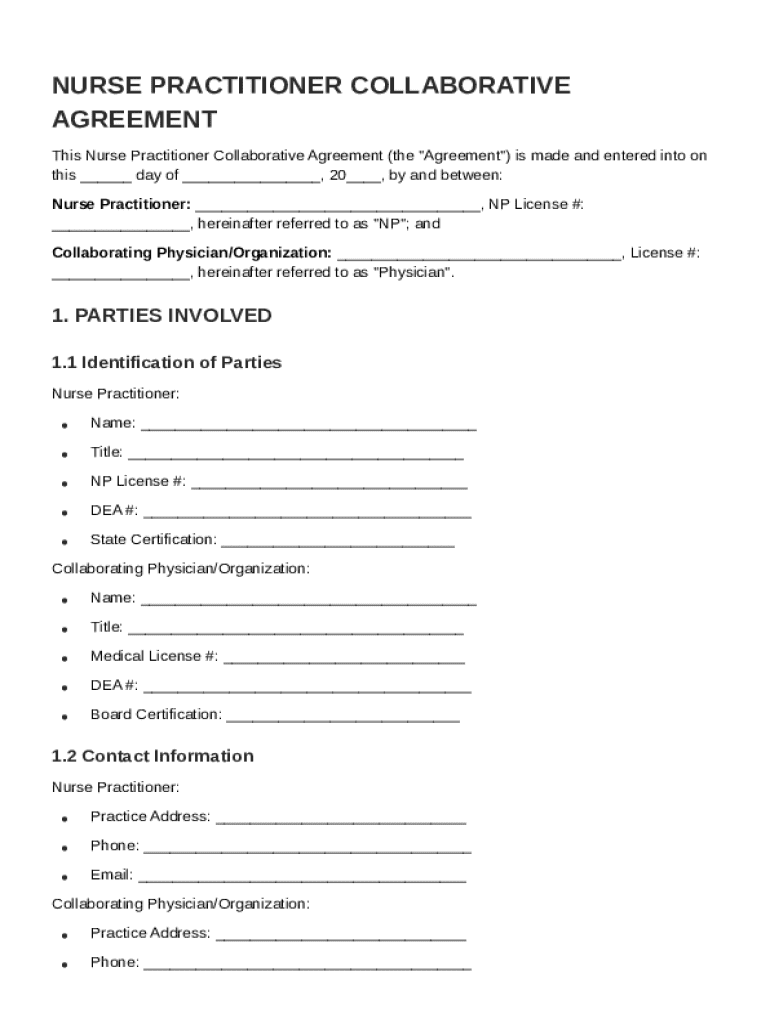
Nurse Practitioner: , NP License #: , hereinafter referred to as "NP"; and Collaborating Physician/Organization: , License #: , hereinafter referred to as "Physician". 1. PARTIES INVOLVED 1.1 Identification of Parties Nurse Practitioner: Name: Title: NP License #: DEA #:.
Loading

Open form follow the instructions

Easily sign the form with your finger

Send filled & signed form or save
How to fill out and sign Nurse Practitioner Collaborative Agreement Template online?
Get your online template and fill it in using progressive features. Enjoy smart fillable fields and interactivity.Follow the simple instructions below:
The times of terrifying complex legal and tax documents have ended. With US Legal Forms the entire process of creating legal documents is anxiety-free. The leading editor is already at your fingertips offering you a wide variety of useful instruments for submitting a Nurse Practitioner Collaborative Agreement Template. These guidelines, with the editor will help you through the complete procedure.
- Click the Get Form option to begin modifying.
- Switch on the Wizard mode in the top toolbar to get additional pieces of advice.
- Fill out each fillable area.
- Make sure the details you fill in Nurse Practitioner Collaborative Agreement Template is updated and correct.
- Indicate the date to the template with the Date function.
- Click the Sign icon and create an electronic signature. Feel free to use three available options; typing, drawing, or uploading one.
- Re-check each area has been filled in correctly.
- Select Done in the top right corne to save and send or download the file. There are various options for receiving the doc. As an instant download, an attachment in an email or through the mail as a hard copy.
We make completing any Nurse Practitioner Collaborative Agreement Template more convenient. Use it now!
Tips on how to fill out, edit and sign Nurse Practitioner Collaborative Agreement Template online
How to fill and sign Nurse Practitioner Collaborative Agreement Template
Get your online template and fill it in using progressive features. Enjoy smart fillable fields and interactivity.Follow the simple instructions below:
The times of terrifying complex legal and tax documents have ended. With US Legal Forms the entire process of creating legal documents is anxiety-free. The leading editor is already at your fingertips offering you a wide variety of useful instruments for submitting a Nurse Practitioner Collaborative Agreement Template. These guidelines, with the editor will help you through the complete procedure.
- Click the Get Form option to begin modifying.
- Switch on the Wizard mode in the top toolbar to get additional pieces of advice.
- Fill out each fillable area.
- Make sure the details you fill in Nurse Practitioner Collaborative Agreement Template is updated and correct.
- Indicate the date to the template with the Date function.
- Click the Sign icon and create an electronic signature. Feel free to use three available options; typing, drawing, or uploading one.
- Re-check each area has been filled in correctly.
- Select Done in the top right corne to save and send or download the file. There are various options for receiving the doc. As an instant download, an attachment in an email or through the mail as a hard copy.
We make completing any Nurse Practitioner Collaborative Agreement Template more convenient. Use it now!
How to edit Nurse Practitioner Collaborative Agreement Template
Completing papers is easy with smart online instruments. Get rid of paperwork with easily downloadable Nurse Practitioner Collaborative Agreement Template templates you can modify online and print out.
Preparing papers and forms must be more reachable, whether it is a day-to-day part of one’s occupation or occasional work. When a person must file a Nurse Practitioner Collaborative Agreement Template, studying regulations and tutorials on how to complete a form properly and what it should include may take a lot of time and effort. However, if you find the right Nurse Practitioner Collaborative Agreement Template template, completing a document will stop being a challenge with a smart editor at hand.
Discover a wider selection of functions you can add to your document flow routine. No need to print out, fill out, and annotate forms manually. With a smart modifying platform, all the essential document processing functions will always be at hand. If you want to make your work process with Nurse Practitioner Collaborative Agreement Template forms more efficient, find the template in the catalog, click on it, and discover a simpler way to fill it in.
- If you want to add text in a random area of the form or insert a text field, use the Text and Text field tools and expand the text in the form as much as you want.
- Use the Highlight instrument to stress the important aspects of the form. If you want to cover or remove some text pieces, utilize the Blackout or Erase instruments.
- Customize the form by adding default graphic components to it. Use the Circle, Check, and Cross instruments to add these elements to the forms, if necessary.
- If you need additional annotations, utilize the Sticky note resource and put as many notes on the forms page as required.
- If the form requires your initials or date, the editor has instruments for that too. Reduce the chance of errors by using the Initials and Date tools.
- It is also easy to add custom graphic components to the form. Use the Arrow, Line, and Draw instruments to change the document.
The more instruments you are familiar with, the simpler it is to work with Nurse Practitioner Collaborative Agreement Template. Try the solution that offers everything essential to find and modify forms in one tab of your browser and forget about manual paperwork.
How to fill and sign Nurse Practitioner Collaborative Agreement Template
Get your online template and fill it in using progressive features. Enjoy smart fillable fields and interactivity.Follow the simple instructions below:
The times of terrifying complex legal and tax documents have ended. With US Legal Forms the entire process of creating legal documents is anxiety-free. The leading editor is already at your fingertips offering you a wide variety of useful instruments for submitting a Nurse Practitioner Collaborative Agreement Template. These guidelines, with the editor will help you through the complete procedure.
- Click the Get Form option to begin modifying.
- Switch on the Wizard mode in the top toolbar to get additional pieces of advice.
- Fill out each fillable area.
- Make sure the details you fill in Nurse Practitioner Collaborative Agreement Template is updated and correct.
- Indicate the date to the template with the Date function.
- Click the Sign icon and create an electronic signature. Feel free to use three available options; typing, drawing, or uploading one.
- Re-check each area has been filled in correctly.
- Select Done in the top right corne to save and send or download the file. There are various options for receiving the doc. As an instant download, an attachment in an email or through the mail as a hard copy.
We make completing any Nurse Practitioner Collaborative Agreement Template more convenient. Use it now!
Experience a faster way to fill out and sign forms on the web. Access the most extensive library of templates available.
Related content
This agreement sets terms between a nurse practitioner and a collaborating physician...
The APP may prescribe/order all drugs, devices, tests, medical treatments, and procedures...
Each application must be accompanied by a collaborative Nurse Practitioner practice...
Get answers to your most pressing questions about US Legal Forms API.
How do nurse practitioners collaborate with physicians?
Nurse practitioners collaborate with physicians through structured communication and shared responsibilities in patient care. They may meet regularly to discuss treatment plans, review patient progress, and ensure comprehensive care. A Nurse Practitioner Collaborative Agreement Template can formalize this collaboration, ensuring that all parties are aligned and aware of their roles in the healthcare team.
What is a collaboration agreement for nurse practitioners?
A collaboration agreement for nurse practitioners is a formalized document that defines the working relationship between a nurse practitioner and a physician. This agreement outlines the scope of practice, prescribing authority, and oversight responsibilities. By using a Nurse Practitioner Collaborative Agreement Template, both parties can ensure clarity and compliance with state laws.
How do you write a collaborative practice agreement?
Writing a collaborative practice agreement involves detailing the working relationship between nurse practitioners and their collaborating physicians. Begin with a statement of intent, and then outline the roles, responsibilities, and protocols for patient care. Using a Nurse Practitioner Collaborative Agreement Template can streamline this process, helping you include all relevant details to foster a successful collaboration.
Can NP practice independently in CO?
In Colorado, Nurse Practitioners have the ability to practice independently after meeting specific criteria. This includes obtaining the required national certification and completing a certain number of hours of practical experience. Understanding the requirements, including the need for a Nurse Practitioner Collaborative Agreement Template, is essential for navigating the steps toward independent practice.
How to create a collaboration contract?
To create a collaboration contract, start by outlining the roles and responsibilities of each party involved. Include key elements such as the scope of practice, supervision guidelines, and duration of the agreement. Utilizing a Nurse Practitioner Collaborative Agreement Template can provide a clear starting point, ensuring you include all necessary components while complying with state regulations.
How do you write a collaboration agreement?
Writing a collaboration agreement involves detailing the collaboration goals, roles, and expectations for all parties involved. Start with a clear introduction outlining the purpose of the agreement, followed by specific contributions from each participant. Make sure to include how disputes will be resolved and how long the agreement will be in effect. Using a Nurse Practitioner Collaborative Agreement Template can provide a solid foundation for your collaboration agreement, streamlining the process.
What are some examples of collaborative practice?
Examples of collaborative practice include nurse practitioners working alongside physicians in clinics, urgent care centers, or hospitals, managing patient care jointly. They may also collaborate with specialists to ensure comprehensive treatment plans for patients. This teamwork can enhance patient outcomes and streamline care delivery. A Nurse Practitioner Collaborative Agreement Template can help clarify these roles and optimize the collaborative process.
How to write a collaborative practice agreement?
To write a collaborative practice agreement, begin by identifying the specific services the nurse practitioner will provide under the physician's supervision. Include details about patient care protocols, emergency procedures, and how consultations will work. Additionally, reference any applicable laws or guidelines that the agreement must adhere to. A Nurse Practitioner Collaborative Agreement Template can offer a structured pathway to crafting this essential document with ease.
What is a collaborative agreement for nurse practitioners?
A collaborative agreement for nurse practitioners is a formal document that outlines the working relationship between nurse practitioners and their collaborating physicians. This document specifies the tasks that nurse practitioners are allowed to perform and the extent of their autonomy. It ensures both parties understand their responsibilities, promoting better patient care. Utilizing a Nurse Practitioner Collaborative Agreement Template can facilitate creating an effective agreement tailored to your specific needs.
Use professional pre-built templates to fill in and sign documents online faster. Get access to thousands of forms.
If you believe that this page should be taken down, please follow our DMCA take down process here.