Loading
Form preview
  • US Legal Forms
  • Other Templates
  • More Forms
  • More Multi-State Forms
  • New Hire Agreement Template

Get New Hire Agreement Template

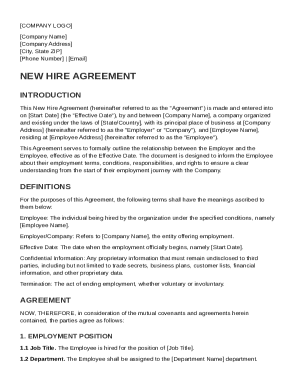
"Agreement") is made and entered into on Start Date (the "Effective Date"), by and between Company Name , a company organized and existing under the laws of State/Country , with its principal place of business at Company Address (hereinafter referred to as the "Employer" or "Company"), and Employee Name , residing at Employee Address (hereinafter referred to as the "Employee"). This Agreement serves to formally outline the relationship between the Employer and the Employee, effective a.

How it works

  1. Open form

    Open form follow the instructions

  2. Easily sign form

    Easily sign the form with your finger

  3. Share form

    Send filled & signed form or save

How to fill out and sign New Hire Agreement Template online?

Get your online template and fill it in using progressive features. Enjoy smart fillable fields and interactivity.Follow the simple instructions below:

Finding a authorized professional, making a scheduled visit and coming to the business office for a private meeting makes finishing a New Hire Agreement Template from beginning to end stressful. US Legal Forms enables you to quickly generate legally-compliant papers based on pre-created web-based samples.

Prepare your docs in minutes using our simple step-by-step guideline:

  1. Find the New Hire Agreement Template you require.
  2. Open it up with online editor and start editing.
  3. Fill out the blank areas; engaged parties names, addresses and numbers etc.
  4. Customize the blanks with exclusive fillable areas.
  5. Add the date and place your e-signature.
  6. Click on Done after twice-checking all the data.
  7. Download the ready-created record to your device or print it like a hard copy.

Easily generate a New Hire Agreement Template without having to involve experts. There are already more than 3 million users benefiting from our unique library of legal documents. Join us today and get access to the #1 collection of browser-based blanks. Try it yourself!

Tips on how to fill out, edit and sign New Hire Agreement Template online

How to fill out and sign New Hire Agreement Template online?

Get your online template and fill it in using progressive features. Enjoy smart fillable fields and interactivity.Follow the simple instructions below:

Finding a authorized professional, making a scheduled visit and coming to the business office for a private meeting makes finishing a New Hire Agreement Template from beginning to end stressful. US Legal Forms enables you to quickly generate legally-compliant papers based on pre-created web-based samples.

Prepare your docs in minutes using our simple step-by-step guideline:

  1. Find the New Hire Agreement Template you require.
  2. Open it up with online editor and start editing.
  3. Fill out the blank areas; engaged parties names, addresses and numbers etc.
  4. Customize the blanks with exclusive fillable areas.
  5. Add the date and place your e-signature.
  6. Click on Done after twice-checking all the data.
  7. Download the ready-created record to your device or print it like a hard copy.

Easily generate a New Hire Agreement Template without having to involve experts. There are already more than 3 million users benefiting from our unique library of legal documents. Join us today and get access to the #1 collection of browser-based blanks. Try it yourself!

How to edit New Hire Agreement Template: customize forms online

Facilitate your document preparation process and adjust it to your demands within clicks. Fill out and approve New Hire Agreement Template with a powerful yet user-friendly online editor.

Managing paperwork is always burdensome, especially when you deal with it from time to time. It demands you strictly adhere to all the formalities and accurately complete all fields with full and accurate data. Nevertheless, it often occurs that you need to adjust the document or add more fields to fill out. If you need to optimize New Hire Agreement Template before submitting it, the easiest way to do it is by using our robust yet straightforward-to-use online editing tools.

This extensive PDF editing solution enables you to quickly and easily complete legal paperwork from any internet-connected device, make simple changes to the template, and place additional fillable fields. The service enables you to choose a particular area for each data type, like Name, Signature, Currency and SSN etc. You can make them mandatory or conditional and decide who should complete each field by assigning them to a defined recipient.

Make the steps listed below to improve your New Hire Agreement Template online:

  1. Open needed file from the catalog.
  2. Fill out the blanks with Text and drop Check and Cross tools to the tickboxes.
  3. Utilize the right-hand toolbar to adjust the template with new fillable areas.
  4. Opt for the fields based on the type of data you want to be collected.
  5. Make these fields mandatory, optional, and conditional and customize their order.
  6. Assign each field to a particular party with the Add Signer option.
  7. Verify that you’ve made all the necessary adjustments and click Done.

Our editor is a universal multi-featured online solution that can help you quickly and easily adapt New Hire Agreement Template and other forms based on your requirements. Minimize document preparation and submission time and make your forms look perfect without hassle.

Get form

Experience a faster way to fill out and sign forms on the web. Access the most extensive library of templates available.
Get form

Related content

work for hire agreement
This WORK FOR HIRE AGREEMENT (the “Agreement”) is made this ___ day of _____ , 2008...
Learn more
1 WORK FOR HIRE AGREEMENT
This Work For Hire Agreement (“Agreement”) is made this ____ day of. ,. 20________...
Learn more
Employee/Independent Contractor Determination...
This form must be completed and signed by the individual performing the service; reviewed...
Learn more

Related links form

DOD NAVMC 11652 2022 KY Zeta Phi Beta Sorority Scholarship Application 2018 Chapter 97. Workers' Compensation Act. Article 1. ... VA 032-03-0651-13 2019

Questions & Answers

Get answers to your most pressing questions about US Legal Forms API.

Contact support

Examples of simple contracts include lease agreements, service contracts, and employment agreements. Each contract typically outlines the parties involved, terms of agreement, and signatures. Utilizing a New Hire Agreement Template can provide a well-structured format, making it easier to draft straightforward agreements.

Writing an agreement between employer and employee should be straightforward and comprehensible. Clearly state the expectations, responsibilities, and the scope of work within the document. Consider using a New Hire Agreement Template to make the process easier and to ensure that you include all necessary details and legal protections.

For beginners, writing a contract starts with understanding its essential components, like title, parties involved, and terms of agreement. Use clear language to define expectations, rights, and responsibilities. A New Hire Agreement Template can serve as a helpful starting point, guiding you through the important sections and ensuring clarity.

Writing a contract for a new employee involves outlining the terms and conditions of their employment clearly. Focus on including job duties, salary, and any additional benefits the employee may receive. A New Hire Agreement Template can assist in ensuring that the contract adheres to legal standards and covers all aspects effectively.

To fill out an agreement form properly, start by reviewing the document to understand each section. Enter the required information accurately, ensuring consistency throughout the form. Additionally, employing a New Hire Agreement Template can guide you in providing the necessary details without missing any important terms.

When writing a contract for a new employee, clarify the terms of employment, including position details and compensation. Outline the job responsibilities and the duration of employment if applicable. Using a New Hire Agreement Template can streamline this process, ensuring all essential elements are captured succinctly.

Creating an employee contract involves drafting a document that outlines the expectations between the employer and the employee. Begin with key details such as the employee's name, position, salary, and work schedule. It’s beneficial to consult a New Hire Agreement Template to guarantee you include all necessary clauses and provisions.

To fill a contract of employment template, start by entering the basic information of both parties, including names and addresses. Next, specify the job title, responsibilities, and salary details. Be sure to include any relevant terms regarding benefits, work hours, and termination procedures. Using a New Hire Agreement Template can help ensure you cover all essential aspects clearly.

Creating a simple contract agreement starts with defining the purpose of the contract and identifying the involved parties. Clearly state the obligations and rights of each party in plain language. Using a New Hire Agreement Template can simplify this task by providing you with a streamlined format, ensuring that all essential components are included in a straightforward manner.

To make a new agreement, first identify the specific terms that need to be addressed, such as payment details, project scopes, or timelines. Next, write the agreement in simple, clear language that both parties can understand. A New Hire Agreement Template can provide you with a solid foundation and structure, making it easier to create a professional document.

Get This Form Now!

Use professional pre-built templates to fill in and sign documents online faster. Get access to thousands of forms.
Get form
If you believe that this page should be taken down, please follow our DMCA take down processhere.
Get New Hire Agreement Template
Get form
  • Adoption
  • Bankruptcy
  • Contractors
  • Divorce
  • Home Sales
  • Employment
  • Identity Theft
  • Incorporation
  • Landlord Tenant
  • Living Trust
  • Name Change
  • Personal Planning
  • Small Business
  • Wills & Estates
  • Packages A-Z
  • Affidavits
  • Bankruptcy
  • Bill of Sale
  • Corporate - LLC
  • Divorce
  • Employment
  • Identity Theft
  • Internet Technology
  • Landlord Tenant
  • Living Wills
  • Name Change
  • Power of Attorney
  • Real Estate
  • Small Estates
  • Wills
  • All Forms
  • Forms A-Z
  • Other Templates
  • Legal Hub
  • About Us
  • Help Portal
  • Legal Resources
  • Blog
  • Affiliates
  • Contact Us
  • Delete My Account
  • Site Map
  • Industries
  • Forms in Spanish
  • Localized Forms
  • State-specific Forms
  • Forms Kit
  • Real Estate Handbook
  • All Guides
  • Notarize
  • Incorporation services
  • For Consumers
  • For Small Business
  • For Attorneys
  • USLegal
  • FormsPass
  • pdfFiller
  • signNow
  • altaFlow
  • DocHub
  • Instapage
Form Packages
  • Adoption
  • Bankruptcy
  • Contractors
  • Divorce
  • Home Sales
  • Employment
  • Identity Theft
  • Incorporation
  • Landlord Tenant
  • Living Trust
  • Name Change
  • Personal Planning
  • Small Business
  • Wills & Estates
  • Packages A-Z
Form Categories
  • Affidavits
  • Bankruptcy
  • Bill of Sale
  • Corporate - LLC
  • Divorce
  • Employment
  • Identity Theft
  • Internet Technology
  • Landlord Tenant
  • Living Wills
  • Name Change
  • Power of Attorney
  • Real Estate
  • Small Estates
  • Wills
  • All Forms
  • Forms A-Z
  • Other Templates
Customer Service
  • Legal Hub
  • About Us
  • Help Portal
  • Legal Resources
  • Blog
  • Affiliates
  • Contact Us
  • Delete My Account
  • Site Map
  • Industries
  • Forms in Spanish
  • Localized Forms
  • State-specific Forms
  • Forms Kit
Legal Guides
  • Real Estate Handbook
  • All Guides
Prepared for you
  • Notarize
  • Incorporation services
Our Customers
  • For Consumers
  • For Small Business
  • For Attorneys
Our Sites
  • USLegal
  • FormsPass
  • pdfFiller
  • signNow
  • altaFlow
  • DocHub
  • Instapage
Social Media
Call us now toll free:
+1 833 426 79 33
As seen in:
© Copyright 1999-2026 airSlate Legal Forms, Inc. 17 Station Street, Ste. 203, Brookline, MA 02445
  • Your Privacy Choices
  • Terms of Service
  • Privacy Notice
  • Content Takedown Policy
  • Bug Bounty Program