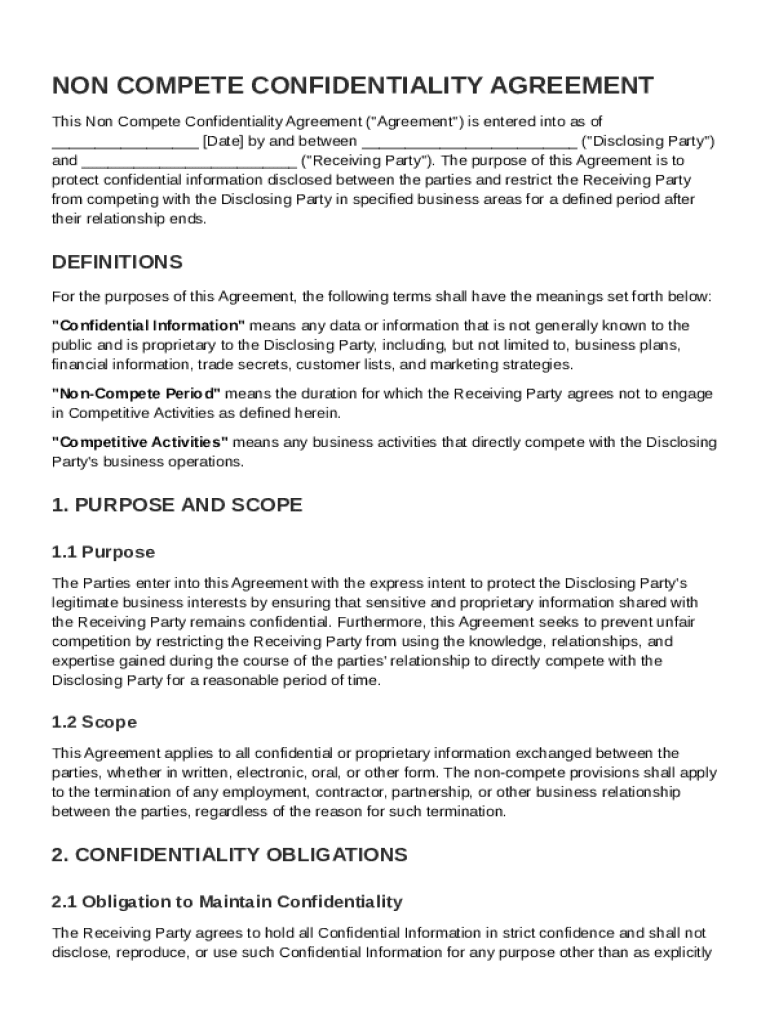
("Disclosing Party") and ("Receiving Party"). The purpose of this Agreement is to protect confidential information disclosed between the parties and restrict the Receiving Party from competing with the Disclosing Party in specified business areas for a defined period after their relationship ends. DEFINITIONS For the purposes of this Agreement, the following terms shall have the meanings set forth below: "Confidential Information" means any data or information that is.

Open form follow the instructions

Easily sign the form with your finger

Send filled & signed form or save
How to fill out and sign Non Compete Confidentiality Agreement Template online?
Get your online template and fill it in using progressive features. Enjoy smart fillable fields and interactivity.Follow the simple instructions below:
The times of frightening complicated tax and legal documents have ended. With US Legal Forms the entire process of completing official documents is anxiety-free. The best editor is directly close at hand giving you a wide range of advantageous tools for filling out a Non Compete Confidentiality Agreement Template. These tips, together with the editor will guide you through the complete procedure.
- Select the orange Get Form button to begin editing and enhancing.
- Turn on the Wizard mode in the top toolbar to acquire more suggestions.
- Fill out each fillable area.
- Ensure the data you add to the Non Compete Confidentiality Agreement Template is up-to-date and accurate.
- Indicate the date to the form using the Date option.
- Click on the Sign tool and create an e-signature. You can use three available choices; typing, drawing, or capturing one.
- Make sure that every area has been filled in properly.
- Select Done in the top right corne to save the sample. There are several choices for getting the doc. As an instant download, an attachment in an email or through the mail as a hard copy.
We make completing any Non Compete Confidentiality Agreement Template more straightforward. Start now!
Tips on how to fill out, edit and sign Non Compete Confidentiality Agreement Template online
How to fill and sign Non Compete Confidentiality Agreement Template
Get your online template and fill it in using progressive features. Enjoy smart fillable fields and interactivity.Follow the simple instructions below:
The times of frightening complicated tax and legal documents have ended. With US Legal Forms the entire process of completing official documents is anxiety-free. The best editor is directly close at hand giving you a wide range of advantageous tools for filling out a Non Compete Confidentiality Agreement Template. These tips, together with the editor will guide you through the complete procedure.
- Select the orange Get Form button to begin editing and enhancing.
- Turn on the Wizard mode in the top toolbar to acquire more suggestions.
- Fill out each fillable area.
- Ensure the data you add to the Non Compete Confidentiality Agreement Template is up-to-date and accurate.
- Indicate the date to the form using the Date option.
- Click on the Sign tool and create an e-signature. You can use three available choices; typing, drawing, or capturing one.
- Make sure that every area has been filled in properly.
- Select Done in the top right corne to save the sample. There are several choices for getting the doc. As an instant download, an attachment in an email or through the mail as a hard copy.
We make completing any Non Compete Confidentiality Agreement Template more straightforward. Start now!
How to edit Non Compete Confidentiality Agreement Template
Completing papers is easy with smart online instruments. Eliminate paperwork with easily downloadable Non Compete Confidentiality Agreement Template templates you can edit online and print out.
Preparing papers and documents should be more reachable, whether it is an everyday component of one’s occupation or occasional work. When a person must file a Non Compete Confidentiality Agreement Template, studying regulations and instructions on how to complete a form correctly and what it should include might take a lot of time and effort. However, if you find the right Non Compete Confidentiality Agreement Template template, completing a document will stop being a challenge with a smart editor at hand.
Discover a wider selection of functions you can add to your document flow routine. No need to print out, fill in, and annotate forms manually. With a smart modifying platform, all the essential document processing functions are always at hand. If you want to make your work process with Non Compete Confidentiality Agreement Template forms more efficient, find the template in the catalog, click on it, and discover a less complicated method to fill it in.
- If you need to add text in a random part of the form or insert a text field, use the Text and Text field tools and expand the text in the form as much as you require.
- Take advantage of the Highlight tool to stress the main aspects of the form. If you need to conceal or remove some text pieces, utilize the Blackout or Erase instruments.
- Customize the form by adding default graphic components to it. Use the Circle, Check, and Cross instruments to add these components to the forms, if required.
- If you need additional annotations, use the Sticky note tool and put as many notes on the forms page as required.
- If the form needs your initials or date, the editor has instruments for that too. Reduce the chance of errors using the Initials and Date tools.
- It is also easy to add custom graphic components to the form. Use the Arrow, Line, and Draw instruments to change the document.
The more instruments you are familiar with, the better it is to work with Non Compete Confidentiality Agreement Template. Try the solution that offers everything essential to find and edit forms in one tab of your browser and forget about manual paperwork.
How to fill and sign Non Compete Confidentiality Agreement Template
Get your online template and fill it in using progressive features. Enjoy smart fillable fields and interactivity.Follow the simple instructions below:
The times of frightening complicated tax and legal documents have ended. With US Legal Forms the entire process of completing official documents is anxiety-free. The best editor is directly close at hand giving you a wide range of advantageous tools for filling out a Non Compete Confidentiality Agreement Template. These tips, together with the editor will guide you through the complete procedure.
- Select the orange Get Form button to begin editing and enhancing.
- Turn on the Wizard mode in the top toolbar to acquire more suggestions.
- Fill out each fillable area.
- Ensure the data you add to the Non Compete Confidentiality Agreement Template is up-to-date and accurate.
- Indicate the date to the form using the Date option.
- Click on the Sign tool and create an e-signature. You can use three available choices; typing, drawing, or capturing one.
- Make sure that every area has been filled in properly.
- Select Done in the top right corne to save the sample. There are several choices for getting the doc. As an instant download, an attachment in an email or through the mail as a hard copy.
We make completing any Non Compete Confidentiality Agreement Template more straightforward. Start now!
Experience a faster way to fill out and sign forms on the web. Access the most extensive library of templates available.
Related content
The Employee agrees to maintain in confidence for the Company and such third parties and...
The receiving party must not disclose confidential information, take security precautions...
Mar 24, 2022 — Provisions like confidentiality or non-compete clauses explicitly outline...
Get answers to your most pressing questions about US Legal Forms API.
How do you fill out a confidentiality and non-disclosure agreement?
To fill out a confidentiality and non-disclosure agreement, begin by entering the names and addresses of the involved parties. Next, clearly define the confidential information and the obligations of each party regarding that information. Using a Non Compete Confidentiality Agreement Template simplifies this process, ensuring all necessary sections are adequately addressed for legal protection.
How to write up a non-compete agreement?
Writing up a non-compete agreement involves specifying the parties, scope of the agreement, and duration of the restrictions. You should also include provisions for both confidentiality and non-compete obligations. A Non Compete Confidentiality Agreement Template can streamline this process, ensuring that you adhere to legal standards while protecting your business interests effectively.
What is an example of a noncompete agreement?
An example of a noncompete agreement is one where an employee agrees not to work for a competing business for a specified period after leaving their job. This agreement usually includes details about the type of work the employee cannot engage in and geographical limitations. Consider utilizing a Non Compete Confidentiality Agreement Template to create a clear, comprehensive example tailored to your needs.
How do you write a non-compete agreement?
To write a non-compete agreement, start by defining the parties involved and the scope of the agreement. Clearly outline the restrictions on competition, including duration and geographical limits. It is advisable to use a Non Compete Confidentiality Agreement Template to ensure all essential components are included. Doing so facilitates a stronger, legally sound agreement.
Is a confidentiality agreement the same as a noncompete?
No, a confidentiality agreement and a noncompete serve different purposes. A confidentiality agreement protects sensitive information while a noncompete restricts a party from working with competitors after leaving a company. Understanding these differences is crucial when drafting your Non Compete Confidentiality Agreement Template. This clarity helps protect your business interests more effectively.
Can I create my own NDA?
Yes, you can create your own Non Compete Confidentiality Agreement Template. It is essential to include key elements, such as the definition of confidential information and the obligations of both parties. Additionally, ensure that the terms are clear and enforceable based on your state laws. However, using a professional template can help ensure you cover all necessary aspects effectively.
What are the 5 key elements of a non-disclosure agreement?
The five key elements of a non-disclosure agreement include the definition of confidential information, obligations of the receiving party, duration of confidentiality, exclusions from confidentiality, and consequences of breach. Knowing these elements helps create a well-rounded Non Compete Confidentiality Agreement Template. This template can ensure that your agreement covers all essential points effectively.
Is a confidentiality agreement the same as a non-disclosure agreement?
Yes, a confidentiality agreement and a non-disclosure agreement are essentially the same. Both documents aim to protect sensitive information from being disclosed without permission. When drafting your Non Compete Confidentiality Agreement Template, you can choose to include provisions from both types to ensure comprehensive protection.
How do you write a simple confidentiality agreement?
To write a simple confidentiality agreement, focus on clarity and brevity. Start by stating the purpose of the agreement, then outline the parties involved and the confidential information covered. Using a Non Compete Confidentiality Agreement Template can simplify this process, guiding you through the necessary clauses while maintaining simplicity.
Is a confidentiality agreement legally enforceable?
Yes, a confidentiality agreement can be legally enforceable if crafted correctly. It must include clear terms that specify the obligations of the parties involved. By utilizing a Non Compete Confidentiality Agreement Template, you can create a document that stands up in court, ensuring your confidential information remains protected.
Use professional pre-built templates to fill in and sign documents online faster. Get access to thousands of forms.
If you believe that this page should be taken down, please follow our DMCA take down process here.