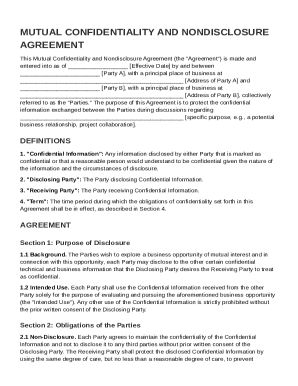
N Party A , with a principal place of business at Address of Party A and Party B , with a principal place of business at Address of Party B , collectively referred to as the "Parties." The purpose of this Agreement is to protect the confidential information exchanged between the Parties during discussions regarding.
Loading
Open form follow the instructions
Easily sign the form with your finger
Send filled & signed form or save
How to fill out and sign Mutual Confidentiality And Nondisclosure Agreement Template online?
Get your online template and fill it in using progressive features. Enjoy smart fillable fields and interactivity.Follow the simple instructions below:
Tax, legal, business and other e-documents demand a top level of compliance with the law and protection. Our documents are regularly updated in accordance with the latest legislative changes. Additionally, with us, all the info you provide in the Mutual Confidentiality And Nondisclosure Agreement Template is protected against loss or damage via top-notch encryption.
The following tips will allow you to fill in Mutual Confidentiality And Nondisclosure Agreement Template quickly and easily:
- Open the form in the feature-rich online editing tool by clicking on Get form.
- Complete the necessary fields that are colored in yellow.
- Hit the green arrow with the inscription Next to move from box to box.
- Go to the e-autograph tool to e-sign the form.
- Put the date.
- Double-check the entire document to be sure that you haven?t skipped anything important.
- Click Done and save the resulting template.
Our service allows you to take the entire procedure of executing legal documents online. As a result, you save hours (if not days or weeks) and eliminate unnecessary payments. From now on, complete Mutual Confidentiality And Nondisclosure Agreement Template from home, office, as well as while on the move.
Tips on how to fill out, edit and sign Mutual Confidentiality And Nondisclosure Agreement Template online
How to fill and sign Mutual Confidentiality And Nondisclosure Agreement Template
Get your online template and fill it in using progressive features. Enjoy smart fillable fields and interactivity.Follow the simple instructions below:
Tax, legal, business and other e-documents demand a top level of compliance with the law and protection. Our documents are regularly updated in accordance with the latest legislative changes. Additionally, with us, all the info you provide in the Mutual Confidentiality And Nondisclosure Agreement Template is protected against loss or damage via top-notch encryption.
The following tips will allow you to fill in Mutual Confidentiality And Nondisclosure Agreement Template quickly and easily:
- Open the form in the feature-rich online editing tool by clicking on Get form.
- Complete the necessary fields that are colored in yellow.
- Hit the green arrow with the inscription Next to move from box to box.
- Go to the e-autograph tool to e-sign the form.
- Put the date.
- Double-check the entire document to be sure that you haven?t skipped anything important.
- Click Done and save the resulting template.
Our service allows you to take the entire procedure of executing legal documents online. As a result, you save hours (if not days or weeks) and eliminate unnecessary payments. From now on, complete Mutual Confidentiality And Nondisclosure Agreement Template from home, office, as well as while on the move.
How to edit Mutual Confidentiality And Nondisclosure Agreement Template
Use our comprehensive editor to transform a simple online template into a completed document. Continue reading to learn how to modify Mutual Confidentiality And Nondisclosure Agreement Template online easily.
Once you discover an ideal Mutual Confidentiality And Nondisclosure Agreement Template, all you have to do is adjust the template to your preferences or legal requirements. Apart from completing the fillable form with accurate details, you may need to delete some provisions in the document that are irrelevant to your case. Alternatively, you may want to add some missing conditions in the original form. Our advanced document editing features are the simplest way to fix and adjust the form.
The editor lets you change the content of any form, even if the file is in PDF format. It is possible to add and erase text, insert fillable fields, and make further changes while keeping the original formatting of the document. You can also rearrange the structure of the document by changing page order.
You don’t need to print the Mutual Confidentiality And Nondisclosure Agreement Template to sign it. The editor comes along with electronic signature capabilities. Most of the forms already have signature fields. So, you simply need to add your signature and request one from the other signing party via email.
Follow this step-by-step guide to create your Mutual Confidentiality And Nondisclosure Agreement Template:
- Open the preferred form.
- Use the toolbar to adjust the template to your preferences.
- Fill out the form providing accurate information.
- Click on the signature field and add your eSignature.
- Send the document for signature to other signers if needed.
After all parties complete the document, you will receive a signed copy which you can download, print, and share with other people.
Our solutions enable you to save tons of your time and minimize the chance of an error in your documents. Enhance your document workflows with efficient editing capabilities and a powerful eSignature solution.
How to fill and sign Mutual Confidentiality And Nondisclosure Agreement Template
Get your online template and fill it in using progressive features. Enjoy smart fillable fields and interactivity.Follow the simple instructions below:
Tax, legal, business and other e-documents demand a top level of compliance with the law and protection. Our documents are regularly updated in accordance with the latest legislative changes. Additionally, with us, all the info you provide in the Mutual Confidentiality And Nondisclosure Agreement Template is protected against loss or damage via top-notch encryption.
The following tips will allow you to fill in Mutual Confidentiality And Nondisclosure Agreement Template quickly and easily:
- Open the form in the feature-rich online editing tool by clicking on Get form.
- Complete the necessary fields that are colored in yellow.
- Hit the green arrow with the inscription Next to move from box to box.
- Go to the e-autograph tool to e-sign the form.
- Put the date.
- Double-check the entire document to be sure that you haven?t skipped anything important.
- Click Done and save the resulting template.
Our service allows you to take the entire procedure of executing legal documents online. As a result, you save hours (if not days or weeks) and eliminate unnecessary payments. From now on, complete Mutual Confidentiality And Nondisclosure Agreement Template from home, office, as well as while on the move.
Experience a faster way to fill out and sign forms on the web. Access the most extensive library of templates available.
Related content
These terms have the following definitions in this Agreement: “Confidential...
THIS MUTUAL CONFIDENTIALITY AND NON-DISCLOSURE AGREEMENT (this. “Agreement”) is...
Mar 24, 2022 — A solid consulting agreement should include the nature of services, fee...
Get answers to your most pressing questions about US Legal Forms API.
Can you write your own non-disclosure agreement?
Yes, you can write your own non-disclosure agreement if you are clear about the terms and the information you wish to protect. However, to avoid missing critical legal stipulations, it’s wise to consult a template. The Mutual Confidentiality And Nondisclosure Agreement Template from USLegalForms can serve as a practical guide when drafting your NDA.
What is the difference between a CDA and an NDA?
A CDA, or confidentiality disclosure agreement, is essentially another term for an NDA. Both documents aim to protect sensitive information, but usage may vary based on context or industry. For a streamlined approach, you can use the Mutual Confidentiality And Nondisclosure Agreement Template to craft a well-defined NDA.
How to get an NDA made?
Creating an NDA can be straightforward. First, determine if you need a one-sided or mutual agreement, and then outline the terms and conditions. You can also leverage a Mutual Confidentiality And Nondisclosure Agreement Template from USLegalForms to ensure that your NDA meets legal standards and covers all needed aspects.
What is the difference between MDA and NDA?
A MDA, or mutual disclosure agreement, is similar to an NDA but focuses on mutual exchange of confidential information. In contrast, an NDA can be one-sided or mutual. When needing a document that addresses both parties, consider using the Mutual Confidentiality And Nondisclosure Agreement Template from USLegalForms to simplify your process.
What is the difference between NDA and mutual NDA?
An NDA generally applies to one party disclosing confidential information to another, while a mutual NDA involves both parties sharing sensitive information with each other. This means that both sides have agreed to keep the information private. A Mutual Confidentiality And Nondisclosure Agreement Template can help you draft an effective mutual NDA suited to your specific requirements.
Is a mutual confidentiality agreement the same as an NDA?
Yes, a mutual confidentiality agreement is essentially a type of NDA. Both documents are designed to protect sensitive information exchanged between two parties. When creating your own agreement, consider using the Mutual Confidentiality And Nondisclosure Agreement Template to ensure clarity and protection for both parties.
How to create a mutual NDA?
To create a mutual NDA, you should start by identifying the parties involved and defining the confidential information shared between them. Next, specify the obligations of both parties regarding the handling of this information and include the duration of the agreement. Using a Mutual Confidentiality And Nondisclosure Agreement Template can streamline this process and ensure all necessary elements are covered.
What is the difference between a confidentiality agreement and NDA?
A confidentiality agreement and a non-disclosure agreement (NDA) serve similar purposes but may differ in scope. A confidentiality agreement typically covers a broader range of information sharing, while an NDA specifically addresses sensitive information shared between parties. It is essential to choose the right document that fits your needs, like the Mutual Confidentiality And Nondisclosure Agreement Template available on USLegalForms.
Can I write an NDA myself?
Yes, you can write an NDA yourself, but it’s important to ensure that you include all essential elements. Consider outlining the parties’ information, defining confidential information, and specifying the terms of use. However, to avoid missing critical details, it is advisable to use a Mutual Confidentiality And Nondisclosure Agreement Template, which offers a structured approach and minimizes errors.
What is an example of a mutual confidentiality clause?
A mutual confidentiality clause often states that both parties agree to keep sensitive information private and not disclose it to third parties. For example, it may read, 'Both parties agree not to disclose any confidential information received from the other party without prior written consent.' This clause can be easily crafted using a Mutual Confidentiality And Nondisclosure Agreement Template for clarity and effectiveness.
Use professional pre-built templates to fill in and sign documents online faster. Get access to thousands of forms.
If you believe that this page should be taken down, please follow our DMCA take down process here.