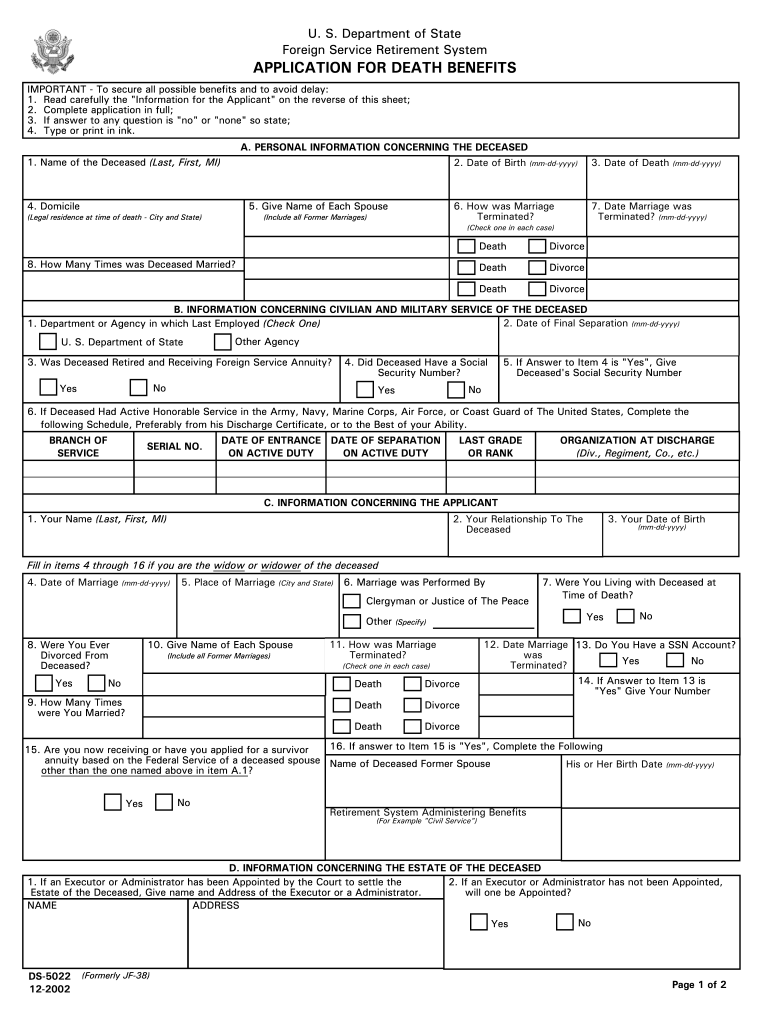
Applicant" on the reverse of this sheet; 2. Complete application in full; 3. If answer to any question is "no" or "none" so state; 4. Type or print in ink. A. PERSONAL INFORMATION CONCERNING THE DECEASED 2. Date of Birth (mm-dd-yyyy) 1. Name of the Deceased (Last, First, MI) 4. Domicile 5. Give Name of Each Spouse (Legal residence at time of death - City and State) 3. Date of Death 6. How was Marriage Terminated? (Include all Former Marriages) (mm-dd-yyyy) 7. Date Marriage was Terminat.

Open form follow the instructions

Easily sign the form with your finger

Send filled & signed form or save
How to fill out the DS-5022 online
This guide provides a comprehensive and user-friendly approach to filling out the DS-5022 form online. Whether you are familiar with digital document management or new to this process, this guide will assist you through each step to ensure accurate completion.
Follow the steps to successfully complete the DS-5022 form online.
- Click the ‘Get Form’ button to access the form and open it in your preferred text editor.
- Begin with Section A: Personal information concerning the deceased. Fill in the deceased's name, date of birth, date of death, domicile, and details regarding their marriage history.
- Proceed to Section B: Information concerning the civilian and military service of the deceased. Here, input the department or agency of last employment, retirement status, social security number, and military service details.
- Next is Section C: Information concerning the applicant. Complete your name, relationship to the deceased, and your date of birth. If applicable, provide details about your marriage to the deceased.
- In Section D: Information concerning the estate of the deceased, indicate if an executor or administrator has been appointed. Provide the necessary details as needed.
- Move to Section E: Information concerning dependent children of the deceased. List all qualifying children, their relationship to the deceased, and indicate if any children are disabled or need guardianship.
- Complete Section F: Information concerning non-dependent children and other relatives. List the names, ages, and relationships of relevant individuals as applicable.
- Finally, review Section G: Certification, confirm all statements are true, sign and date the application. Ensure all required documentation is attached, including a death certificate.
- Once all sections are complete, save your changes and download the form. You may also print or share it as necessary.
Start completing the DS-5022 form online to secure the necessary benefits.
Experience a faster way to fill out and sign forms on the web. Access the most extensive library of templates available.
Related content
Aug 10, 2017 — DS-5022A. Spouse's Application for Death Benefits. HR/RET. Full. *...
"Trees, SVM and Unsupervised Learning" is designed to provide working professionals with a...
Video Management Software package to unify Security Surveillance,. Business Intelligence...
Get answers to your most pressing questions about US Legal Forms API.
How to fill out parental information on a passport application?
When filling out the parental information section of your passport application, you need to provide details such as parents' names, addresses, and citizenship status. For the DS-5022, it's essential to include both parents' information if applicable, as this ensures compliance with U.S. passport requirements. You should also provide any necessary documents proving parental relationship, like a birth certificate. Accurate details help streamline the passport application process.
Can I fill out DS 11 at home?
Yes, you can fill out the DS-11 form at home. However, ensure you print the form clearly without making any errors. This form is used for new passports, so remember to gather all required documents, including proof of citizenship and identification. Once completed, you must submit the DS-11 in person at an authorized acceptance facility.
How to fill out a passport renewal form?
To fill out a passport renewal form, start by obtaining the correct form, which is the DS-5022. Make sure you provide accurate personal information including your full name, date of birth, and passport details. You should also include a recent passport photo that meets the official requirements. Double-check your information before submitting your application to avoid delays.
What documents do I need to submit with DS-260?
When submitting the DS-260 form, you will need to gather specific documents to support your application. Commonly required documents include your passport, birth certificate, and any prior immigration paperwork. Be sure to check the latest guidelines as requirements can change. Resources on DS-5022 can help you ensure you have everything you need.
How do I submit a DS-160?
To submit a DS-160, you must complete the form electronically on the Consular Electronic Application Center website. After filling out the required fields, you will need to review your information and submit it online. Don’t forget to print your confirmation page, as it’s essential for your visa interview. For additional support, refer to the DS-5022 resources.
How do I submit a DS?
Submitting a DS form is straightforward. You can complete the process online or via a printed copy. To submit online, visit the official website, fill out the DS form, and follow the instructions to submit it. Remember to keep a copy for your records, and consider using DS-5022 for any additional guidance.
Use professional pre-built templates to fill in and sign documents online faster. Get access to thousands of forms.
If you believe that this page should be taken down, please follow our DMCA take down process here.