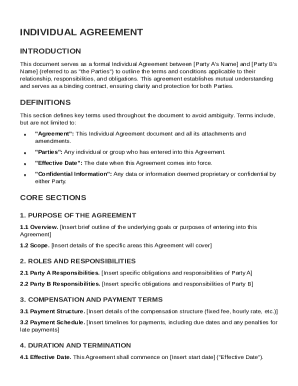
Get Individual Agreement Template
How it works
-

Open form follow the instructions
-

Easily sign the form with your finger
-

Send filled & signed form or save
How to fill out and sign Individual Agreement Template online?
Get your online template and fill it in using progressive features. Enjoy smart fillable fields and interactivity.Follow the simple instructions below:The preparing of lawful documents can be expensive and time-ingesting. However, with our preconfigured web templates, things get simpler. Now, creating a Individual Agreement Template requires a maximum of 5 minutes. Our state web-based samples and complete instructions eradicate human-prone mistakes.
Adhere to our simple steps to have your Individual Agreement Template prepared rapidly:
- Select the template from the library.
- Enter all necessary information in the necessary fillable areas. The user-friendly drag&drop user interface allows you to include or relocate fields.
- Check if everything is filled in appropriately, without any typos or lacking blocks.
- Place your electronic signature to the page.
- Simply click Done to confirm the alterations.
- Save the papers or print your copy.
- Send immediately towards the receiver.
Use the fast search and powerful cloud editor to produce a precise Individual Agreement Template. Clear away the routine and produce papers on the internet!
Tips on how to fill out, edit and sign Individual Agreement Template online
How to fill out and sign Individual Agreement Template online?
Get your online template and fill it in using progressive features. Enjoy smart fillable fields and interactivity.Follow the simple instructions below:
The preparing of lawful documents can be expensive and time-ingesting. However, with our preconfigured web templates, things get simpler. Now, creating a Individual Agreement Template requires a maximum of 5 minutes. Our state web-based samples and complete instructions eradicate human-prone mistakes.
Adhere to our simple steps to have your Individual Agreement Template prepared rapidly:
- Select the template from the library.
- Enter all necessary information in the necessary fillable areas. The user-friendly drag&drop user interface allows you to include or relocate fields.
- Check if everything is filled in appropriately, without any typos or lacking blocks.
- Place your electronic signature to the page.
- Simply click Done to confirm the alterations.
- Save the papers or print your copy.
- Send immediately towards the receiver.
Use the fast search and powerful cloud editor to produce a precise Individual Agreement Template. Clear away the routine and produce papers on the internet!
How to edit Individual Agreement Template: customize forms online
Facilitate your document preparation process and adapt it to your demands within clicks. Fill out and sign Individual Agreement Template with a robust yet easy-to-use online editor.
Preparing paperwork is always burdensome, especially when you deal with it from time to time. It demands you strictly adhere to all the formalities and precisely fill out all fields with full and precise information. Nevertheless, it often happens that you need to adjust the document or add more fields to fill out. If you need to improve Individual Agreement Template prior to submitting it, the simplest way to do it is by using our powerful yet easy-to-use online editing tools.
This extensive PDF editing tool enables you to easily and quickly complete legal paperwork from any internet-connected device, make fundamental changes to the template, and insert more fillable fields. The service enables you to select a particular area for each data type, like Name, Signature, Currency and SSN and so on. You can make them mandatory or conditional and decide who should complete each field by assigning them to a particular recipient.
Make the steps below to optimize your Individual Agreement Template online:
- Open needed sample from the catalog.
- Fill out the blanks with Text and drop Check and Cross tools to the tickboxes.
- Utilize the right-hand panel to alter the form with new fillable areas.
- Opt for the fields depending on the type of data you want to be collected.
- Make these fields mandatory, optional, and conditional and customize their order.
- Assign each field to a particular party with the Add Signer tool.
- Check if you’ve made all the necessary modifications and click Done.
Our editor is a versatile multi-featured online solution that can help you easily and quickly adapt Individual Agreement Template and other forms based on your requirements. Optimize document preparation and submission time and make your documentation look professional without hassle.
An example of a personal contract could be a rental agreement between a landlord and tenant outlining the terms of occupancy, payment dates, and maintenance responsibilities. Another good example is a service contract between a freelancer and a client, detailing the scope of work and payment terms. To create effective personal contracts, consider using the Individual Agreement Template from uslegalforms for a well-organized approach.